You build your vector database, craft an Agentforce agent, and link your search indexes to corporate knowledge. Then during user testing, your agent misses a glaring detail from a PDF or misinterprets a conversation entirely. The common reaction is to blame the LLM. The reality? Your chunking strategy fractured the data before the model ever saw it.
If a text snippet lacks proper context when retrieved from the vector database, your agent cannot generate an accurate response. This is the structural reality of retrieval-augmented generation (RAG): garbage in, garbage out.
This post shows how pro-code chunking for Data 360 search indexes using Data 360 Code Extension functions can be used to address three common chunking failures: fragmented data tables, multispeaker dialogue, and exposed personally identifiable information (PII). For each, it compares native chunking against custom pro-code chunking and shows the impact on agent responses.
Where native chunking falls short
Data 360 offers reliable native chunking for standard content. Mechanisms like Section-aware chunking and Semantic-based passage extraction cut documents along structural headings or thematic boundaries. They prevent sentences from splitting awkwardly and keep related paragraphs together.
However, enterprise data is rarely clean. It lives in complex multipage PDFs, regulatory records, dense tables, and multispeaker transcripts. When this data is fed into a character-count or token-length splitter, semantic continuity shatters.
How to write and deploy Code Extension functions
Note: The code examples in this post are intended to illustrate the concepts described in a simple way. They are designed for representative, happy-path examples, not for the full range of possible real-world inputs. Because the implementations rely on regular expressions (regex) and other pattern-based heuristics, they can produce both false positives and false negatives. For example, a heuristic might incorrectly classify an ordinary value as an account number or fail to recognize a valid table, speaker label, timestamp, or identifier in an unexpected format. Production-grade implementations of these functions are beyond the scope of this post.
Data 360 Code Extension functions let you deploy pro-code Python scripts natively within the Salesforce trust boundary for unstructured data pipelines where the built-in chunking behavior isn’t enough.
A function is a small, serverless-style unit that takes an input, performs a computation, and returns an output, running fully sandboxed and stateless. You author and debug it locally in your favorite IDE with the Data Custom Code SDK, deploy it through the Salesforce CLI or the UI, and wire it into your pipeline at the search index creation step. A code extension function can also call a generative or predictive model when your use case needs it. To go deeper, see the developer documentation.
How we tested
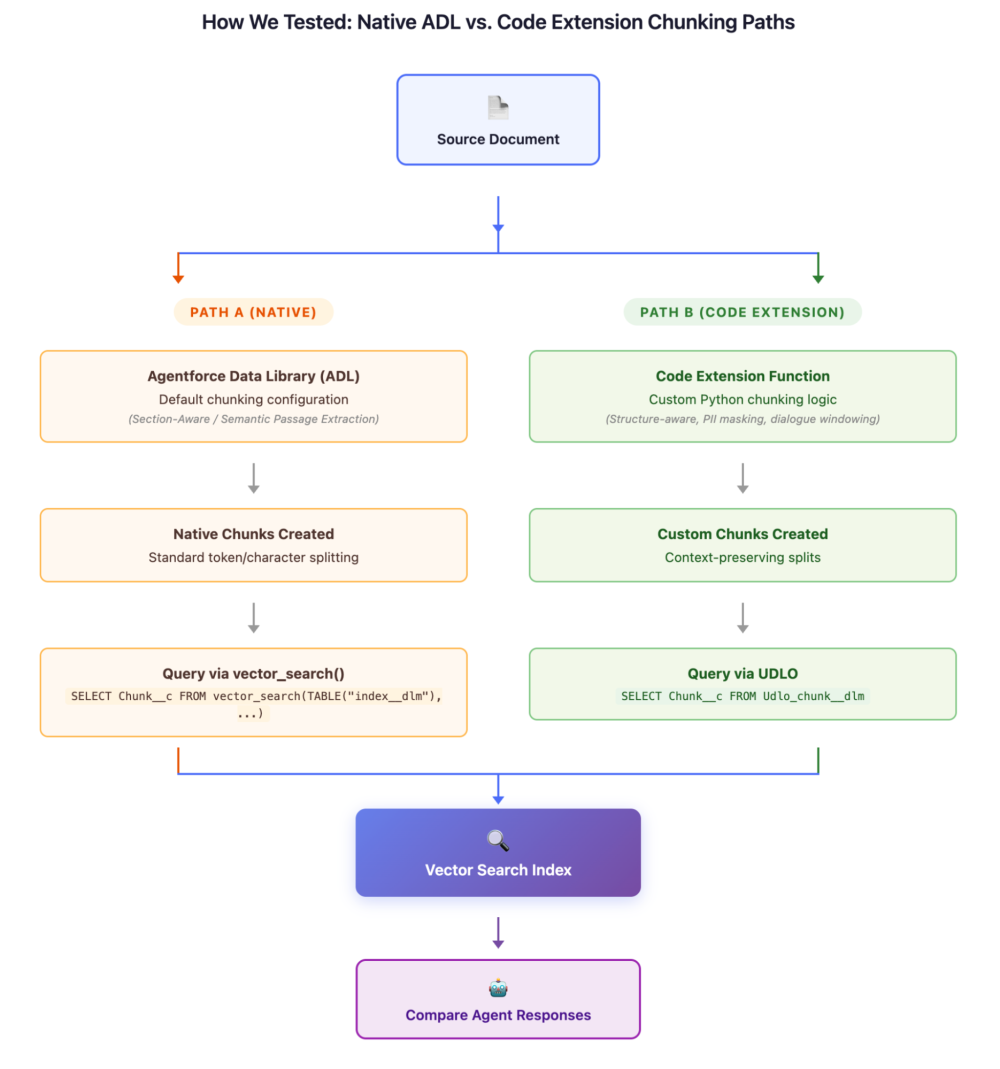
To test Code Extension custom chunking capabilities and compare them with native chunking capabilities, we evaluated three different documents. You can explore the structure of a chunking function and learn how to deploy it and run it during search index creation in the developer docs.
For each use case, we followed the same methodology:
- Chunk the same source document via two separate paths:
- Path A (Native): The standard Agentforce Data Libraries (ADL) route with default chunking configuration
- Path B (Code Extension): Custom Python chunking function deployed via Code Extension
- Query the resulting vector search indexes for Path A chunks using:
1SELECT Chunk__c FROM vector_search(TABLE("index_name__dlm"), 'query', 2 'SourceRecordId__c="<adl-id>/<filename>"', 100) - Query the chunks for Path B by querying the unstructured data model object (UDMO) directly:
1SELECT Chunk__c FROM vector_search(TABLE("index_name__dlm"), 'query', 2 'SourceRecordId__c="<adl-id>/<filename>"', 100) - Compare the chunks retrieved and evaluate what an agent would answer from each.
Use case 1: fragmented data tables
Imagine you are indexing a quarterly financial report (ABC_corp_q4_fy2025_financial_report.pdf): a 5-page PDF containing an executive summary, four dense multicolumn data tables, and forward-looking guidance.
Here are a few snapshots from the financial report document:
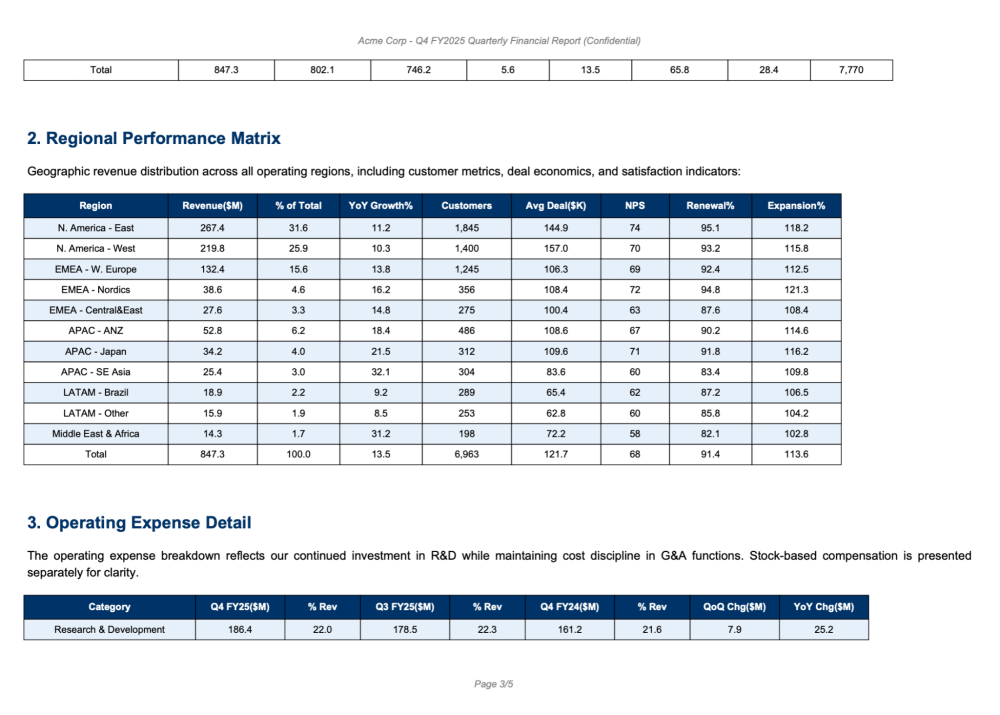
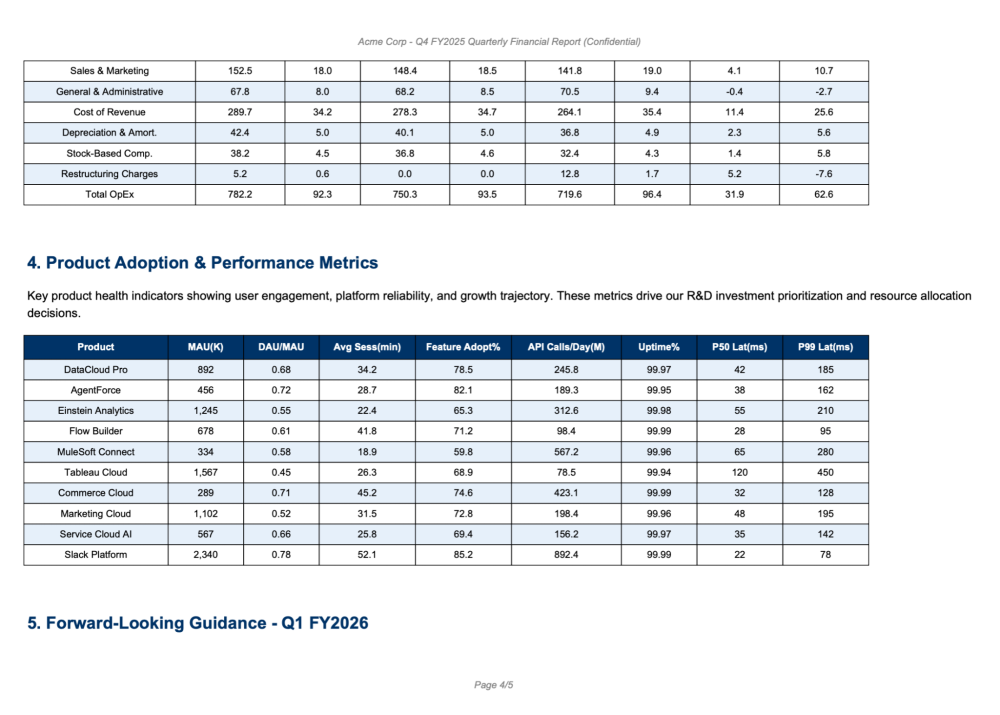
The Problem: Standard splitters often slice text strictly by character or token limits. Tables spanning multiple columns lose the relationship between headers and data rows. When your agent retrieves a chunk containing raw numbers, it has no column context to understand what those numbers mean.
You can solve this problem by implementing a structure-aware Python function that detects table boundaries (for example, markdown pipe tables, grid tables, and HTML tables), keeps each table as a unified block, and when a table exceeds the chunk size limit, splits it into sub-chunks with column headers repeated at the top of each sub-chunk.
Native chunks: what you get without Code Extension
1SELECT Chunk__c FROM vector_search(TABLE("ADL_ABC_Financial_index__dlm"),
2  'test something',
3  'SourceRecordId__c="1JDKd000000kADxOAM/ABC_corp_q4_fy2025_financial_report.pdf"', 100)
Here is what native chunking produced, a wall of numbers with no structural context:
Native Chunk Example 1 (Raw Data Dump):
1DataCloud Pro 892 0.68 34.2 78.5 245.8 99.97 42 185 AgentForce 456 0.72 28.7 82.1 189.3
299.95 38 162 Einstein Analytics 1,245 0.55 22.4 65.3 312.6 99.98 55 210 Flow Builder 678
30.61 41.8 71.2 98.4 99.99 28 95 MuleSoft Connect 334 0.58 18.9 59.8 567.2 99.96 65 280
4Tableau Cloud 1,567 0.45 26.3 68.9 78.5 99.94 120 450 Commerce Cloud 289 0.71 45.2 74.6
5423.1 99.99 32 128 Marketing Cloud 1,102 0.52 31.5 72.8 198.4 99.96 48 195Service Cloud AI
6567 0.66 25.8 69.4 156.2 99.97 35 142Slack Platform 2,340 0.78 52.1 85.2 892.4 99.99 22
778 5. Forward-Looking Guidance - Q1 FY2026 Page 4/5
Native Chunk Example 2 (Fragmented Table):
1Enterprise Software 156.2 152.8 149.5 2.2 4.5 81.2 38.7 1,350 Professional Svcs 89.4 87.1
282.6 2.6 8.2 42.1 15.3 980 Hardware & Infra 52.3 54.7 58.9 4.4 11.2 35.6 8.9 620 Emerging
3Mkts & IoT 24.8 21.2 15.4 17.0 61.0 55.4 5.2 340 Security & Compliance 13.4 11.9 9.8 12.6
436.7 78.1 22.4 210 AI & Automation 42.1 35.8 22.4 17.6 87.9 82.5 28.1 410 Integration
5Platform 38.9 36.2 33.1 7.5 17.5 71.8 26.9 380Developer Tools 28.6 25.4 19.8 12.6 44.4
676.3 18.2 290 Industry Solutions 52.8 48.9 41.2 8.0 28.2 69.4 24.5 450 Page 2/5
The Problem: As just one example, the numbers following “AI & Automation” (42.1 35.8 22.4 17.6 87.9 82.5 28.1 410) sit in a chunk with no column headers. What is 42.1? Revenue? A margin? A growth rate? Without the header row (Segment | Q4 FY25 Rev($M) | Q3 FY25 Rev($M) | ... | Headcount), these numbers are meaningless. Your agent cannot answer even basic questions about this data.
Code Extension chunks: structure preserved
The custom function detects table boundaries, preserves the header row, and produces structured chunks:
1SELECT Chunk__c FROM ADL_ABC_Financial_MultiPage_chunk__dlmCustom Chunk Example 1 (Executive Summary — Clean Prose):
1ABC Corp - Q4 FY2025 Quarterly Financial Report (Confidential)
2
3**Executive Summary**
4
5Total revenue for Q4 FY2025 reached $847.3M, representing a 12% year-over-year increase
6driven primarily by growth in our Cloud Services and Data Platform segments. Operating margin
7improved to 28.4%, up from 25.1% in the prior quarter, reflecting improved cost discipline
8and scale efficiencies across all business units.
9
10Key highlights include the successful launch of three new enterprise products, expansion into
11the APAC market with two new regional data centers, and a 15% reduction in customer churn
12attributed to our enhanced support model. The Data Platform segment showed particularly strong
13momentum with 18.1% YoY growth, driven by increased adoption of our AI-powered analytics features.
14
15Free cash flow generation remained robust at $198.4M for the quarter, enabling continued
16investment in R&D while returning $85M to shareholders through buybacks. Our balance sheet
17remains strong with $2.1B in cash and short-term investments and a net-debt-to-EBITDA ratio of 0.8x.
Custom Chunk Example 2 (Table with Headers Preserved — Revenue by Segment):
1**1. Revenue Breakdown by Business Segment**
2
3The following table summarizes revenue performance across all business segments for Q4 FY2025,
4with year-over-year and quarter-over-quarter comparisons, gross margin, and headcount allocation:
5
6* **Cloud Services**
7* The Segment has Q4 FY25 Rev($M) of 312.5.
8* The Segment has Q3 FY25 Rev($M) of 289.1.
9* The Segment has Q4 FY24 Rev($M) of 261.8.
10* The Segment has QoQ Growth% of 8.1.
11* The Segment has YoY Growth% of 19.4.
12* The Segment has Gross Margin% of 72.3.
13* The Segment has Op Margin% of 34.2.
14* The Segment has Headcount of 2,450.
15
16* **Data Platform**
17* The Segment has Q4 FY25 Rev($M) of 198.7.
18* The Segment has Q3 FY25 Rev($M) of 185.3.
19* The Segment has Q4 FY24 Rev($M) of 168.2.
20* The Segment has QoQ Growth% of 7.2.
21* The Segment has YoY Growth% of 18.1.
22* The Segment has Gross Margin% of 68.9.
23* The Segment has Op Margin% of 31.5.
24* The Segment has Headcount of 1,820.
Custom Chunk Example 3 (Regional Performance — Each Region Self-Contained):
1**2. Regional Performance Matrix**
2
3Geographic revenue distribution across all operating regions, including customer metrics,
4deal economics, and satisfaction indicators:
5
6* **APAC - ANZ**
7* Revenue ($M): 52.8
8* % of Total: 6.2%
9* YoY Growth %: 18.4%
10* Customers: 486
11* Avg Deal ($K): 108.6
12* NPS: 67
13* Renewal %: 90.2%
14* Expansion %: 114.6%
15
16* **APAC - Japan**
17* Revenue ($M): 34.2
18* % of Total: 4.0%
19* YoY Growth %: 21.5%
20* Customers: 312
21* Avg Deal ($K): 109.6
22* NPS: 71
23* Renewal %: 91.8%
24* Expansion %: 116.2%
Impact on agent responses
User Query: “What is the YoY growth rate for the AI & Automation segment and how does its operating margin compare to Cloud Services?”
| Without Code Extension | With Code Extension | |
|---|---|---|
| Retrieved Chunk | ...AI & Automation 42.1 35.8 22.4 17.6 87.9 82.5 28.1 410... (no headers) |
Structured block with labeled fields for “AI & Automation” and “Cloud Services” |
| Agent Response | “I found data mentioning AI & Automation with values 42.1 and 87.9, but I cannot determine which figures represent growth rates versus revenue versus margins without additional context.” | “The AI & Automation segment grew 87.9% YoY (Q4 FY25 Rev of $42.1M vs Q4 FY24 of $22.4M) with an operating margin of 28.1%. This compares to Cloud Services at 34.2% operating margin — a 6.1 percentage point gap.” |
| Accuracy | Cannot distinguish columns, which makes chunks unusable | Precise multisegment comparison with calculated insights |
Use case 2: multispeaker dialogue
Now consider a use case in which you’re grounding your service agents on a recorded customer escalation call: a 45-minute platform migration planning session with five participants (Sarah Chen, VP of Engineering; Marcus Webb, Solutions Architect; Priya Desai, Database Lead; Tom Nakamura, DevOps Manager; Lisa Okafor, Customer Success Director).
Source document: Globex_Migration_Escalation_Call_2025_Q4.pdf
Here is a snapshot from the source document:
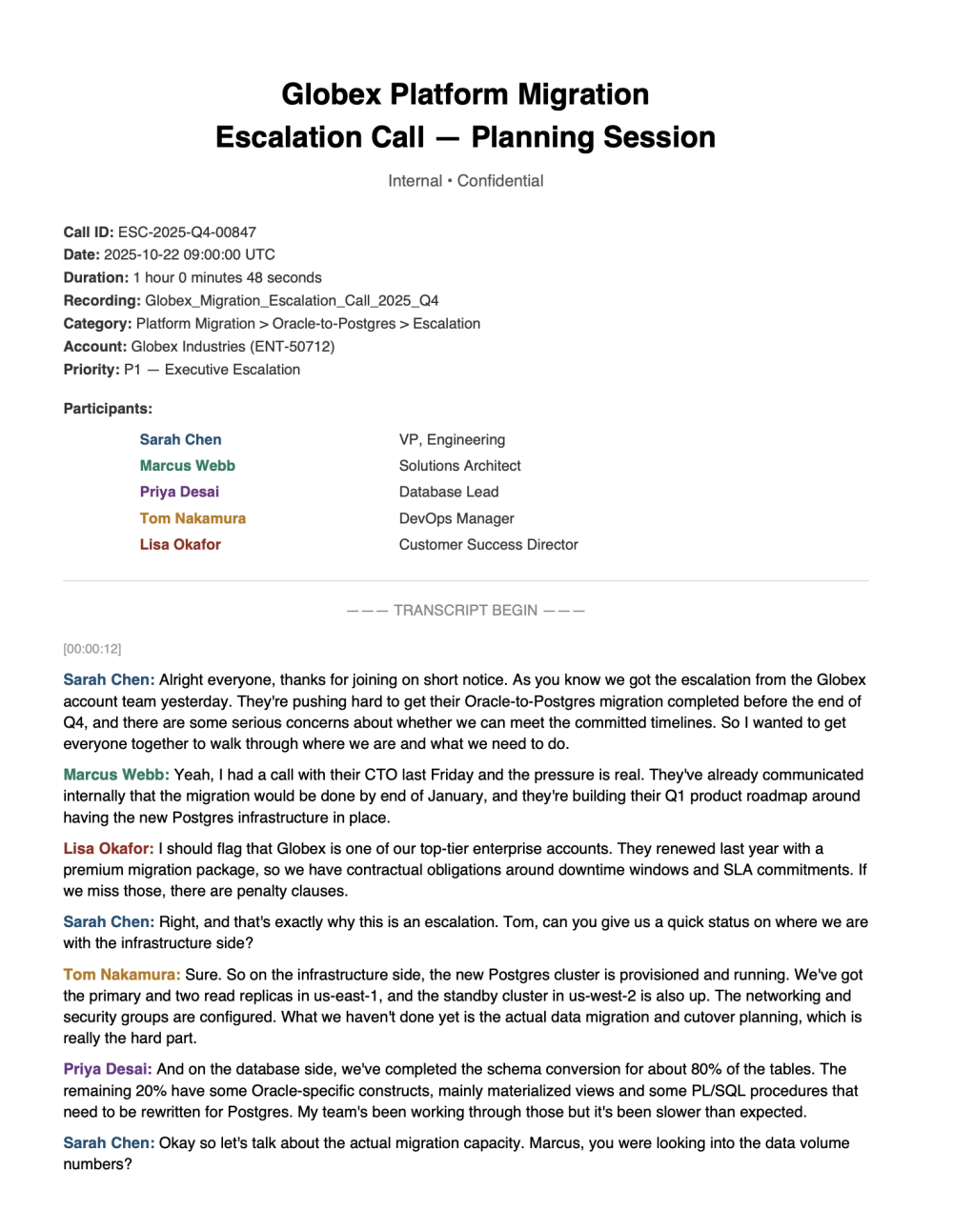
The Problem: Standard chunking produces massive walls of unstructured text. Speaker boundaries are lost, timestamps disappear, and topical shifts get merged into a single chunk. The result: chunks thousands of characters long where you cannot tell who said what or when.
You can solve this by using a windowed sliding dialogue mechanism with these parameters: WINDOW_SIZE = 6 turns, STRIDE = 3 turns, MAX_CHUNK_CHARS = 1500. This helps ensure that every question and its answer are almost always co-located in at least one chunk. Adjacent chunks overlap so context is virtually never orphaned.
Native chunks: what you get without Code Extension
1SELECT Chunk__c FROM vector_search(TABLE("ADL_MultiSpeakerCon_index__dlm"),
2  'test something',
3  'SourceRecordId__c="<library-id>/Globex_Migration_Escalation_Call_2025_Q4.pdf"', 100)
Native Chunk Example (Wall of Text — No Speaker Attribution):
1Marcus Webb: I think yeah I th I think if you can just get a number whether it's through
2the benchmarks we ran last month or whether we have to do new load tests. If you can just
3get a number and saying if you had to migrate the legacy Oracle instances to the new
4Postgres cluster, how much data volume can we migrate within that within 72 hours or I
5guess even conservatively within 48 hours. Let's go with 48 hours because we probably
6need a buffer for rollback as well. Um do you know just just coming up with numbers of
7how much data we can migrate within a period of timewill give us some kind of uh
8measurement to know how many tenant databases we can cut over within that window or we
9can commit to Sarah Chen: Yeah,Marcus Webb: enough Sarah Chen: because the the challenge
10is like uh we'll be penalized right if we commit to uh certain migration windows if
11we're not able to meet that. 00:25:46 Sarah Chen: So this is a very crucial part of it
12wherein uh we have to kind of come up with these numbers based on uh the actual load
13testing uh given that we're not going the blue-green deployment route and we're doing it
14on a rolling basis. So I think we need that sort of analysis to be Marcus Webb: Priya,
15Tom Nakamura: A Marcus Webb: is that something Kevin can can work with the DBA team
16Sarah Chen: done. Tom Nakamura: minute. Marcus Webb: on? Priya Desai: Yeah, I'll follow
17up with Kevin after this Marcus Webb: Okay, thanks.
The Problems:
- No speaker separation: Turns from Marcus, Sarah, Tom, and Priya are mashed together in a single paragraph
- Timestamps embedded randomly:
00:25:46appears midsentence with no structural break - Questions divorced from answers: Marcus asks “can Kevin work with the DBA team?” and Priya’s answer is buried without clear attribution
- Topic bleed: The Oracle-to-Postgres migration capacity discussion runs directly into the SLA penalty discussion with no boundary
Code Extension chunks: windowed dialogue
The custom function parses speaker turns, then creates overlapping windows:
Custom Chunk Example 1 (Clear Speaker Attribution and Overlap):
1Sarah Chen: uh so I would uh so that's what my categorization of phases and milestones is.
2Phase one is more longer term more strategic where we want to land up eventually right we do
3want to uh achieve uh reach a point wherein for all the enterprise tier customers we want to
4uh have a zero-downtime migration kind of an approach uh but you know in terms of milestones
5now milestone is more like uh you know various different checkpoints that we have so our first
6milestone is towards end of Q4 when we want to
7
8Sarah Chen: in Yeah. Yeah. So basically that was the next thing that I was going to talk
9about. If you see this these bottom uh you know tiers. So for all the enterprise tier
10customers what we offer them is guaranteed migration within the committed downtime windows
11you know uh they pay for a contractual guarantee. Whereas for all the customers who don't uh
12uh purchase the premium migration package, it'll be on a best effort basis without any
13committed timelines, no contractual SLAs, but they'll
14
15Sarah Chen: anywhere uh we have like three layers. The first two layers talks about schema
16migration and data replication setup. We know the CDC streams are running every 5 minutes.
17The full table snapshots you know every 12 hours and we are also trying to you know make uh
18target uh to reduce the 12-hour sync window to 2 hours for Q4 and uh the development is
19complete and we are in the process of you know testing it and the third layer is where uh you
20know the the actual cutover needs to happen
Custom Chunk Example 2 (Decision and Response Together):
1Tom Nakamura: correct as long as uh we are meeting their downtime window requirement they
2don't bother how we are providing Sarah Chen: might Tom Nakamura: them that migration how
3efficient
4
5Sarah Chen: uh so I would uh so that's what my categorization of phases and milestones is.
6Phase one is more longer term more strategic where we want to land up eventually right we do
7want to uh achieve
8
9Sarah Chen: in Yeah. Yeah. So basically that was the next thing that I was going to talk
10about. If you see this these bottom uh you know tiers. So for all the enterprise tier
11customers what we offer them is guaranteed migration within the committed downtime windows
12
13Sarah Chen: anywhere uh we have like three layers. The first two layers talks about schema
14migration and data replication setup.
15
1600:55:02
17
18Sarah Chen: Yeah. Yeah. We Tom Nakamura: Hey. Uh, so our milestone it talks about in terms
19of per tenant for Q4,
Key Difference: Each chunk now contains multiple turns from the same topical exchange. The sliding window (stride of 3) helps ensure that a question asked in one chunk is always paired with its answer. Speaker names are preserved as structural anchors.
Impact on agent responses
User Query: “What is the committed downtime window for enterprise tier customers during the database migration?”
| Without Code Extension | With Code Extension | |
|---|---|---|
| Retrieved Chunk | Wall of text mixing downtime window discussion with unrelated load testing talk | Focused window containing Sarah’s statement about enterprise tier commitments |
| Agent Response | “The transcript mentions numbers 72, 48, 12, and 2 hours in the context of data migration, but I cannot determine which are committed SLAs versus aspirational targets versus load test benchmarks.” | “For enterprise tier customers, the migration is guaranteed within committed downtime windows as a contractual SLA. They pay for this guarantee. Non-enterprise customers are on best-effort migration without committed timelines.” |
| Accuracy | Cannot distinguish commitments from discussion | Identifies the contractual commitment and differentiates customer tiers clearly |
Use case 3: PII masking and regulatory cleansing
In this use case, you’re operating in a regulated sector (for example, healthcare, banking, or public sector) where internal identifiers must be sanitized before ingestion into a vector database that agents will query.
Source document: Sample_PII_Masking_Test_Document.pdf is a five-page document with simulated clinical intake records, banking credit memos, and public sector benefits cases. It contains both standard PII and proprietary identifiers.
Here is a snapshot from the source document:
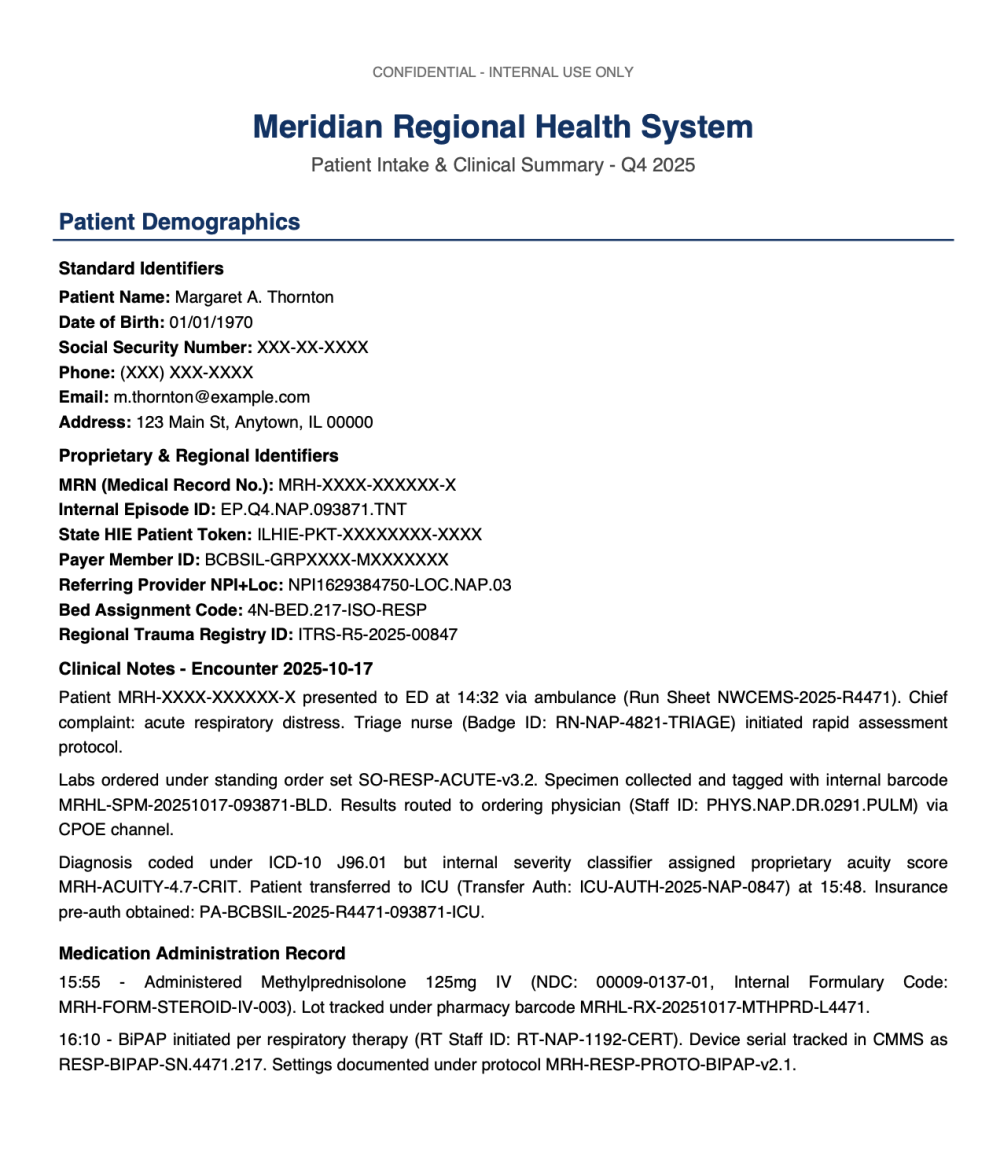
The Problem: Standard pattern recognition is not applied during chunking via the ADL route. All identifiers, standard and proprietary, pass through into the vector index unmasked.
You can address this by implementing regex-based pattern matching over the raw text inside your custom function before chunking. This cleanses SSNs, credit card numbers, phone numbers, email addresses, employer identification numbers (EINs), ICD codes, and other industry-specific formats on-the-fly. The data is sanitized before it ever reaches the chunk data model object (DMO).
Native chunks: all PII exposed
1SELECT Chunk__c FROM vector_search(TABLE("ADL_PIIMasking_index__dlm"),
2  'test something',
3  'SourceRecordId__c="1JDKd000000kAE7OAM/Sample_PII_Masking_Test_Document.pdf"', 100)
Native Chunk Example 1 (Healthcare — Full PII Exposed):
Note: The X characters below are synthetic placeholders; they represent identifiers that are present and unmasked, not values that have already been redacted.
1CONFIDENTIAL - INTERNAL USE ONLY Meridian Regional Health System Patient Intake & Clinical
2Summary - Q4 2025 Patient Demographics Standard Identifiers Patient Name: Margaret A. Thornton
3Date of Birth: 01/01/1970 Social Security Number: XXX-XX-XXXX Phone: (XXX) XXX-XXXX Email:
4m.thornton@example.com Address: 123 Main St, Anytown, IL 00000 Proprietary &
5Regional Identifiers MRN (Medical Record No.): MRH-XXXX-XXXXXX-X Internal Episode ID:
6EP.Q4.NAP.093871.TNT State HIE Patient Token: ILHIE-PKT-XXXXXXXX-XXXX Payer Member ID:
7BCBSIL-GRPXXXX-MXXXXXXX Referring Provider NPI+Loc: NPI1629384750-LOC.NAP.03 Bed Assignment
8Code: 4N-BED.217-ISO-RESP Regional Trauma Registry ID: ITRS-R5-2025-00847
Native Chunk Example 2 (Banking — All Identifiers Visible):
1Credit Analysis Narrative Subject: Apex Manufacturing Solutions (CIF: CNB-CIF-2025-093871-COMM)
2requests $4.2M term loan expansion. Current exposure tracked under facility ID
3FAC-CNB-MW-2025-APEX-001. Borrower maintains primary operating account
4(DDA-CNB-MW-7741093871) with average collected balance of $847K. Guarantor Robert J. Whitfield
5(Internal KYC Profile: KYC-IND-XX-XXXX-XXXXXX, SSN:XXX-XX-XXXX) provides unlimited
6assessment net worth WA-CNB-2025-0291-WHTFLD. personalguarantee. Guarantor verified via
7internal wealth Collateral: IL. Appraisal ordered under engagement APR-CNB-2025-093871-IND
8(Appraiser Vendor ID: VND-APR-MW-0087-CERT). Environmental Phase I completed (Report ID:
9ENV-PH1-2025-APEX-093871).
Native Chunk Example 3 (Cross-System — Re-identification Risk):
1Event 2: Employment Verification Timestamp: 2025-11-03T09:15:00Z Source: IL Dept of Revenue
2(System ID: SYS-ILDOR-EMPL-VERIFY) Destination: DHS Benefits (System ID:
3SYS-DHS-IL-ELIG-ENGINE) Subject: SSN XXX-XX-XXXX / DHS-IL-XXXX-XXXX-XXXXXX-XX Employer Match:
4ILDOR-EMP-2025-00-0000000-APEX Income Verified:
53,847.00/month(PayPeriodID:PP-APEX-2025-B22) Verification Token: ILDOR-VT-2025-1103-093871-CONF
The Problem: Every sensitive identifier sits unmasked in the vector index:
- SSNs:
XXX-XX-XXXX,XXX-XX-XXXX,XXX-XX-XXXX - Credit card number:
XXXX-XXXX-XXXX-XXXX - Email address:
m.thornton@example.com - Phone number:
(XXX) XXX-XXXX - Medical record number:
MRH-XXXX-XXXXXX-X - Internal KYC profile:
KYC-IND-XX-XXXX-XXXXXX - Payer member ID:
BCBSIL-GRPXXXX-MXXXXXXX - DHS case number:
DHS-IL-XXXX-XXXX-XXXXXX-XX
When your agent retrieves these chunks, it may echo PII directly back to end users, which constitutes a compliance violation under HIPAA, PCI-DSS, and many state privacy laws.
Code Extension chunks: PII masked before indexing
The custom function applies regex-based pattern matching to sanitize sensitive data before chunking:
Custom Chunk Example 1 (Healthcare — Standard PII Redacted):
1CONFIDENTIAL - [SWIFT_REDACTED] USE ONLY Meridian Regional Health System Patient Intake &
2Clinical Summary - Q4 2025 Patient Demographics Standard Identifiers Patient Name: Margaret A.
3Thornton Date of Birth: 01/01/1970 Social Security Number: [SSN_REDACTED] Phone:
4([PHONE_REDACTED] Email: [EMAIL_REDACTED] Address: 123 Main St, Anytown, IL 00000
5Proprietary & Regional Identifiers MRN (Medical Record No.): MRH-XXXX-XXXXXX-X Internal
6Episode ID: EP.Q4.NAP.093871.TNT
Note the ‘[SWIFT_REDACTED]’ token replacing ‘INTERNAL’: an over-broad SWIFT-code pattern matched a plain word. Also note that certain PII, such as names, addresses, dates of birth are not handled by the example function).
Custom Chunk Example 2 (Banking — Standard PII and Financial IDs Redacted):
1Primary Contact SSN: [SSN_REDACTED] DUNS Number: 07-481-2937 Credit Card on File:
2[CREDIT_CARD_REDACTED] (Exp: 09/27) Internal & Proprietary Identifiers Relationship Manager
3ID: RM-COMM.MW.4471.SR Internal Credit Score: CNB-ICS-782-TIER2A Collateral Tracking ID:
4COLL-RE.IL.2025.093871.INDUST Loan Pipeline Position: PL-Q4.2025-MW-00291-PEND Risk Rating
5(Proprietary): RR-CNB-3B-WATCH-MOD BSA/AML Case Reference: AML-SAR.2025.MW.04471 Treasury
6Mgmt Client Code: TM-APEX-MW-4471-SWEEP
Custom Chunk Example 3 (Cross-System Events — SSN and EIN Masked):
1Event 2: Employment Verification Timestamp: 2025-11-03T09:15:00Z Source: IL Dept of Revenue
2(System ID: SYS-ILDOR-EMPL-VERIFY) Destination: DHS Benefits (System ID:
3SYS-DHS-IL-ELIG-ENGINE) Subject: SSN [SSN_REDACTED] / DHS-IL-XXXX-XXXX-XXXXXX-XX Employer
4Match: ILDOR-EMP-2025-[EIN_REDACTED]-APEX Income Verified: $3,847.00/month (Pay Period ID:
5PP-APEX-2025-B22) Verification Token: ILDOR-VT-2025-1103-093871-CONF
Custom Chunk Example 4 (Public Sector — Government IDs Masked):
1CONFIDENTIAL - [SWIFT_REDACTED] USE ONLY State of Illinois - Department of Human Services
2Benefits Determination & Case Management Summary Claimant Information Standard Identifiers
3Claimant Name: David R. Okonkwo Social Security Number: [SSN_REDACTED] Date of Birth:
401/01/1980 Driver's License: O-000-0000-0000 (IL) Phone: ([PHONE_REDACTED] Agency-Specific
5& Regional Identifiers DHS Case Number: DHS-IL-XXXX-XXXX-XXXXXX-XX
What got caught and what needs custom patterns
In this test, the Code Extension function successfully redacted:
- SSNs:
XXX-XX-XXXX→[SSN_REDACTED] - Credit card numbers:
XXXX-XXXX-XXXX-XXXX→[CREDIT_CARD_REDACTED] - Email addresses:
m.thornton@example.com→[EMAIL_REDACTED] - Phone numbers:
(XXX) XXX-XXXX→[PHONE_REDACTED] - EINs:
00-0000000→[EIN_REDACTED] - ICD Codes:
J96.01→[ICD_CODE_REDACTED]
Proprietary identifiers that require organization-specific patterns (these passed through, demonstrating why you must extend the pattern registry for your formats):
MRH-XXXX-XXXXXX-X— Medical record numberBCBSIL-GRPXXXX-MXXXXXXX— Payer member IDDHS-IL-XXXX-XXXX-XXXXXX-XX— DHS case numberILHIE-PKT-XXXXXXXX-XXXX— HIE patient token
The key insight: Code Extension gives you the framework to add any pattern your organization needs. Standard numeric identifier patterns are handled by the existing sample code. Proprietary formats are added as one-line regex entries:
code here 22
Impact on agent responses
User Query: “What was the clinical pathway for the patient admitted on October 17th?”
| Without Code Extension | With Code Extension | |
|---|---|---|
| Retrieved Chunk | Full text with SSN XXX-XX-XXXX, MRN MRH-XXXX-XXXXXX-X, Staff IDs exposed |
Text with [SSN_REDACTED], standard PII masked, clinical narrative preserved |
| Agent Response | “Patient Margaret A. Thornton (SSN: XXX-XX-XXXX, MRN: MRH-XXXX-XXXXXX-X) presented with acute respiratory distress, assessed by nurse RN-NAP-4821-TRIAGE…” | “The patient presented with acute respiratory distress at 14:32, was triaged under rapid assessment protocol, treated with Methylprednisolone 125mg IV and BiPAP, and transferred to ICU at 15:48 with insurance pre-authorization obtained.” |
| Risk | Compliance violation — agent echoes SSN, MRN, staff IDs back to end user | The agent delivers a clinically accurate answer. Standard PII masked; proprietary IDs can be extended. |
Compliance implications
| Identifier Type | Example | Regulatory Risk | Native (ADL) | Code Extension |
|---|---|---|---|---|
| Social Security Number | XXX-XX-XXXX |
HIPAA, state privacy laws | Exposed | Masked |
| Credit Card Number | XXXX-XXXX-XXXX-XXXX |
PCI-DSS | Exposed | Masked |
| Email Address | m.thornton@example.com |
Privacy regulations | Exposed | Masked |
| Phone Number | (XXX) XXX-XXXX |
Privacy regulations | Exposed | Masked |
| EIN | 00-0000000 |
Financial privacy | Exposed | Masked |
| Medical Record Number | MRH-XXXX-XXXXXX-X |
HIPAA | Exposed | Requires custom pattern |
| Payer Member ID | BCBSIL-GRPXXXX-MXXXXXXX |
HIPAA, fraud vector | Exposed | Requires custom pattern |
| HIE Patient Token | ILHIE-PKT-XXXXXXXX-XXXX |
HIPAA, re-identification | Exposed | Requires custom pattern |
| DHS Case Number | DHS-IL-XXXX-XXXX-XXXXXX-XX |
Government privacy | Exposed | Requires custom pattern |
The bottom line: without Code Extension, everything goes into the vector store unmasked. With the Code Extension function, PII formats covered by the sample patterns are masked during search index chunking, and the extensible pattern registry gives you a path to add proprietary formats as you discover them.
Conclusion
Code Extension functions are not a replacement for native chunking; they provide an escalation path when enterprise data complexity outpaces standard algorithms. Investing in pro-code chunking ensures your search indexes remain contextually rich and drive accurate Agentforce responses.
Get started with Code Extension
What are you waiting for? Start building Code Extensions today: Enable Code Extension in Data 360 setup feature manager, install the Data Custom Code SDK and the Salesforce CLI, and start building right away. To learn more:
- Check out the Code Extension function documentation.
- Watch the Extend Data 360 with Code Extension YouTube playlist.
About the authors
Jitin Mehndiratta is a Product Management Director at Salesforce working on Data 360. He focuses on enabling developers to build intelligent data pipelines that power Agentforce experiences.
Samaritha Patlori is a Product Manager for Code Extension at Salesforce Data 360. With 7+ years across engineering and product, she is currently focused on enabling developers to run custom code securely within Data 360.