For years, Lightning Web Components (LWC) have been at the heart of building modern user experiences on Salesforce. Now, Salesforce developers and web development teams can expand that model with Salesforce Microfrontends, bringing applications built with React, Angular, Vue, and other web technologies directly into Salesforce Lightning experiences. With Salesforce Microfrontends, implemented through UI Embedding, you can securely embed a web application alongside LWC while exchanging context, data, and events between the two experiences. This gives teams a way to bring existing web investments into Salesforce without rebuilding every experience from scratch. In this post, we’ll explore how Salesforce Microfrontends work, build a simple host and guest example, and look at how Microfrontends fit into the broader Salesforce Multi-Framework story.
What are Salesforce Microfrontends?
Salesforce Microfrontends let you bring independently developed web applications and widgets into Lightning while keeping a clear boundary between Salesforce and the embedded application.
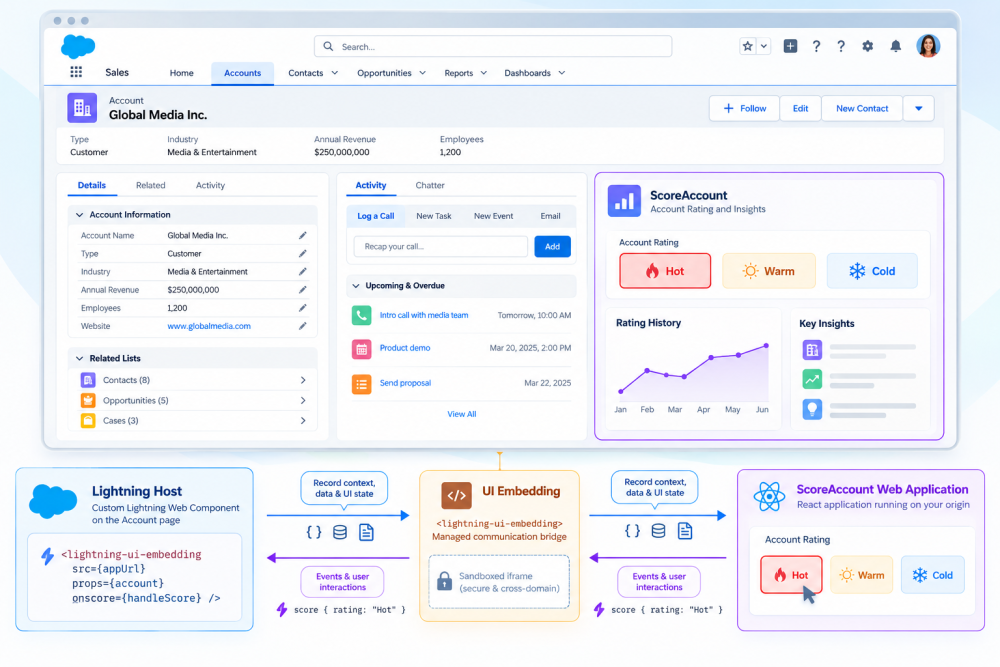
At a high level, the architecture has three parts:
Lightning host → UI Embedding → embedded web application
The host is a custom Lightning Web Component that renders the lightning-ui-embedding base component. It owns the Salesforce context, retrieves the platform data the embedded application needs, and determines what information to share with it.
The guest is the web application or widget being embedded. It can receive context and UI state from its Lightning host and send custom events back through the UI Embedding channel.
The guest runs inside a sandboxed iframe, providing an isolation boundary between the two applications. UI Embedding provides the managed communication layer that connects them.
This means, for example, that an Account page can use native LWC for record details, actions, and navigation while displaying an embedded React application for a specialized experience.
To the user, these experiences come together within Lightning. To developers, they remain independently developed applications connected through a Salesforce-supported integration layer.
More than embedding a web page
Unlike a plain iframe, a Microfrontend can exchange context, data, UI state, and events with its Lightning host through UI Embedding.
Consider a simple ScoreAccount web application. The application displays an Account’s current rating and lets the user select Hot, Warm, or Cold. When the Account page loads, the Lightning host retrieves the Salesforce record information and provides the relevant state to ScoreAccount. The embedded application renders the current rating.
If the user selects a different rating, ScoreAccount sends an event back to the host. The Lightning Web Component handles that event and updates the Salesforce record.
Conceptually, the interaction looks like this:
Salesforce → record context, data, and UI state → Microfrontend
Microfrontend → events and user interactions → Salesforce
Neither application needs to know how the other is implemented. UI Embedding provides the contract between them.
Understand the security boundary
The isolation between Salesforce and the embedded application is an important part of the Microfrontends architecture.
The embedded application runs inside a sandboxed iframe rather than directly inside the Lightning page. This creates a browser-enforced boundary between the two application environments.
For an externally hosted application, its origin must also be configured appropriately in Salesforce so the browser is permitted to load it. The host then controls the information shared with the guest through the UI Embedding channel.
The embedded application remains responsible for its own application architecture and any authentication or data access required outside the information explicitly provided by its Lightning host.
This model allows the applications to communicate without collapsing them into the same runtime or tightly coupling their implementations.
For the latest security configuration and supported options, refer to the UI Embedding setup documentation.
Build the ScoreAccount Microfrontend
Let’s make the architecture concrete.
The ScoreAccount application displays an Account’s current rating and lets the user change it to Hot, Warm, or Cold.
Bringing the application into Lightning involves four main pieces:
- Allow the application’s origin in your Salesforce security configuration.
- Connect the guest application to the Salesforce UI Embedding channel.
- Create a host LWC using
lightning-ui-embedding. - Deploy the web application and Salesforce host through their respective deployment workflows.
The interesting part is how the guest and host communicate.
Connect the guest application
The guest application connects to its Lightning host through the Salesforce Platform SDK.
It can retrieve UI state supplied by the host, subscribe to future changes, and dispatch events when users interact with the application.
Here’s the ScoreAccount example:
1// Get SDK instance
2import { getViewSDK } from "@salesforce/platform-sdk";
3
4const RATINGS = ["Hot", "Warm", "Cold"];
5
6export default function ScoreAccount() {
7  const [connected, setConnected] = useState(false);
8  const [props, setProps] = useState({});
9
10  // Data in: read the props the host pushed, and stay subscribed.
11  useEffect(() => {
12    let unsubscribe;
13    let cancelled = false;
14
15    getViewSDK().then(
16      (sdk) => {
17        if (cancelled) return;
18        const ui = sdk.getUiState();
19        if (!ui) return; // no host state → stay disconnected
20        setConnected(true);
21        setProps(ui.state.props ?? {});
22        unsubscribe = ui.subscribe((next) => setProps(next.props ?? {}));
23      },
24      () => {}, // SDK never resolved → stay disconnected
25    );
26
27    return () => {
28      cancelled = true;
29      unsubscribe?.();
30    };
31  }, []);
32
33  // Data out: send the chosen rating back to the host.
34  async function score(rating) {
35    const sdk = await getViewSDK();
36    sdk.dispatchEvent(
37      new CustomEvent("score", { detail: { rating }, bubbles: true }),
38    );
39  }
40
41  return (
42    <Card connected={connected} name={props.name} rating={props.rating}>
43      <RatingPicker
44        ratings={RATINGS}
45        active={connected ? props.rating : null}
46        disabled={!connected}
47        onScore={score}
48      />
49    </Card>
50  );
51}
There are two important flows here.
Data comes in. ScoreAccount reads the UI state provided by its Lightning host and subscribes to changes. If Salesforce provides an updated state, the embedded experience can react to it.
Events go out. When the user selects a rating, ScoreAccount dispatches a score event containing the selected value.
The example uses React, but externally hosted Microfrontends aren’t tied to a specific frontend framework. You can use React, Angular, Vue, or other standards-based web technologies supported by the embedding model.
Create the Lightning host
Now let’s look at the Salesforce side.
A host Lightning Web Component renders ScoreAccount using the lightning-ui-embedding base component.
The markup is small:
1<!-- scoreAccountEmbedding.html -->
2<template>
3  <lightning-ui-embedding
4    sandbox="allow-forms allow-modals allow-popups allow-popups-to-escape-sandbox"
5    shell-title="Account Score Widget"
6    src={computedSrc}
7    props={account}
8    onscore={handleScore}
9  ></lightning-ui-embedding>
10</template>
Each part has a clear responsibility.
src identifies the guest application. props contains the information Salesforce sends to it. sandbox controls the standard browser iframe capabilities granted to the guest. And onscore lets the host respond to the custom event sent by ScoreAccount.
The JavaScript connects this experience to Salesforce data:
1// scoreAccountEmbedding.js
2import { LightningElement, api, wire } from "lwc";
3import { getRecord, getFieldValue, updateRecord } from "lightning/uiRecordApi";
4import RATING from "@salesforce/schema/Account.Rating";
5
6const FIELDS = [RATING];
7
8export default class ScoreAccountEmbedding extends LightningElement {
9  @api baseUrl = "http://localhost:5173"; // App origin
10  @api recordId;
11
12  @wire(getRecord, { recordId: "$recordId", fields: FIELDS })
13  record;
14
15  get computedSrc() {
16    const url = new URL(this.baseUrl);
17    url.pathname = "/embedding/score-account";
18    return url.toString();
19  }
20
21  // Send updated Salesforce state to the guest.
22  get account() {
23    return {
24      recordId: this.recordId,
25      rating: getFieldValue(this.record?.data, RATING)
26    };
27  }
28
29  // Handle the rating event from the guest.
30  async handleScore(evt) {
31    const { rating } = evt.detail ?? {};
32    if (!this.recordId) return;
33
34    await updateRecord({
35      fields: {
36        Id: this.recordId,
37        Rating: rating
38      }
39    });
40  }
41}
Now the complete interaction becomes clear:
- The Account page loads and the host retrieves the current rating from Salesforce.
- The host passes the Account context and rating into ScoreAccount.
- ScoreAccount renders that state for the user.
- The user selects Hot.
- ScoreAccount dispatches the
scoreevent back to its Lightning host. - The host receives the event and updates the Salesforce record.
- When the Salesforce data changes, the host provides the updated state back to the embedded application.
The Lightning host understands Salesforce. The guest understands its application. UI Embedding connects them.
For detailed state and event patterns, see Exchange Data Between the Page and an Embedded App.
Bring existing web applications into Lightning
The ScoreAccount example is intentionally small, but the architecture applies to much larger applications.
Many organizations already have web applications with their own frameworks, component libraries, engineering teams, deployment pipelines, and release schedules. Rebuilding those experiences simply to make them available in Salesforce may not always make sense.
With Microfrontends, the application can remain externally hosted while participating in a Lightning experience. The application continues to own its frontend framework, application logic, hosting, and release lifecycle. Salesforce provides the embedding boundary and the communication model needed to connect it with Lightning.
That could mean bringing an existing analytics experience into an Account workspace, embedding an internal search application, or surfacing a specialized workflow maintained by another engineering team.
Microfrontends allow existing web investments to participate in Salesforce without requiring the application and Lightning host to become the same application.
Microfrontends and Multi-Framework
Microfrontends are also part of a broader evolution in how modern frontend applications can work with Salesforce.
Microfrontends with UI Embedding focus on bringing web applications into Salesforce experiences.
For externally hosted applications, your application can remain on its existing infrastructure and retain its development and deployment model.
Salesforce Multi-Framework expands the development model further by enabling applications built with supported open-source frontend frameworks to be developed and deployed on Salesforce.
These applications can be packaged as UI bundles, a Salesforce metadata type that contains the application and the information Salesforce needs to build and run it.
The two models are complementary:
| Externally hosted Microfrontend | Salesforce-hosted UI bundle | |
| Application hosting | Your infrastructure | Salesforce |
| Development model | Existing web development workflow | Salesforce Multi-Framework workflow |
| Framework model | Framework-agnostic web application | Frameworks currently supported by UI bundles (React and Angular as of this writing) |
| Application lifecycle | Managed independently | Built and deployed through Salesforce development workflows |
| Lightning integration | UI Embedding (GA since September 2026) | UI Embedding (currently in Beta; GA targeted for mid-November 2026) |
Framework support for Salesforce-hosted UI bundles may evolve across releases. Refer to the current framework support documentation for the latest supported frameworks.
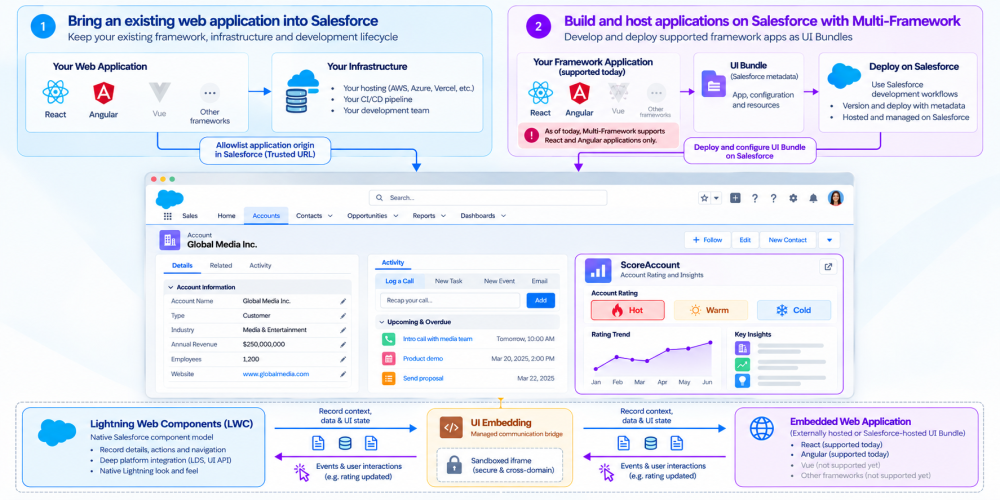
LWC and Microfrontends work together
Microfrontends don’t replace Lightning Web Components. They expand the Salesforce frontend ecosystem around them.
LWC remains the native component model for building Salesforce experiences and working deeply with Salesforce platform capabilities.
Microfrontends add another architectural option when an experience already exists outside Salesforce or needs to retain its own frontend technology, application boundary, and development lifecycle.
That means a single Lightning experience can combine native LWC for record information, Salesforce actions, and platform workflows with an embedded web application for a specialized experience.
Different engineering teams can also maintain those experiences independently.
The team responsible for the Microfrontend can own its framework, components, and release process. The Salesforce team can own the Lightning experience and control the context shared across the application boundary.
The result isn’t LWC versus Microfrontends. It’s an architecture where each can do what it does best.
Where Microfrontends fit
Microfrontends are particularly useful when you’re bringing an established web experience into Lightning and want to preserve its existing technology and development lifecycle.
For example, an organization may already have a specialized React analytics application maintained by a dedicated engineering team. Embedding that experience can preserve the team’s existing framework, component library, and release process while making the application available to Salesforce users.
Native LWC remains a natural fit for experiences designed specifically around Salesforce platform capabilities and native Lightning development.
The key architectural question isn’t simply which frontend framework you prefer. It’s where the application boundary belongs.
If an experience should remain an independently developed web application, Microfrontends provide a supported way to connect that boundary to Lightning.
If you’re building a native Salesforce component that depends deeply on Salesforce platform behavior, LWC continues to provide the native development model. And if you’re building a supported modern framework application directly on Salesforce, Multi-Framework and UI bundles extend the set of development options further.
Together, these models give teams more flexibility in how they design modern Salesforce applications.
Try Salesforce Microfrontends
The easiest way to understand the model is to see the host and guest working together.
The UI Embedding recipes provide working patterns for embedding applications, exchanging state, sending events, managing sizing, and integrating an embedded application with Lightning.
For implementation details, configuration, security requirements, and the latest supported capabilities, use the Salesforce Developer documentation as the source of truth.
The core mental model is simple:
- Embed your web application in Lightning using lightning-ui-embedding.
- Pass the context and data it needs through the managed embedding channel.
- Handle events sent back by the embedded application.
Everything else builds on that foundation.
Conclusion
Lightning Web Components have long provided Salesforce developers with a powerful native way to build user experiences.
Salesforce Microfrontends expand that story.
With UI Embedding, teams can bring modern web applications into Lightning while allowing those applications to retain their frameworks, development models, and application boundaries.
The Lightning host provides the Salesforce context. The external application provides its specialized application experience. Microfrontends securely connect the two.
And with Salesforce Multi-Framework, that story expands further by enabling supported modern framework applications to be built and hosted on Salesforce.
For developers, this creates a broader frontend development model:
Build natively with LWC. Bring existing web applications into Lightning with Microfrontends. Build supported modern framework applications on Salesforce with Multi-Framework.
Resources
- Get started with Salesforce Microfrontends and UI Embedding
- Explore framework support
- Exchange data between Salesforce and an embedded application
- Style an embedded application
- Explore UI Embedding Recipes
- Embed an internally hosted UI Bundle
- Learn more about Salesforce Multi-Framework
- Explore Multi-Framework Recipes on GitHub
About the author
Sangeeta Patnaik is a Senior Product Manager at Salesforce, building products across platform security, developer productivity, and modern application experiences. She is passionate about AI, security, and making complex technology simpler to build, safer to use, and easier to connect.