Credential stuffing is one of the most common attacks against a storefront login: attackers replay thousands of username/password pairs leaked from other breaches, betting that a shopper reused one.
As of the September 2026 release of B2C Commerce (release 26.9), you don’t need a third-party bot-management entitlement to fight back. eCDN, the Cloudflare-based CDN built into B2C Commerce, sits in front of every storefront request. This release adds four new detection fields you can write firewall and rate-limiting rules against, plus a managed-transform header you can read at your origin to warn the shopper directly.
This post covers:
- The detection fields eCDN now exposes
- The firewall-rule and rate-limiting-rule syntax to act on them
- A working example in SFRA (B2C Commerce’s Storefront Reference Architecture) that turns the edge signal into a shopper-facing “reset your password” prompt
- How to monitor what the detection is catching
Prerequisites
Salesforce must enable the Leaked-Credential-Check managed transform on your zone or zones. This is a Cloudflare-side toggle, so no redeploy is required on your part. Custom rules and rate limit rules can be created at any time with the detection fields below. Contact Salesforce (through a support case) to enable the managed transform for your zone.
The detection fields
Four fields are available in your eCDN firewall and rate-limiting rule expressions as of release 26.9:
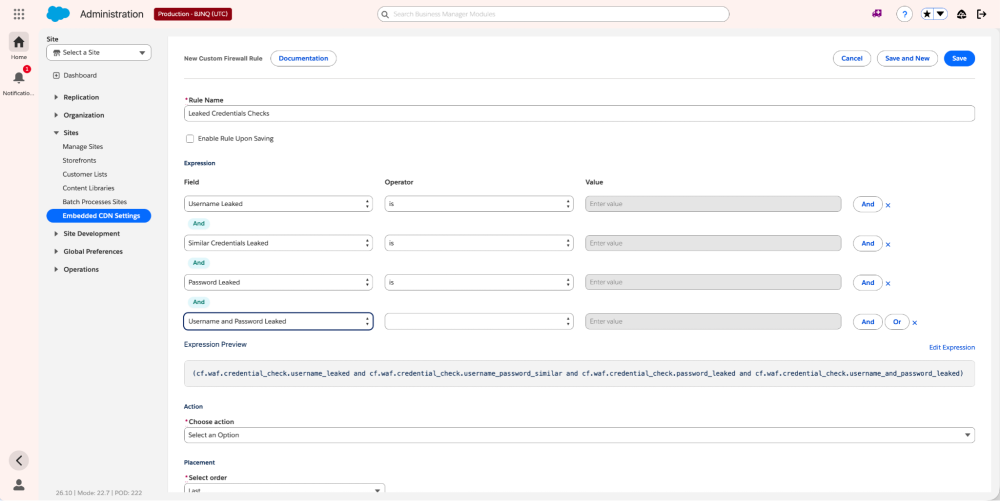
cf.waf.credential_check.password_leakedcf.waf.credential_check.username_leakedcf.waf.credential_check.username_and_password_leakedcf.waf.credential_check.username_password_similar
They evaluate on the SFRA storefront login endpoints (Account-Login) and the SLAS login endpoint. SLAS submits credentials via HTTP Basic auth, which the detection engine decodes, so headless and PWA Kit implementations are covered too. If you run a custom login controller, contact Salesforce; we’ll work with you to make sure that endpoint is protected too.
Challenge leaked credentials with a security rule
Managed Challenge is an action you can select when creating a Custom rule. It is an adaptive security check that Cloudflare presents when a request matches a rule. It tries to determine whether the requester is a legitimate human/browser or an automated/malicious client without always showing a traditional CAPTCHA. You can challenge login attempts that use a leaked password. From the custom-rules examples:
1# Expression
2(http.request.uri.path contains "/Account-Login" and cf.waf.credential_check.password_leaked)
3# Action
4managed_challenge
5# Note: SLAS cannot solve a challenge, consider block or rate limiting.
Throttle credential stuffing with a rate-limiting rule
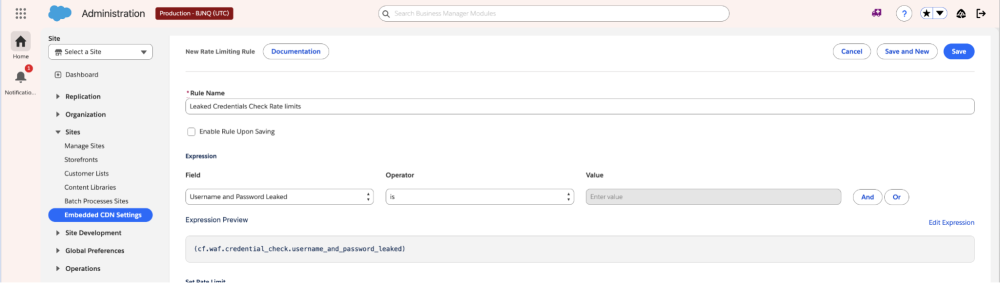
To throttle credential stuffing without penalizing legitimate search crawlers, split the rule expression (what to count) from the counting expression (what increments the counter). From Allow verified search crawlers and detect leaked credentials:
1# Rule expression — count login POSTs, excluding verified bots
2(http.request.uri.path contains "/Account-Login" and http.request.method eq "POST" and not cf.client.bot)
3# Counting expression — only increment when credentials are leaked
4(cf.waf.credential_check.username_and_password_leaked)
The not cf.client.bot clause in the rule expression excludes requests identified as verified search crawlers, so legitimate bots aren’t throttled alongside credential-stuffing attackers.
Warn the shopper in SFRA
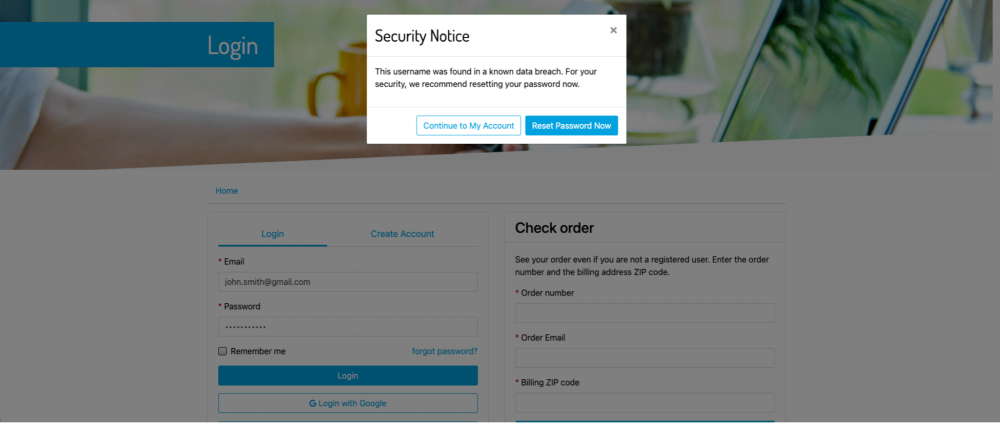
A plain block is the wrong tool here: a reused breached password isn’t proof of an attacker; it’s often the legitimate shopper who needs a nudge to rotate a password. When the Exposed-Credential-Check managed transform is on, eCDN adds a header to the login request before it reaches your storefront server. The shopper’s browser never sees it. It’s a request-side header, readable only server-side, on the same request that carries the login submission.
Header value → Meaning:
- 1 → Previously leaked username and password
- 2 → Previously leaked username
- 3 → Similar combination of previously leaked username and password
- 4 → Previously leaked password
In SFRA, req.httpHeaders is a case-insensitive map of the incoming request headers, available in every controller; no new middleware is needed. Here’s what’s new in Account.js’s server.post('Login', ...), added so the warning is attached only when authentication succeeds:
1var URLUtils = require('dw/web/URLUtils'); // add to the existing require block
2
3   // Exposed-Credential-Check is added by Cloudflare to the request it forwards to
4   // the origin; it is never sent by the shopper's browser.
5   var exposedCredentialCheckMessages = {
6       1: Resource.msg('warning.message.exposedcredentialcheck.usernamepassword', 'login', null),
7       2: Resource.msg('warning.message.exposedcredentialcheck.username', 'login', null),
8       3: Resource.msg('warning.message.exposedcredentialcheck.similar', 'login', null),
9       4: Resource.msg('warning.message.exposedcredentialcheck.password', 'login', null)
10   };
11   var exposedCredentialCheckHeader = req.httpHeaders.get('exposed-credential-check');
12
13   // ...inside the existing successful-login branch, before res.json(loginResponse):
14   if (exposedCredentialCheckMessages[exposedCredentialCheckHeader]) {
15       loginResponse.exposedCredentialWarning = {
16           message: exposedCredentialCheckMessages[exposedCredentialCheckHeader],
17           resetPasswordUrl: URLUtils.url('Account-EditPassword').toString()
18       };
19   }
Why only on a successful login? Two reasons:
- You act only once you know it’s the real shopper. A correct password is the proof point that it’s safe to say “these credentials are known-breached elsewhere — please rotate them.”
- No oracle for attackers. If the same flag were echoed on a failed login, a credential-stuffing attacker could learn which guessed username/password combinations are breach-flagged, independent of whether the guess was correct. Restricting to successful logins closes that side channel.
If the header is absent or not 1–4, exposedCredentialWarning is simply omitted and the response is identical to today’s behavior.
For the resource-bundle messages, modal template, client-side handler, and build step, see the full SFRA walkthrough gist.
Monitor it
Before you tighten actions, check how much of your login traffic the detection flags. Use Security Analytics in Business Manager to filter on the credential-check detection and confirm your rule fires as expected.
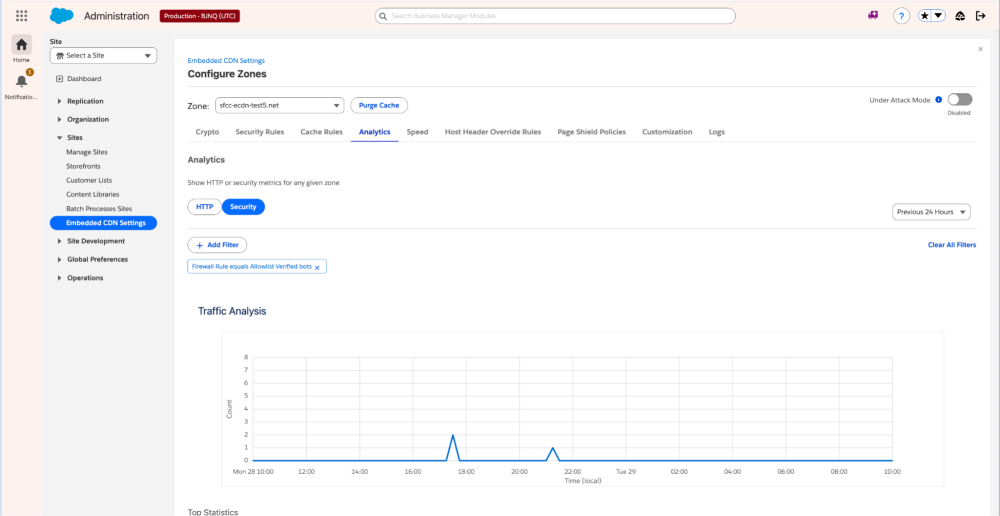
Need to export the raw logs instead? eCDN Logpush can batch and ship your firewall logs to S3, Splunk, Datadog, and more.
Demo video
Watch leaked-credential detection in action: https://youtu.be/vr3n6XLgEtU
Extend the learning: full SFRA walkthrough
The controller change above is the core of the integration. For the rest of the origin-side code, including the resource-bundle messages, modal template, client-side handler, and build step, see the full SFRA walkthrough gist.
Conclusion
Release 26.9 raises the floor on credential-stuffing defense for every B2C Commerce customer, with no new entitlement required: detection fields you can act on at the edge, and a managed-transform header you can turn into a shopper-facing safeguard in a few lines of SFRA. Use this as your baseline, then see the Bot Management Developer Guide for how to layer in the rest of a defense-in-depth bot-mitigation program.
Resources
- Bot Management Developer Guide
- Bot Mitigation Best Practices for Flash Sales
- SLAS Best Practices
- Create custom rules (with examples)
- Rate-limiting rules — allow verified crawlers & detect leaked credentials
- eCDN Logpush
- Leaked Credentials release notes
- Full SFRA walkthrough (sample code gist)
About the Author
Raghu Venkatraman, Director, Product Management — Raghu Venkatraman is a Product Management Director at Salesforce, where he drives product and bot mitigation strategy and innovation for B2C Commerce. With extensive experience in enterprise software and a passion for building user-centric solutions, Raghu focuses on delivering products that empower organizations to work more efficiently and effectively. He brings deep expertise in product leadership and cross-functional collaboration to help customers maximize their Salesforce investments. Follow him on LinkedIn