Bots increasingly skip the storefront and call the B2C Commerce API (SCAPI) directly. This is common with headless and composable storefronts, and with bots that chase high-demand inventory through the API instead of the UI. At the same time, AI crawlers and shopping agents are now a regular part of the traffic mix. While most of that traffic is legitimate, at volume it drives up search and large language model (LLM) costs and skews your analytics.
The October 2026 release of B2C Commerce gives you the tools to see and control both. The SCAPI zone (the eCDN zone in front of your Commerce API traffic) is now manageable in Business Manager and the CDN API. The new SCAPI Identity Header (SIH) lets you accept Shopper API traffic only from Managed Runtime (MRT). Verified-bot fields let you identify AI crawlers and agents on any eCDN zone.
This post covers:
- What the SCAPI zone is and what you can control there
- How to restrict Shopper API traffic to Managed Runtime traffic with the SIH
- How to allow your other legitimate API clients
- How to harden SLAS, the login service behind SCAPI
- How to identify AI crawlers and shopping agents, and manage them with rate limits and SEO controls
The SCAPI zone and what you can control there
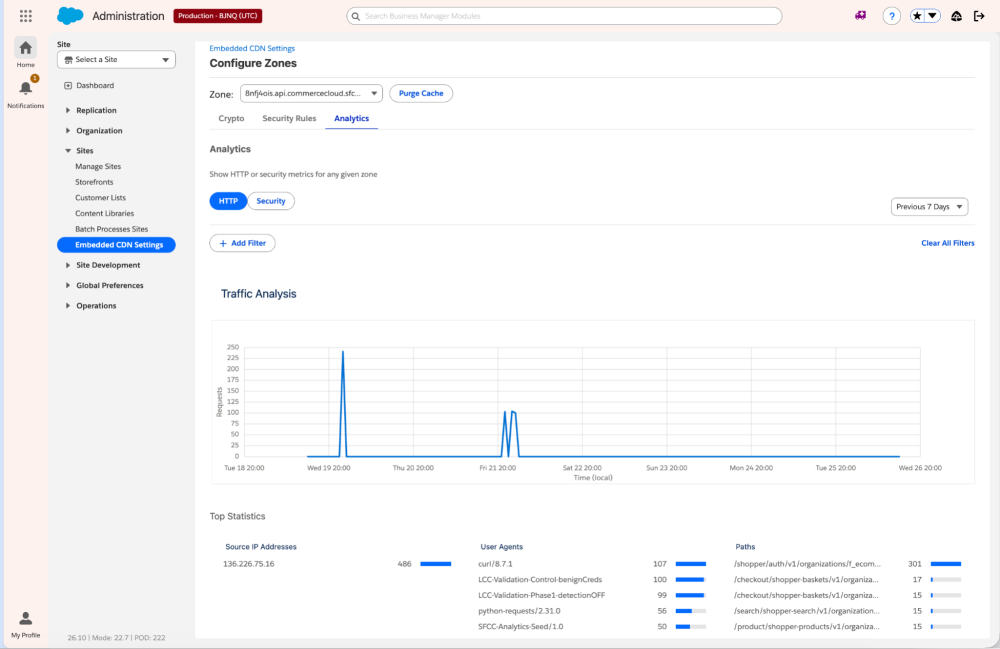
The SCAPI zone is provisioned automatically. You can’t create it or change its hostnames, and it appears alongside your storefront zones in the zone list. One SCAPI zone is shared across your Development, Staging, and Production instances, and you manage it from Production only. Business Manager shows a shared-zone banner, and some Salesforce-managed rules are locked.
What you can control: custom firewall rules, rate limiting, IP access lists, HTTP and security analytics, and cache purge.
What isn’t available: WAF managed rulesets, mutual TLS (mTLS), TLS 1.3 settings, HTTP Strict Transport Security (HSTS), Page Shield, and Under Attack Mode. The Crypto tab is read-only.
Restrict Shopper API traffic to Managed Runtime with the SCAPI Identity Header
If all your Shopper API traffic comes from MRT (Composable Storefront or Storefront Next), you can close the direct-to-API path that bots use to get around your CDN and MRT.
First, turn on the Managed Runtime SCAPI Request Identification feature in each instance you want to protect. Managed Runtime then attaches the SIH, a shared secret that Salesforce generates and rotates for you, to every request it forwards to SCAPI. A locked, Salesforce-managed allow rule appears in the SCAPI zone. It’s scoped to the instance by an org-specific path segment, for example f_ecom_abcd_prd for Production.
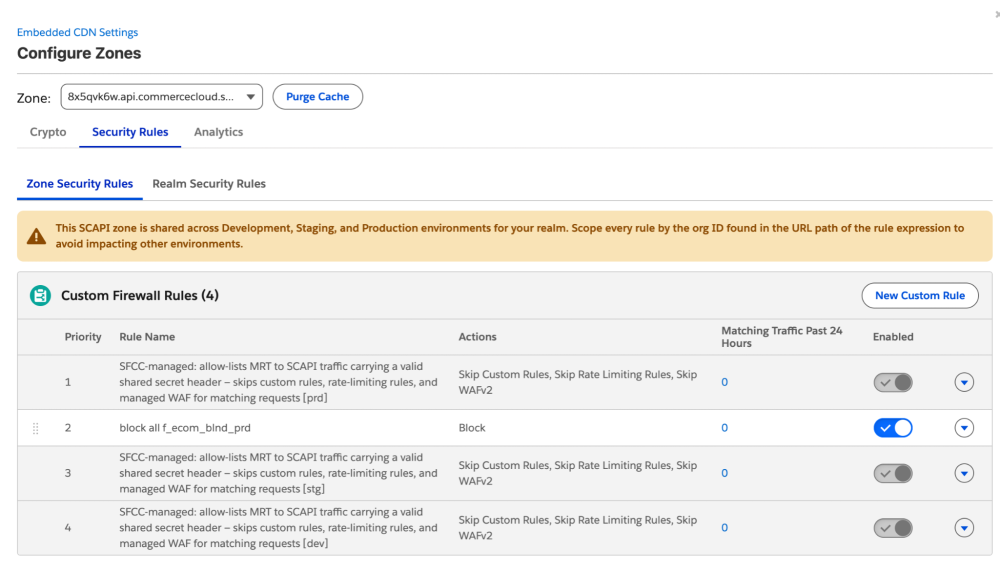
Next, add a custom firewall rule on the SCAPI zone’s Security Rules tab that blocks everything else for the same path segment:
1# Block direct Shopper API traffic for the Production instance
2Expression: URI Path contains "f_ecom_abcd_prd" and URI Path contains "/shopper"
3Action:     Log first to verify matches, then Block
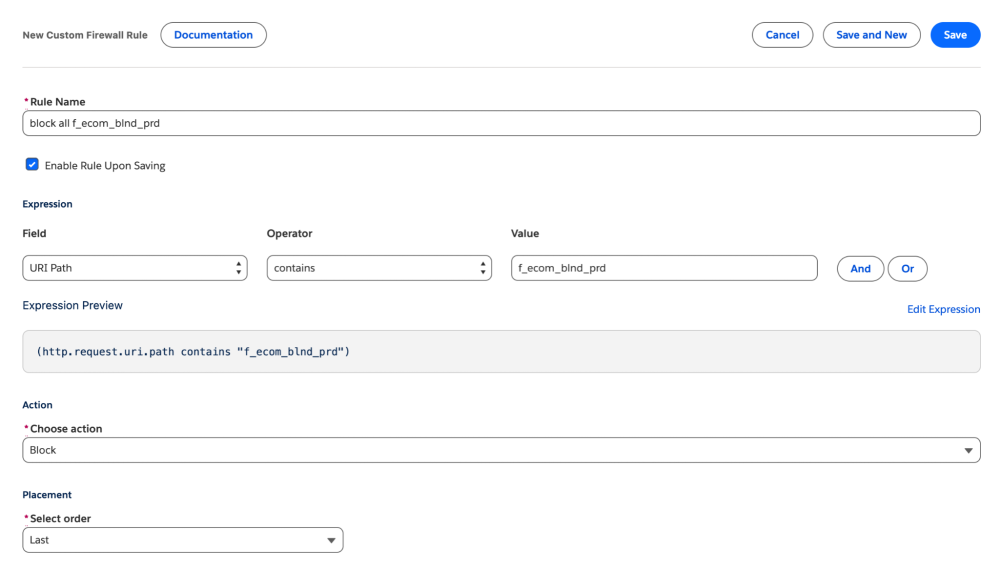
Start with the Log action and confirm what traffic matches. Then switch to Block and drag the rule directly after that instance’s managed allow rule. Rules run in order, so the allow rule passes legitimate Managed Runtime traffic before your block rule runs.
Allow your other API clients
A custom Backend for Frontend (BFF), mobile app backend, or partner integration may call the Shopper API directly by design. It can’t present the Managed Runtime SIH, so the block rule will catch it too. Give each integration its own allow rule, placed above the block rule:
1# Allow a custom BFF integration for Production
2Expression: URI Path contains "f_ecom_abcd_prd" and URI Path contains "/shopper"
3            and HTTP Request Header "X-Integration-Secret" equals "<your-shared-secret>"
4Action:     Skip (remaining custom rules)
Generate a long random value for <your-shared-secret>, store it server-side, rotate it regularly, and treat it like any other API credential. Never send it from a browser or mobile client, because anyone can read it there. Use a separate secret and allow rules for each integration.
Harden SLAS
Every Shopper API call needs a shopper access token, and SLAS (Shopper Login and API Access Service) issues those tokens. A bot that can’t get a token can’t call Shopper API, so attackers go after SLAS itself, for example by running credential stuffing against its /login endpoint. Harden SLAS along with the SCAPI zone.
Turn on Strict Client Auth for private clients. SLAS then requires every /login and /authorize request to carry this header:
1x-slas-client-auth: Base64(client_id:client_secret)A missing or wrong secret gets a 401, so a leaked or guessed client_id alone can no longer drive your login endpoints. Keep private-client secrets server-side.
Compatibility: Composable Storefront (PWA Kit) and Storefront Next don’t send this header yet. If you turn on Strict Client Auth for a private client either storefront uses, /login and /authorize return 401 and shoppers can’t log in. Until support ships, enable it only for private clients called from your own server-side code, such as a custom BFF. Check SLAS Best Practices for current status.
Let the refresh-token throttle work for you. SLAS allows 3 refresh-token exchanges per 60 seconds and returns a 429 with a Retry-After header beyond that. Reused, revoked, or unknown tokens count toward the same limit.
Forward c_* headers into your bot logic. SLAS passes custom headers prefixed with c_ from the /login request through to B2C Commerce. Use them to give a third-party bot manager or your own origin checks per-request context.
For client types, guest-token rotation, and token validation, see SLAS Best Practices.
Identify AI crawlers and shopping agents
Blocking unwanted API access is one half of the problem. The other half is traffic you may want, just not at any volume: AI crawlers, AI search, and shopping agents acting for shoppers. eCDN gives you two fields to identify it, with no extra entitlement, on every eCDN zone, both storefront and SCAPI:
- Known Bot (
cf.client.bot): true when the request comes from a bot Cloudflare has verified, such as a search engine crawler or AI agent. - Verified Bot Category (
cf.verified_bot_category): sorts verified bots into categories, so you can tell a model-training crawler from a shopping agent or a search indexer.
Use them alongside signals you already see in logs and analytics, such as a rising share of “direct” traffic with no referrer or UTM landing straight on product detail pages, or near-identical queries repeating at machine speed.
To act on them, add a condition to a custom firewall rule, for example:
1cf.verified_bot_category in {"AI Crawler" "AI Search"}Then choose an action such as Log, Managed Challenge, Block, or Skip.
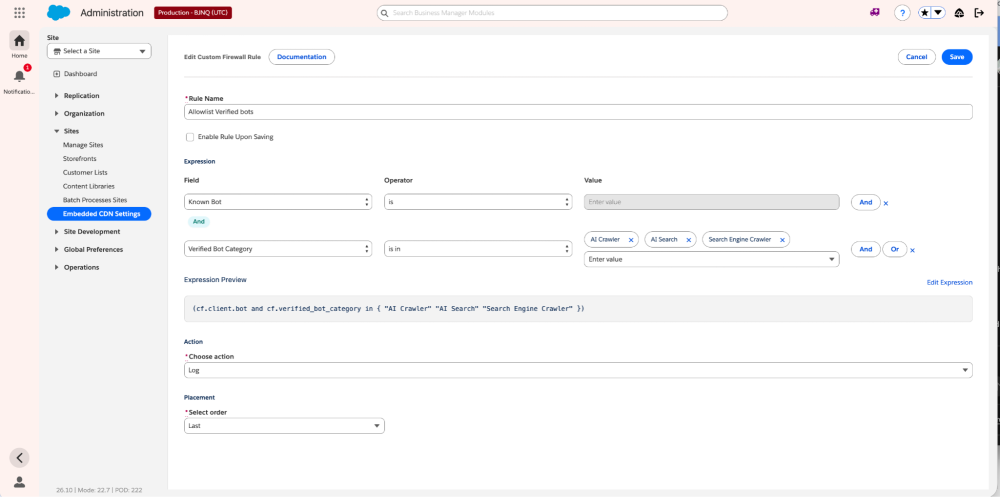
The Verified Bot Category field covers 17 categories. Here are the most relevant ones:
| Category | What it is | Example bots |
|---|---|---|
| AI Assistant | AI bot acting on a user’s request | Perplexity-User, DuckAssistBot |
| AI Crawler | Crawls content to train AI models | GPTBot, ClaudeBot |
| AI Search | Powers AI-driven search experiences | OAI-SearchBot |
| Search Engine Crawler | Indexes pages for search results | Googlebot, Bingbot |
| Search Engine Optimization | Analyzes sites to improve ranking | Google Lighthouse, GTmetrix |
Treating categories differently is the point. For example, you can let Search Engine Crawler traffic index your catalog while rate limiting AI Crawler and AI Search traffic on your most expensive endpoints.
Act on AI traffic: rate limit, then steer
Some AI training controls exist only in robots.txt. For example, Google-Extended controls whether Google uses your content for Gemini, but Google crawls with Googlebot, so an edge rule can’t single it out. Once you can identify AI traffic, rate limit it on your most expensive endpoints instead of blocking it outright. Search and recommendation calls are the usual cost drivers. Here’s an example rate-limiting rule that works on a storefront zone or the SCAPI zone:
1# Rate limit AI crawlers and AI search on product search
2Expression: cf.verified_bot_category in {"AI Crawler" "AI Search"}
3            and URI Path contains "/product-search"
4Counting:   per IP
5Threshold:  30 requests per 60 seconds   (example; tune from your logs)
6Action:     Log first, then Block for 10 minutes
On the SCAPI zone, which Development, Staging, and Production share, add and URI Path contains "f_ecom_abcd_prd" (your org+instance-specific path segment) to scope the rule to one instance. Storefront zones belong to a single instance, so they don’t need this condition.
For Storefront Reference Architecture (SFRA) storefronts, scope the path to your search controller instead, for example Search-Show. Run the rule in Log mode and check the matches in Security Analytics before you enforce it. Set thresholds well above real shopper behavior; a shopper applying eight refinements, for example, shouldn’t trip a limit meant for agents.
Match your edge rules to what you publish: use robots directives and crawler settings to tell crawlers what they may access, and let eCDN rules enforce it. See SEO & Discoverability for B2C Commerce.
Known Bot and Verified Bot Category only identify bots that Cloudflare has verified. To catch unverified or spoofed automation, you need behavioral detection such as bot scores and fingerprinting. That’s available from a third-party bot mitigation partner, a stacked CDN, or your own Cloudflare zone with Bot Management in front of eCDN. See the Bot Management Developer Guide for the options.
Conclusion
Bots that skip the storefront and AI agents that don’t need to are two sides of the same shift. With the October 2026 release you can see your SCAPI traffic, accept the Shopper API traffic only from Managed Runtime and the integrations you trust, harden SLAS, and decide how much AI traffic each endpoint should take. Start every new rule in Log mode, confirm what it catches, then enforce. For edge protection of your login forms, see our companion post, Stop Credential Stuffing at the Edge with B2C Commerce eCDN.
Resources
- SCAPI Zone overview
- Restrict SCAPI Access to Managed Runtime Traffic (SCAPI Identity Header)
- SLAS Best Practices
- SCAPI Security
- Allow Traffic from Search Engine and Other Verified Bots with eCDN Rules
- Create a Custom Firewall Rule for an eCDN Zone
- Create a Rate Limiting Rule for an eCDN Zone
- SEO & Discoverability for B2C Commerce Overview
- Knowledge Article: Mitigating Scrapers and AI Crawlers
- Knowledge Article: AI Crawler and Agent Traffic
- Bot Management Developer Guide
About the Author
Raghu Venkatraman is a Director of Product Management at Salesforce, where he drives product and bot mitigation strategy for B2C Commerce. With extensive experience in enterprise software and a passion for building user-centric solutions, Raghu focuses on delivering products that help organizations work more efficiently and effectively. Follow him on LinkedIn.