


 j
jascii()
chr()
ends_with()
index_of()
len()
lower()
ltrim()
mv_to_string()
number_to_string
replace()
rtrim()
starts_with()
string_to_number
substr()
trim()
upper()
Windowing Functions
coalesce
Previous Versions
Converts a number literal to a string literal.
number_to_string(number, number_format)
Returns the string representation of number. Use number_format to specify the format of the string, for example as currency or with two decimal places. number_format can specify seperate formats for positive and negative numbers:
number_to_string(number, number_format)
The format specified by number_format is used for both positive and negative numbers.
number_to_string(number, <POSITIVE>;<NEGATIVE>)
If number is positive, the number format specified by <POSITIVE> is used. If number is negative, the number format specified by <NEGATIVE> is used. Note the semicolon separating the two specified formats.
You can specify the format with these characters:
Display the number amount as a string, formatted as currency:
1q = foreach q generate 'Amount' as 'Amount', number_to_string('Amount',"$#,###.00") as 'NumberAmount';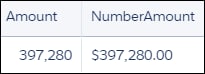
Suppose that you have a measure field with the format shown in Number You Start With. Use the format shown in number_format to display this number as a shown in Resulting String.
| Initial Number | number_format | Resulting String |
|---|---|---|
| 1234.56 | ####.# | 1234.6 |
| 8.9 | #.000 | 8.900 |
| .631 | 0.# | 0.6 |
| 12 | #.0# | 12.0 |
| 1234.568 | #.0# | 1234.57 |
| 12000 | #,### | 12,000 |
| 12000 | #, | 12 |
| 12200000 | 0.0,, | 12.2 |
| 12 | 00000 | 00012 |
| 0.03457 | #.00% | 3.46% |
| 12.3 | $#.00;($#.00) | $12.30 |
| -12.3 | $#.00;($#.00) | ($12.30) |
| 32 | +;- | + |
| -32 | +;- | - |
j