


Salesforce1 App Developer Guide
 j
j
No Results
Search Tips:
- Please consider misspellings
- Try different search keywords
When to Use the Navigation Menu or the Publisher
- Navigation menu
The navigation menu appears when you tap
 . This menu is available in the global context.
For example, if a user logs in and is viewing items in the feed, they
can tap and open the navigation menu, and it displays menu items.
Typically, these menu items lead to more complex business processes
that don’t take place in the context of any particular object.
. This menu is available in the global context.
For example, if a user logs in and is viewing items in the feed, they
can tap and open the navigation menu, and it displays menu items.
Typically, these menu items lead to more complex business processes
that don’t take place in the context of any particular object. Menu items in the navigation menu should bring users to a fully functional page or app. So if you have a page or app that contains many fields through which the user would need to scroll and perform a more complex process, you’ll want to make it available from the navigation menu.
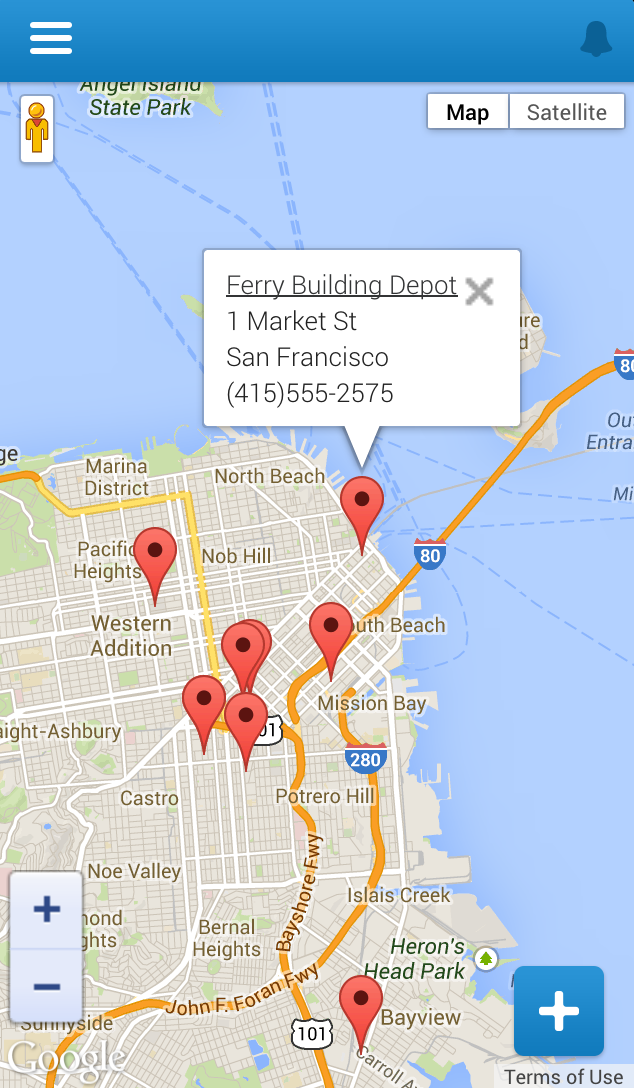
An example from this book is the Find Warehouses Visualforce page that we made available from the navigation menu in Extending Salesforce1 with Visualforce Pages. When the mobile technician taps the menu item, a page appears that contains a Google map and displays any nearby warehouses. The functionality of this page is global—not in the context of any particular object in our schema.
- Publisher
The publisher appears when you tap
 . This menu is for accessing custom functionality
that displays small amounts of data and allows users to perform short,
quick actions. If you have functionality that occurs in the context
of an object, you’ll want to add it as an action in the publisher.
. This menu is for accessing custom functionality
that displays small amounts of data and allows users to perform short,
quick actions. If you have functionality that occurs in the context
of an object, you’ll want to add it as an action in the publisher.An example from this book is the Create Quick Order action available from the publisher within a customer account. While the mobile technician is servicing a customer account, they can tap the action and then enter in just the merchandise name and distance to find warehouses with a part in stock. Then the technician enters the quantity and a customer order is created. The functionality of this Visualforce page occurs within the context of a customer account. The user interaction with the page is quick, and it’s a simple process to search and create an order because the page contains only a few fields.
