


Force.com Platform Fundamentals
 j
jNewer Version Available
Introducing Approvals
Now that we've automated parts of our business using processes, let's take a look at another business logic tool that the platform provides: approval processes.
Approval processes let you specify a sequence of steps that are required to approve a record. Each step allows one or more designated approvers to accept or reject a record. The steps can apply to all records for the object associated with the process, or just to records that meet certain requirements. Like processes you create in Process Builder, approval processes also let you specify actions—like sending an email alert, updating a field value, or assigning a task—that should occur whenever a record is approved, rejected, first submitted for approval, or recalled.
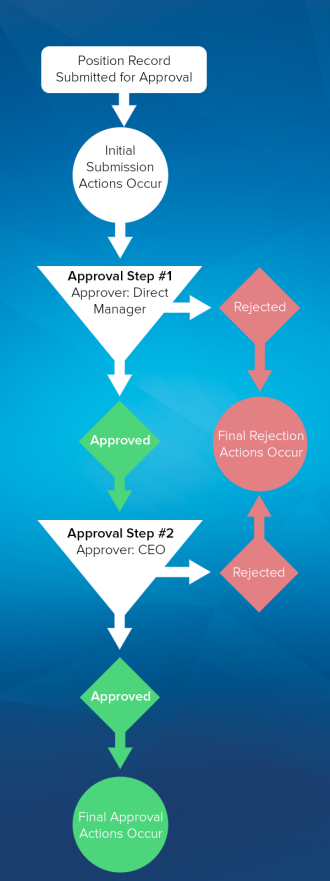
- If an expense record is submitted for approval, lock the record so that users cannot edit it and change the status to “Submitted.”
- If the amount is $50 or less, automatically approve the request.
- If the amount is greater than $50, send an approval request to the direct manager.
- If the amount is greater than $5,000 and the first approval request is approved, send an approval request to the Vice President.
- If all approval requests are approved, change the status to “Approved” and unlock the record.
- If any approval requests are rejected, change the status to “Rejected” and unlock the record.
For our recruiting app, we're going to define a similar approval process to submit new positions for approval. We want to make sure that a manager approves any position that his or her employee creates, and that any position with a minimum salary of more than $150,000 is approved by the CEO. Let's get started.