Salesforce Knowledge Developer Guide
 j
jNewer Version Available
Create an Article
Create articles from the Knowledge tab to build your knowledge base.
The more articles you have the more realistic your development knowledge base. You can import multiple articles with .csv files; one for each article type. For information on importing articles, see https://help.salesforce.com/HTViewHelpDoc?id=knowledge_article_importer.htm.
-
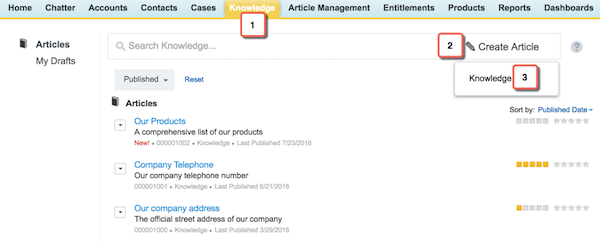
Click the Knowledge tab.
- Click Create Article.
-
Select the Knowledge article type.
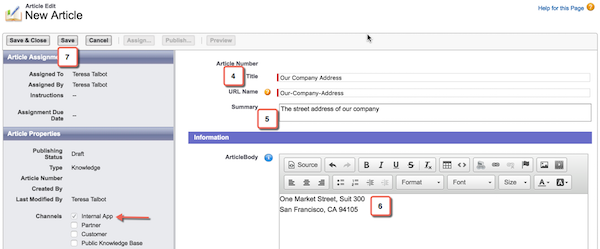
- Create a title for your article, such as “Our company address.”
- Write a description, this goes under the title in the search results.
- Put your company address in the rich text area field you created in the last unit. Notice that the article is available by default to your internal users.
-
Click Save.