


Salesforce1 Mobile App Developer Guide
 j
jAbout Action Layouts
Just as object record pages have page layouts that can be customized, actions have action layouts that can be customized. We do this in the action layout editor.
When you create an action, Salesforce populates its layout with a default set of fields. You can add, remove, or reorder fields on the action layout to present only the essential items your users need when they’re taking the action.
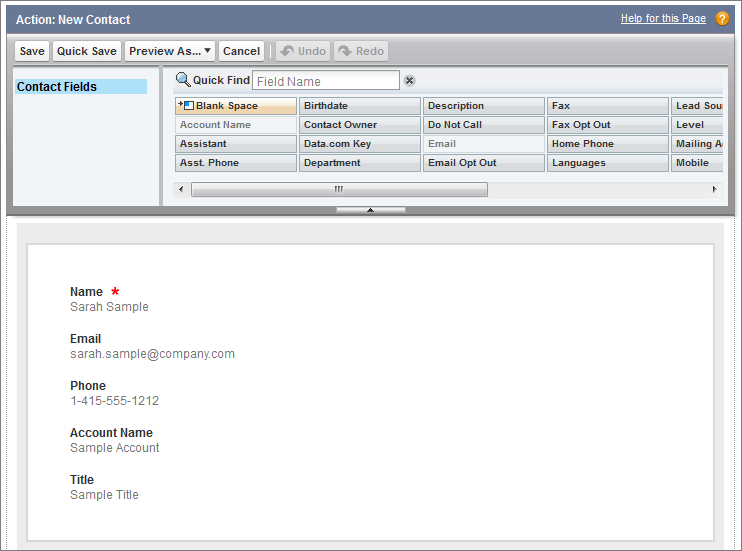
The upper part of the editor contains a palette, and
below the palette is the action layout. The palette contains fields from the action’s target
object that you can add to the action layout, except for the following unsupported field
types:
- Record type fields
- Read-only field types such as roll-up summary, formula, and auto-number fields
- Read-only system fields such as Created By or Last Modified By
- Inactive Fields
- Fields that are already on the action layout still appear on the palette but are inactive. When you select an inactive field on the palette, Salesforce highlights the field on the action layout.
- Field Type Conversion
- If you convert a field’s type from one that is supported for actions to a type that isn’t supported, Salesforce removes the field from the action layout. If you convert the field back to a supported type without changing the action layout, Salesforce automatically adds the field back to the layout. If you edit the layout, and then convert the field back to a supported type, add the field back to the layout manually.
- Layouts Used for Log a Call Actions
- A Log a Call action takes the active task page layout except under the following conditions:
- Suppose that your organization has a custom Log a Call action for an object. The custom action takes the custom action layout defined for it.
- Now suppose that your organization has a custom Log a Call global action. That action takes the custom layout defined for it, unless you also have a custom Log a Call action for an object. (A custom action on an object overrides a custom global action.)
- Layout Auditing
- Salesforce tracks action layout customization in the setup audit trail history.