


Force.com IDE Developer Guide
 j
jCreate a Lightning Component Bundle in the Force.com IDE
A Lightning component is a
combination of markup, JavaScript, and CSS. Create a Lightning component bundle that contains
these files.
- In the Force.com IDE, select .
-
Enter MyContactList in the Name field, and then click
Finish.

- In the Package Explorer, expand the src, aura, and MyContactList directories.
- Double-click MyContactList.cmp.
-
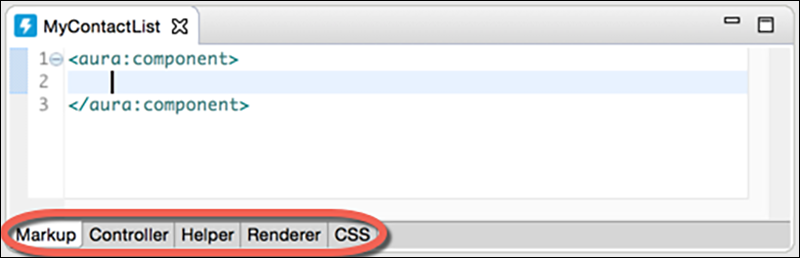
Note the Markup, Controller, Helper, Renderer, and CSS tabs at the bottom of your
source panel. When you created the MyContactList component bundle, the bundle’s
controller, helper, renderer, and CSS files were created for you. You can easily navigate
among the items in your component bundle using these tabs.
-
Replace the MyContactList.cmp line that contains <aura:component> with the following line.
1<aura:component controller="MyContactListController"> - To save your updated component, press Ctrl+S or (Cmd+S on macOS).
- Click the Controller tab.
-
In the body of the myAction JavaScript
function, add this code.
1var action = component.get("c.getContacts"); 2action.setCallback(this, function(data) { 3component.set("v.contacts", data.getReturnValue()); 4}); 5$A.enqueueAction(action); - To save your updated controller, press Ctrl+S or (Cmd+S on macOS).
Your component can now access data from the MyContactListController Apex controller.