


ISVforce Guide
 j
jNewer Version Available
Select a Pricing Model for a Listing
AppExchange Checkout lets you
select the pricing model that works best for customers and your business. You can choose
either company or per-user pricing and charge customers on a recurring basis or as a
one-time payment.
| User Permissions Needed | |
|---|---|
| To manage listings in the Partner Community: | Manage Listings |
AppExchange Checkout
supports the following pricing models.
- Per user—Billed monthly, annually, or as a one-time payment
- Per company (org-wide)—Billed monthly, annually, or as a one-time payment
- Log in to the Partner Community and go to the Publishing tab.
- Create a listing, or edit an existing one.
-
On the Pricing tab, select Paid, using Checkout
(1).
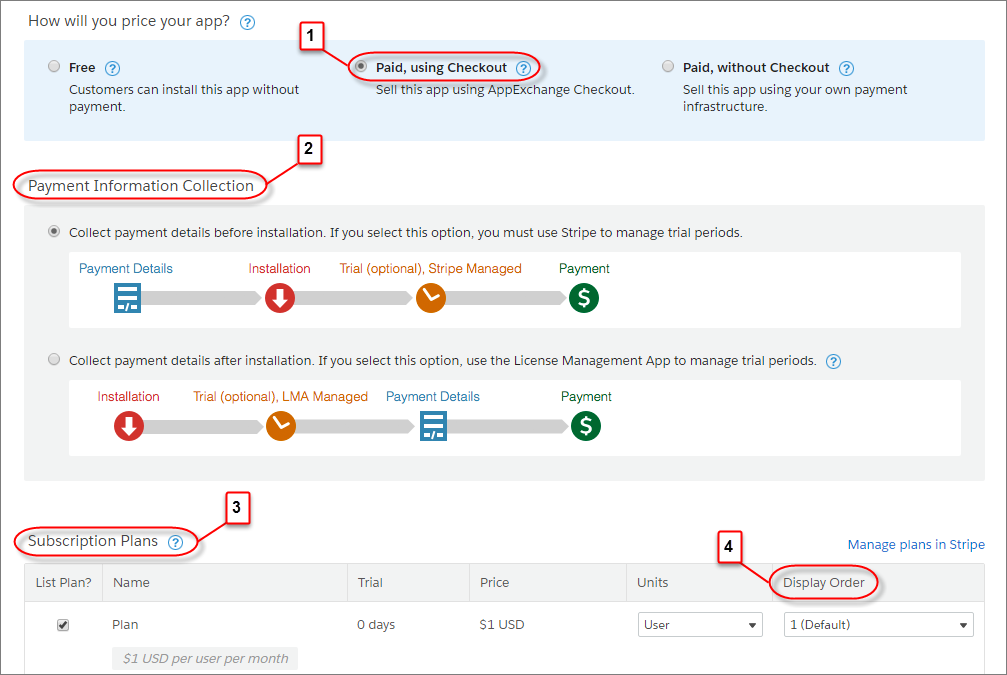
- Choose whether to collect payment information before or after a customer installs your offering (2).
-
Select a pricing model (3).
Pricing Model Steps Recurring charge - Select one of the subscription plans that you created in Stripe.
- Select company or per-user pricing.
One-time payment - Select Add One Time Price Option.
- Provide a name for the plan.
- Select a price and currency.
- Select company or per-user pricing.
- If you offer several pricing models, adjust their display order (4).
- Click Save.