


Salesforce App Admin Guide
 j
jAccess Data in the Salesforce App While Offline
Caching in the Salesforce app is enabled the first time someone in your org installs Salesforce for Android and Salesforce for iOS.
The contents of a user’s cache determines the data that’s accessible when the user’s mobile device is offline. Let’s look at how the cache is initially populated and then updated throughout a Salesforce app session.
- When a user logs in, the cache is empty. If the user’s device goes offline with an empty cache, no Salesforce data is available.
- Users can quickly populate the cache with a default set of most recently accessed records
in two ways. Users can put Salesforce in the background by switching away to a different app
or navigating to the device home screen to populate their cache. Or users can go to the
navigation menu, select .
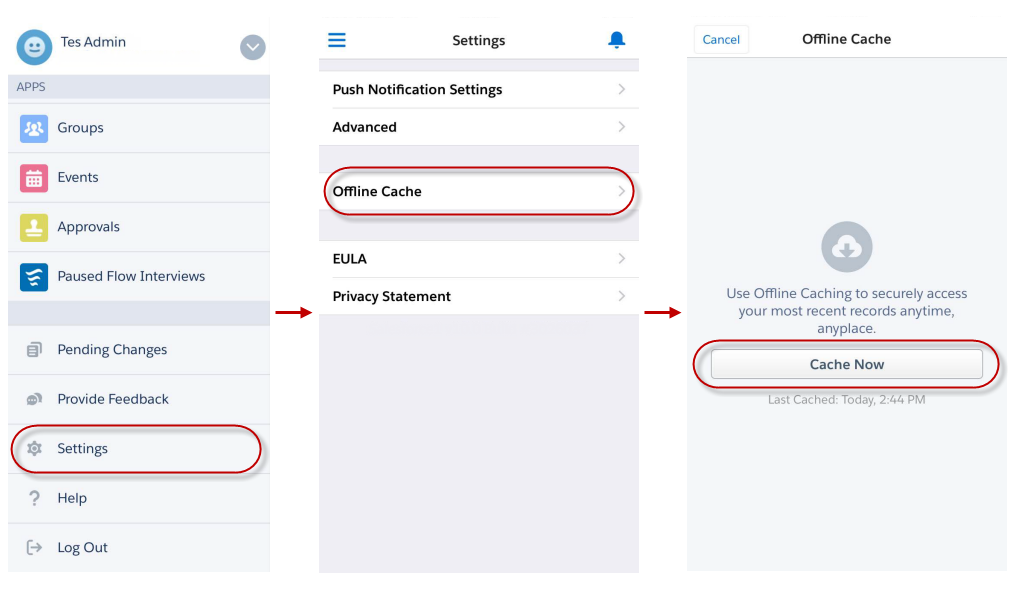
Populating the cache collects recently accessed records for the first five objects listed in the Recent section of the user’s navigation menu, plus the user’s recent tasks and dashboards. For the first five objects listed in the Recent section of the navigation menu, up to 30 most recently accessed records are cached per object. For tasks and dashboards, the tasks listed under My Tasks and the five most recently accessed dashboards are cached. Recently accessed records are determined by a user's activities in both the app and the full Salesforce site, including Salesforce Classic and Lightning Experience.
After users initially populate their cache, users can refresh their cache in two ways. If the last cache refresh is more than one hour old, users can put Salesforce in the background by switching away to a different app or navigating to the device home screen to refresh the cache. Or users can manually refresh the cache by going to the navigation menu, select .
- Throughout a session, many of the other records that the user accesses are also added to the cache. (Not all Salesforce data is available offline—see Data and UI Elements That Are Available When the Salesforce App is Offline.)
- A record remains in the user’s cache for 30 days. Each time the same record is accessed, the clock resets. But if the record isn’t touched within 30 days, it’s automatically removed from the cache and won’t be available offline until the user accesses the record again.
- Logging out of Salesforce removes all data from the cache. The next time the user logs in, the process of generating the cache starts over.