


Analytics SAQL Reference
 j
jNewer Version Available
Date Functions
Dates in Einstein Analytics
When you upload a date field to Einstein Analytics, it creates dimension and measure fields to contain the date and time information. You can use SAQL date functions to convert the dimensions and measures to dates. You can then use the dates to sort, filter, and group data in your SAQL queries.
For example, suppose that you upload a dataset that contains the CloseDate date field.
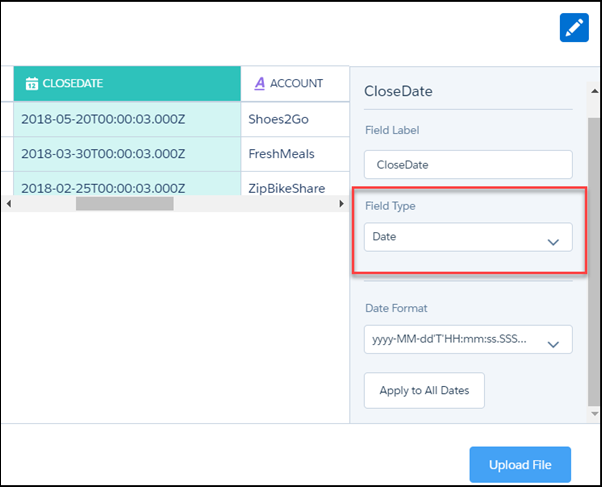
During the dataflow, Einstein Analytics creates these fields. All the fields are dimensions, except for the epoch fields, which are measures.
| Field | Description |
|---|---|
| CloseDate | A dimension containing the date and time. For example, 2018-02-25T00:00:03.000Z. You can’t use this string in a date filter. Instead, ‘cast’ it to a date type using toDate(). |
| CloseDate (Day) | Dimension containing the day in the month, for example 30. |
| CloseDate (Hour) | Dimension containing the hour, for example, 11. If the original date did not contain the hour, this field contains 00. |
| CloseDate (Minute) | Dimension containing the minute, for example, 59. If the original date did not contain the minute, this field contains 00 |
| CloseDate (Month) | Dimension containing the month, for example, 12. |
| CloseDate(Quarter) | Dimension containing the quarter, for example, 4. |
| CloseDate (Second) | Dimension containing the second, for example, 59. If the original date did not contain the minute, this field contains 00. |
| CloseDate (Week) | Dimension containing the week, for example, 52. |
| CloseDate_day_epoch | Measure containing the UNIX epoch time, which is the number of days that have elapsed since 00:00:00, Thursday, 1 January 1970. |
| CloseDate_sec_epoch | Measure containing the Unix epoch time in seconds. Seconds epoch time is the number of seconds that have elapsed since 00:00:00, Thursday, 1 January 1970. |
Example: Display the Number of Days Since an Opportunity Opened
Suppose that you have an opportunity dataset with the account name and the epoch seconds fields:

You want to see how many days ago an opportunity was opened. Use daysBetween() and now().
1q = load "OpsDates1";
2
3q = foreach q generate Account, daysBetween(toDate(OrderDate_sec_epoch), now()) as 'daysOpened';
The resulting data stream displays the number of days since the opportunity was opened.

Example: Display Opportunities Closed This Month
Suppose that you want to see which opportunities closed this month. Your data includes the account name, the close date fields, and the epoch seconds field.

Use date() to generate the close date in date format. Then use relative date ranges to filter opportunities closed in the current month.
1q = load "OpsDates1";
2q = filter q by date(’CloseDate_Year’, ‘CloseDate_Month’, ‘CloseDate_Day’) in [”current month” .. “current month”];
3q = foreach q generate Account;
If the query is run in May 2018, the resulting data stream contains one entry:

To add the close date in a readable format, use toDate().
1q = load "OpsDates1";
2q = filter q by date('CloseDate_Year', 'CloseDate_Month', 'CloseDate_Day') in ["current month" .. "current month"];
3q = foreach q generate Account, toDate('CloseDate_sec_epoch') as 'Close Date';
The resulting data stream includes the full date and time of the close date.

You can also display just the month and day of the close date.
1q = load "OpsDates1";
2q = filter q by date('CloseDate_Year', 'CloseDate_Month', 'CloseDate_Day') in ["current month" .. "current month"];
3q = foreach q generate Account, 'CloseDate_Month' + "/" + 'CloseDate_Day' as 'Close Date';
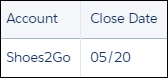
The resulting data stream contains the month and day of the close date.
Functions
date(year, month, day)
1date('OrderDate_Year', 'OrderDate_Month', 'OrderDate_Day')Examples:
Use this date filter to see all orders that have been placed in the past 30 days.
1q = filter q by date('CloseDate_Year', 'CloseDate_Month', 'CloseDate_Day') in ["current day - 30 days"..];date_diff(datepart,startdate,enddate)
- year
- month
- quarter
- day
- week
- hour
- minute
- second
enddate indicates the end date.
The difference between two dates is calculated based on the difference in the indicated date part. For example, the year difference between two dates is calculated by subtracting the year part of startdate from the year part of enddate.date_diff("year", toDate("31-12-2015", "dd-MM-yyyy"), toDate("1-1-2016", "dd-MM-yyyy")) returns a result of 1.
Similarly, using the date part month as an example:date_diff("month", toDate("31-12-2015", "dd-MM-yyyy"), toDate("1-1-2016", "dd-MM-yyyy")) returns a result of 1.
If startdate is after enddate the result is a negative integer of the difference.| Query | Result |
| date_diff(“year", '2004-02-29', '2005-02-28’) | 1 |
| date_diff(“year", '2012-1-1', '2012-12-31’) | 0 |
| date_diff(“month", '2003-02-01', '2003-05-01’) | 3 |
| date_diff(“month", '2004-02-28', '2004-03-31’) | 1 |
| date_diff(“quarter", '2012-12-12', '2013-01-05') | 1 |
| date_diff(“week", '2012-12-12', '2013-01-05') | 3 |
| date_diff(“day", '2012-12-12', '2013-01-05') | 24 |
| date_diff(“hour", '2012-12-12', '2013-01-05') | 576 |
| date_diff(“minute", '2012-12-12', '2013-01-05') | 34560 |
| date_diff(“second", '2016-09-15 19:42:36', '2016-09-16 19:42:36') | 86400 |
Query example:
1q = load \"em/dates\";
2q = foreach q generate date_diff("year", toDate(DateOfBirth, "yyyy-MM-dd"), now()) as age;
3q = order q by age asc;
Invalid examples:
1q = group q by date_diff("month", toDate(DateOfBirth, "yyyy-MM-dd"),
2 toDate(RegisteredDate));1q = order q by date_diff("year", toDate(DateOfBirth, "yyyy-MM-dd"),
2 toDate(RegisteredDate));1q = filter q by date_diff("day", toDate(DateOfBirth, "yyyy-MM-dd"), now());date_to_epoch(date)
Returns the number of seconds elapsed since January 1, 1970, 00:00:00.000 GMT. If a date before this is passed, the result is a negative number. If the parameter is not a date, an error results. If null is passed as a parameter, null is returned.
Examples:
1date_to_epoch(now()) == 1496404452 (current time)1date_to_epoch(toDate("2017-06-02 11:54:12")) == 1496404452date_to_string(date, formatString)
1q = foreach q generate date_to_string(now(), \"yyyy-MM-dd HH:mm:ss\") as ds1;dateRange(startArray_y_m_d, endArray_y_m_d)
1dateRange([1970, 1, 1], [1970, 1, 31])day_in_month(date)
day_in_quarter(date)
day_in_week(date)
date indicates the reference date.
1q = foreach q generate day_in_week(toDate(OrderDate));day_in_year(date)
daysBetween(date1, date2)
1q = foreach q generate daysBetween(toDate(OrderDate, “yyyy-MM-dd”),
2 now()) as daysToShip;1q = foreach q generate daysBetween(toDate(OrderDate, “yyyy-MM-dd”),
2 toDate(ShipDate, “yyyy-MM-dd”)) as daysToShip;1q = foreach q generate daysBetween(toDate(OrderDate_Year + “:”
2 + OrderDate_Month + “:” + OrderDate_Day, “yyyy:MM:dd”), toDate(ShipDate_Year + “:”
3 + ShipDate_Month + “:” + ShipDate_Day, “yyyy:MM:dd”)) as daysToShip;month_days(date)
date indicates the reference date.
| Query | Result |
| month_days(toDate('2004-02-12', "yyyy-MM-dd") | 29 |
| month_days(toDate('2012-04-07', "yyyy-MM-dd") | 30 |
| month_days(toDate('1990-13-11', "yyyy-MM-dd") | NULL |
Query example:
1q = load \"em/dates\";
2q = foreach q generate month_days(toDate(BillDate, "yyyy-MM-dd")) as BillingMonth;
3q = order q by BillingMonth asc;
Invalid examples:
1q = group q by month_days(toDate(BillDate, "yyyy-MM-dd"));1q = order q by month_days(toDate(BillDate, "yyyy-MM-dd"));1q = filter q by month_days(toDate(BillDate, "yyyy-MM-dd"));month_last_day(date)
now()
1q = foreach q generate now() as now;This function is commonly used in daysBetween() and toString() functions.
quarter_days(date)
quarter_last_day(date)
toDate(string [,formatString])
1q = foreach q generate toDate(OrderDate);1q = foreach q generate toDate(OrderDate_Day + \"-\" + OrderDate_Month + \"-\" + OrderDate_Year, \"dd-MM-yyyy\");This function is often passed as an argument to daysBetween() or toString().
toDate(epoch_seconds)
This function is convenient for adding or subtracting time periods to or from a date. When adjusting dates for time zone differences, adding or subtracting the number of seconds in the time difference produces the correct local date. If the time crosses the local meridian, a different date is produced.
For example, assuming Current_Date is the current date expressed as the number of seconds since '1970-01-01 00:00:00', then the function toDate(Current_Date - 8*3600) subtracts 8 hours. Refer to Working with Time Zones for a practical example.
toString(date, formatString)
1q = foreach q generate toString(now(), \"yyyy-MM-dd HH:mm:ss\") as ds1;week_last_day(date)
date indicates the reference date.
| Query | Result |
| week_last_day(toDate('2016-12-08', "yyyy-MM-dd")) | 2016-12-10 |
| week_last_day(toDate('2015-07-05', "yyyy-MM-dd")) | 2015-07-11 |
| week_last_day(toDate('2012-11-33', "yyyy-MM-dd")) | Error |
Query example:
1q = load \"em/dates\";
2q = foreach q generate week_last_day(toDate(BillDate, "yyyy-MM-dd")) as BillingWeek;
3q = order q by BillingWeek asc;
Invalid examples:
1q = group q by week_last_day(toDate(BillDate, "yyyy-MM-dd"));1q = order q by week_last_day(toDate(BillDate, "yyyy-MM-dd"));1q = filter q by week_last_day(toDate(BillDate, "yyyy-MM-dd"));year_days(date)
year_last_day(date)
Specify Fixed Date Ranges
To specify a range for fixed dates, use the dateRange() function. Specify the dates in the order: year, month, day.
Example
1a = filter a by date('year', 'month', 'day') in [dateRange([1970, 1, 1], [1970, 1, 11])];Specify Relative Date Ranges
To specify a relative date range, use the in operator on an array with relative date keywords. Here are 4 examples:
1a = filter a by date('year', 'month', 'day') in ["1 year ago".."current year"];
2a = filter a by date('year', 'month', 'day') in ["2 quarters ago".."2 quarters ahead"];
3a = filter a by date('year', 'month', 'day') in ["4 months ago".."1 year ahead"];
4a = filter a by date('year', 'month', 'day') in ["2 fiscal_years ago".."current day"];- current day
- n day(s) ago
- n day(s) ahead
- current week
- n week(s) ago
- n week(s) ahead
- current month
- n month(s) ago
- n month(s) ahead
- current quarter
- n quarter(s) ago
- n quarter(s) ahead
- current fiscal_quarter
- n fiscal_quarter(s) ago
- n fiscal_quarter(s) ahead
- current year
- n year(s) ago
- n year(s) ahead
- current fiscal_year
- n fiscal_year(s) ago
- n fiscal_year(s) ahead
| Relative Date Keyword | Start Date | End Date |
|---|---|---|
| current day | 2014/12/16 00:00:00 | 2014/12/16 23:59:59 |
| current quarter | 2014/10/1 00:00:00 | 2014/12/31 23:59:59 |
| 1 year ago | 2013/1/1 00:00:00 | 2013/12/31 23:59:59 |
| 1 month ahead | 2015/1/1 00:00:00 | 2015/1/31 23:59:59 |
| current fiscal_year | 2014/2/1 00:00:00 | 2015/1/31 23:59:59 |
| current fiscal_quarter | 2014/11/1 00:00:00 | 2015/1/31 23:59:59 |
| 2 fiscal_quarters ahead | 2015/5/1 00:00:00 | 2015/7/31 23:59:59 |
| current day - 1 year | 2013/12/16 00:00:00 | 2013/12/16 23:59:59 |
| current fiscal_year + 5 days | 2014/2/6 00:00:00 | 2014/2/6 23:59:59 |
Add and Subtract Dates
You can add and subtract dates using the relative date keywords.
Example
Here are examples of time windows for relative date keywords using addition and subtraction. In these time window examples, the current day is 2014/12/16 and FiscalMonthOffset 1 (the fiscal year starts on February 1).
1a= filter a by date('year', 'month', 'day') in ["current day - 1 year"..] ;1a= filter a by date('year', 'month', 'day') in ["current day".."2 years ahead + 3 months"];1a= filter a by date('year', 'month', 'day') in ["current fiscal_year + 5 days".."2 years ahead + 3 months"];Use Open-Ended Relative Date Ranges
Example
1a = filter a by date('year','month','day') in [.."current month"];Example
1q = filter q by OrderDate in [“2015-01-01"..];Working with Time Zones
A practical use of the toDate() function is to calculate time zone changes for an Analytics dashboard. This JSON code fragment uses a computeExpression action in a transformation, which in turn uses a saqlExpression to call the toDate() function. This technique enables a dashboard to show the most appropriate time and date, whether local or UTC.
1"Extract_Opportunity": {
2  "action": "computeExpression",
3  "parameters": {
4    "source": "Digest_Opportunity",
5    "mergeWithSource": true,
6    "computedFields": [
7     {
8      "name": "CreatedDateNew",
9      "type": "Date",
10      "format": "MM/dd/yyyy",
11      "saqlExpression": "toDate(CreatedDate_sec_epoch - 8*3600)"
12     }
13    ]
14  }
15},
The example takes an existing date CreatedDate_sec_epoch and subtracts 8 hours to create a new date CreateDateNew. The table shows how the calculation changes the (formatted) CreatedDateNew dates. In each case, the time change has also changed the date.
| CreatedDate_sec_epoch | CreatedDateNew |
|---|---|
| 2015-11-03T06:49:25.00OZ | 11/2/2015 |
| 2014-08-19T06:42:33.00OZ | 8/18/2014 |
| 2014-09-28T03:12:25.00OZ | 9/27/2014 |
Refer to the computeExpression topic for further information.