


ISVforce Guide
 j
jNewer Version Available
AppExchange Trailblazer Scorecard
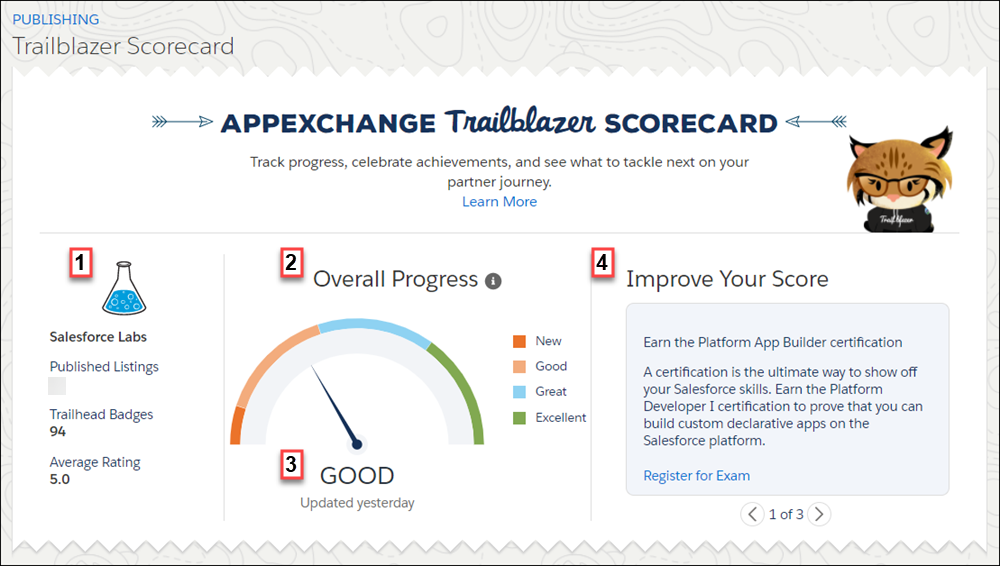
| Element | Shows You |
|---|---|
| Company Details (1) |
Metrics related to the health of your partnership, such as the average rating of your product. |
| Overall Progress (2) |
Your overall progress based on achievements in categories across the partner journey, such as setting up your AppExchange listing. |
| Last Updated Date (3) |
The last time your scorecard was updated. Scorecards are updated daily. |
| Recommendations (4) |
The top three actions that you can take to improve your score, such as offering discounted pricing for nonprofits on your listing. As you accomplish these tasks, new recommendations are added so that you can keep making progress. |
Let’s take a deeper look at a scorecard category.
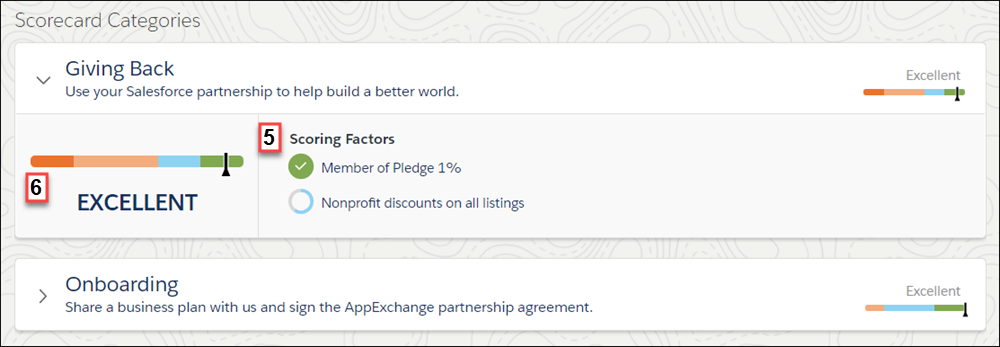
A category contains scoring factors (5) to measure progress within the category (6). Some scoring factors look at one-time milestones along the partner journey. For example, you joined the Pledge 1% program. Others, like total product installs, are evaluated on an ongoing basis. For details about how a scoring factor is measured, hover over the factor.
Progress for scoring factors has four levels: New, Good, Great, and Excellent. For factors that consider one-time milestones, your progress level remains New until you accomplish the milestone. Then your progress level switches to Excellent. For factors that are evaluated on an ongoing basis, there are no fixed rules about moving between levels. For example, we don’t publish a fixed number of product installs for achieving the Good progress level. Rather, the guidance is general: the more, the better.