


Salesforce App Admin Guide
 j
jWorking with Quick Actions
Quick actions enable users to do more in Salesforce and in the Salesforce mobile app.
With custom quick actions, you can make your users’ navigation and workflow as smooth as possible
by giving them convenient access to information that’s most important. For example, you can let
users create or update records and log calls directly in their Chatter feed or from their mobile
device.
Create quick actions, and add them to your Salesforce Classic home page, to the Chatter tab, to Chatter groups, and to record detail pages. Choose from standard quick actions, such as create and update actions, or create custom actions based on your company’s needs.
Salesforce Mobile App Actions in the Action Bar and Action Menu
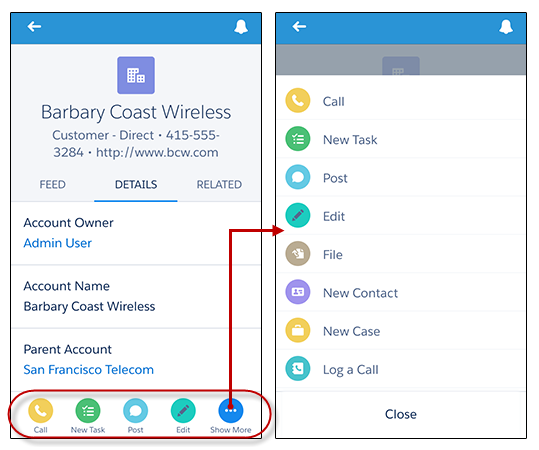
After creating quick actions, you can customize them. Quick actions have their own action layouts, which let you specify which fields are included in the action, and in which order.
Follow these steps when setting up actions for the Salesforce app.
- Create a global or object-specific action.
- Customize the action’s layout, choosing the fields users see when they use it.
- If you created an object-specific action, add it to one or more of that object’s page layouts. If you created a global action, add it to a global publisher layout.
- Set predefined field values for required fields, where possible.
Let’s learn a little more about the types and categories of actions. First we’ll look at global and object-specific actions.