


Lightning Flow for Service Developer Guide
 j
jNewer Version Available
Implementing the Example Use Case
Maria, the admin at Awesome Bank, is ready to set up Lightning Flow for Service for her agents. She wants to configure flows as channel defaults so that agents see the loan application steps on a contact or case page. In addition, she wants to integrate Lightning Flow for Service with Awesome Bank’s Open CTI implementation. That way, agents can quickly create a contact record when there's an unknown caller.
- Create flows in Flow Builder.
- To handle unknown callers, Maria creates a flow called Create Contact that walks agents through creating a contact record.
- To walk agents and portal customers through the steps to apply for a loan, she creates a flow called New Loan.
- To determine a customer’s credit score, she creates a flow called Check Credit Score.
- To let agents process a loan application, she creates a flow called Process Loan.
- To walk agents through the wrap-up steps, she creates a flow called Wrap Up Loan.
- Update the Screen Pop Settings for the softphone layout in Setup (in Lightning
Experience).
To handle unknown callers, Maria updates the No Matching Records setting to pop to the unknown caller flow, Create Contact. This setting ensures that when an agent accepts a call from an unknown caller, the agent is presented with a flow that creates a contact record.
- Create a Guided Action deployment in Setup.
- From Setup, in the Quick Find box, enter Guided Actions, and select Guided Actions.
- Click New Deployment. Name your deployment.
- Define the actions available for users to add when needed. At run time, an agent can click Add and select a flow from this subset.
- Configure channel defaults.
On each channel, select the actions to show as defaults. For example, Maria wants to configure the flows defined in Step 1 as channel defaults. She drags those flows to the preview pane. She assigns attributes to indicate which flows users can remove at run time and which are mandatory, such as the Check Credit Score flow.
- Edit a Lightning record page, and add the Guided Action List component.
To display a list of flows associated with the contact and case records, Maria adds the Guided Action List component to those pages. In the component properties, she selects her deployment.
The Agent Experience
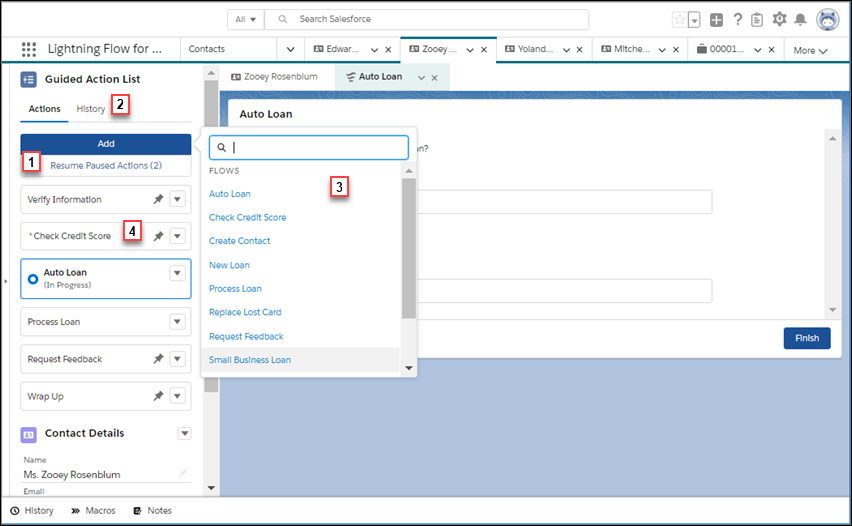
The Guided Action List gives the loan agents at Awesome Bank a clear set of steps to follow when they speak to customers about a loan. When the record page has a paused flow, it’s listed in the Resume Paused Actions area (1). If there’s a handoff between agents, an agent can use the History tab (2) to learn which steps in the loan process have been started or completed. If agents don’t see a step, they can click Add and add a different flow (3) to the list. And agents see an asterisk in the Guided Action List next to mandatory flows (4).
Example Customer Scenarios
Yolanda is a business owner who is hoping to expand and open a new location. She’s looking for a small business loan to jump-start the new venture, so she calls Awesome Bank. Yolanda has never done business with the bank before, so her phone number isn’t recognized. Because Maria configured settings to pop to the Create Contact flow for unknown callers, the agent that takes Yolanda's call sees the flow and completes a new contact record. The agent also sees the other steps to complete for the loan application because Maria configured default actions for the Phone channel. One of the other steps, of course, is the mandatory step to check Yolanda’s credit score.
Erika is buying a new car. She heads to Awesome Bank’s website and starts an application for an auto loan. Midway through, she realizes that she doesn’t have the required vehicle information. She pauses the application. Later that day, Erika finds the information she needs and calls to finish the application. Because the paused flow is associated with Erika’s contact record, when the agent takes the call, the paused flow appears on the Guided Action List on Erika’s contact page. The agent resumes the flow, enters the missing information, and completes the application, picking up right where Erika left off.