A component has two types of IDs: a local ID and a global ID. You can retrieve a component using its local ID in your JavaScript code. A global ID can be useful to differentiate between multiple instances of a component or for debugging purposes.
Local IDs
A local ID is an ID that is only scoped to the component. A local ID is often unique but it’s not required to be unique.
Create a local ID by using the aura:id attribute. For example:
aura:id doesn’t support expressions. You can only assign literal string values to aura:id.
Note
Find the button component by calling cmp.find("button1") in your client-side controller, where cmp is a reference to the component containing the button.
find() returns different types depending on the result.
If the local ID is unique, find() returns the component.
If there are multiple components with the same local ID, find() returns an array of the components.
If there is no matching local ID, find() returns undefined.
To find the local ID for a component in JavaScript, use cmp.getLocalId().
Global IDs
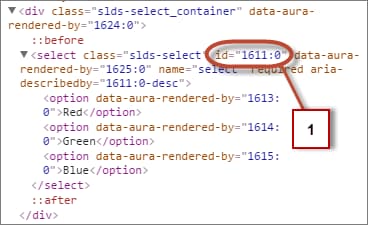
Every component has a unique globalId, which is the generated runtime-unique ID of the component instance. A global ID (1) is not guaranteed to be the same beyond the lifetime of a component, so it should never be relied on. A global ID can be useful to differentiate between multiple instances of a component or for debugging purposes.
To create a unique ID for an HTML element, you can use the globalId as a prefix or suffix for your element. For example:
1<div id="{!globalId + '_footer'}"></div>
In your browser’s developer console, retrieve the element using document.getElementById("<globalId>_footer"), where <globalId> is the generated runtime-unique ID.
To retrieve a component’s global ID in JavaScript, use the getGlobalId() function.


 j
j