Field Service Lightning Developer Guide
 j
jNewer Version Available
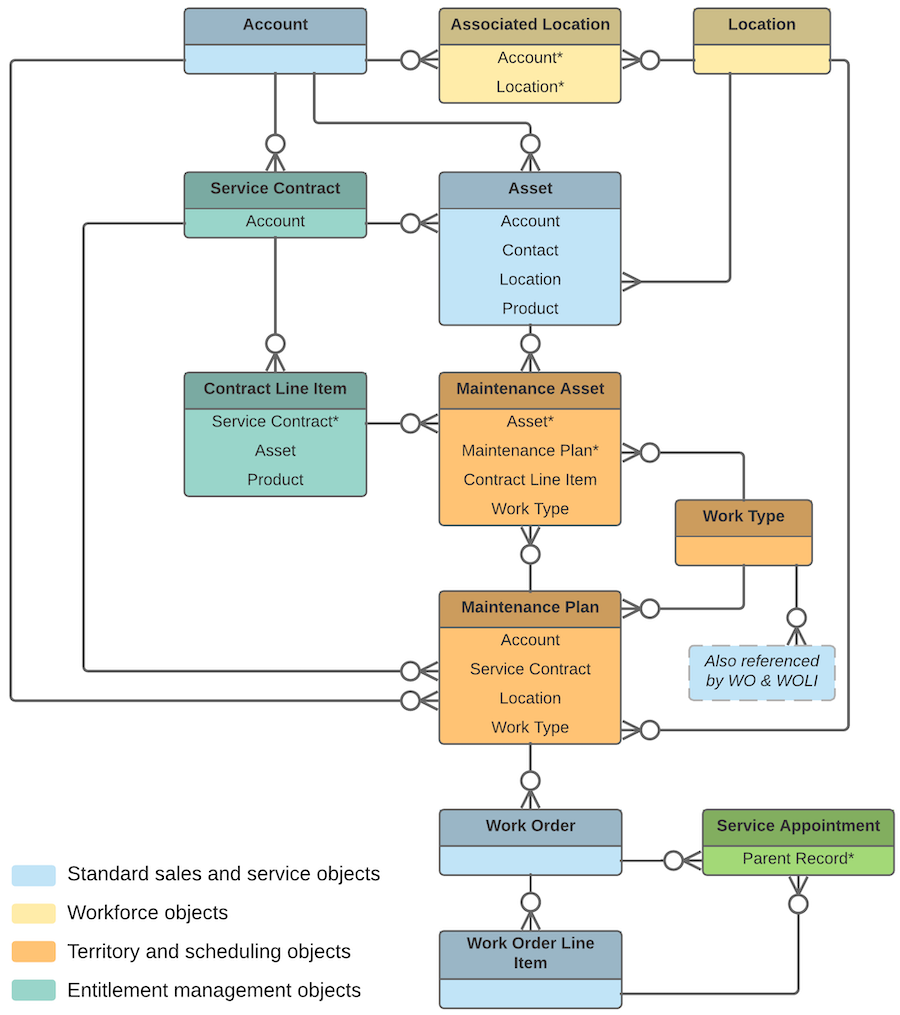
Field Service Lightning Preventive Maintenance Data Model
A maintenance plan can be linked to an account and contact—representing the customer—and to a service contract, if the customer has one.
A maintenance plan can cover multiple assets. For example, you can create a maintenance plan to track the monthly maintenance of 20 laser printers installed in a customer’s office building. The assets covered by a maintenance plan are represented as child records of the maintenance plan called maintenance assets. You can also link a maintenance plan to a location to indicate where the assets are installed. For example, link a plan to a location of the Site type that represents the office building where the printers are installed.
After you create a maintenance plan, it’s time to generate work orders for the planned maintenance visits. Maintenance plans come with a Generate Work Orders quick action, which can also be called with Apex code. Your maintenance plan settings determine how many work orders and work order line items are generated at once and what their settings are. You can opt to generate one work order per maintenance asset for each visit, or to generate one parent work order for each visit with one work order line item per maintenance asset.
- If you specify a work type on a maintenance plan, all of the plan’s work orders use that work type.
- If you specify a work type on a maintenance asset, generated work orders that are associated with the maintenance asset use the maintenance asset’s work type rather than the maintenance plan’s work type.