Newer Version Available

This content describes an older version of this product. View Latest

Let Users Resume Paused Flows from the Actions & Recommendations Component

When you configure Process Automation Settings, you can allow users to pause flows. Show agents paused flows associated with the current record page in the Actions & Recommendations component. When there’s a handoff or a customer calls back, the agent can easily find and resume the paused flow. The component shows all paused flows associated with the current record, including flows not started from the list.

For example, Erika is a customer at the fictitious Awesome Bank. Erika is completing an online auto loan application that uses a flow. She pauses the flow because she’s missing some required information. She calls the bank later to complete the application. Because the current record variable in the flow is set to Erika’s contact record, when her contact page opens, the agent sees the paused flow in the Actions & Recommendations component. To resume the flow, the agent clicks Resume Paused Actions and selects the flow.Click Resume Paused Actions to see paused flows.
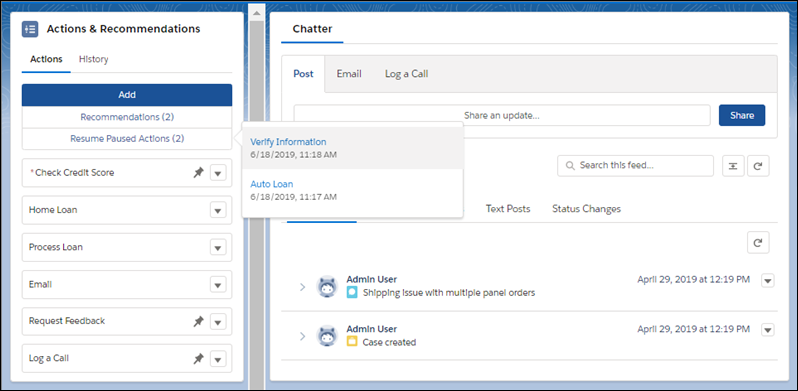
When an agent resumes a flow, it opens, and the list updates to include it. If the flow was started from a pinned region of the list, it’s added at the end of that region. Otherwise, it’s added to the bottom of the unpinned region.

A flow can use the variable Flow.CurrentRecord to track the current record associated with the flow. Sometimes API or flow logic updates this variable. For example, if a flow is associated with a lead record and the lead is converted to a contact, the record association is updated. When a user pauses a flow, the component checks the currently associated record. If the record context changed, the paused flow doesn’t appear on the record page’s list. Instead, to resume the flow, a message directs the user to the new record that is associated with the flow.

Note