


Lightning Flow for Service Developer Guide
 j
jNewer Version Available
Let Users View and Resume Paused Flows from the Guided Action List
For example, Erika is a customer at the fictitious Awesome Bank. Erika is completing an
online auto loan application that uses a flow. She pauses the flow because she’s missing some
required information. She calls the bank later to complete the application. Because the
current record variable in the flow is set to Erika’s contact record, when her contact page
opens, the agent sees the paused flow in the Guided Action List. To resume the flow, the agent
clicks Resume Paused Actions and selects the flow.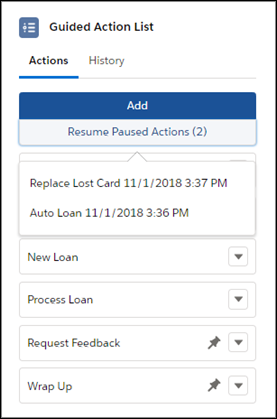
When an agent resumes a flow, it's added as a step. If the flow was started from a pinned region of the list, it’s added at the end of that region. Otherwise, it’s added to the bottom of the unpinned region.