


Metadata API Developer Guide
 j
jNewer Version Available
ExperienceBundle
File Suffix and Directory Location
ExperienceBundle components have the suffix .json and are stored in the experiences folder when retrieved. Each Experience Builder site in your org has its own folder. Each of these folders contains other folders for the supported properties.
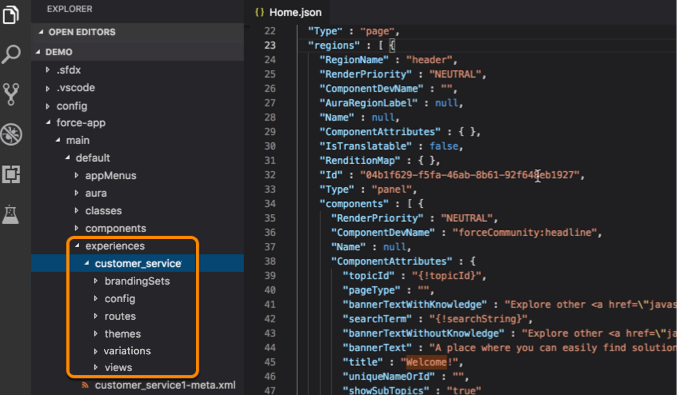
The ExperienceBundle can contain one or more site definitions under the experiences folder. Each site definition has resource folders for brandingSets, config, routes, themes, variations, and views, each with additional, related configuration information in JSON files. Here’s an example site definition, showing the resource folders.
Version
ExperienceBundle components are available in API version 46.0 and later.
Special Access Rules
To use the ExperienceBundle metadata type for Aura-based Experience Builder sites, from Setup, enter Digital Experiences in the Quick Find box, and then select Settings. Select Enable ExperienceBundle Metadata API, and save your changes. LWR sites use ExperienceBundle by default.
Fields
| Field Name | Field Type | Description |
|---|---|---|
| experienceResources | ExperienceResources[] | The list of resources in this ExperienceBundle. Each resource represents an artifact of a site such as brandingSets, config, routes, themes, variations, and views. |
| label | string | Required. Represents the name of the ExperienceBundle. |
| type | SiteType (enumeration of type string) | Required. Identifies the kind of site. Only Experience Builder sites are supported, using the value ChatterNetworkPicasso. |
ExperienceResources
Represents a list of sites in the bundle.
| Field Name | Field Type | Description |
|---|---|---|
| experienceResource | ExperienceResource[] | The list of resources in this ExperienceBundle. Each resource represents a property for the site, such as brandingSets, config, routes, themes, and views. |
ExperienceResource
Represents specific site information included in the ExperienceBundle.
Each type has a folder in the structure. Each folder contains one or more files providing information about that type and the site. Each corresponds to a specific folder and file in the ExperienceBundle.
| Field Name | Field Type | Description |
|---|---|---|
| fileName | string | Required. Name of resource file. |
| format | string | Required. Only JSON is allowed. |
| source | base64 | The JSON content of each file. |
| type | string | Required. The type of the resource. Valid values are:
|
Folders and Bundled Definitions
Each ExperienceBundle includes folders and associated data that is contained in JSON files.
brandingSets Folder
This folder contains one JSON file per branding set, named brandingSets_name.json. Each file has the same structure and properties.
<brandingSets_name>.json
| Property | Type | Description |
|---|---|---|
| brandingSetType | string | Required in LWR sites. Not applicable for Aura sites.. Represents whether the
color palette stored in the branding set is for the entire site or a specific
section. You can’t change one branding set type to another. Available in API Version
52.0 and later. Valid values are:
|
| definitionName | string | Required. Represents the name for the branding set that is used in grouping
branding sets under a theme. Defined as
theme:branding-theme. For example, if the site theme is Stella, the definitionName would be stella:branding-stella. In addition,
there are several standard templates that have unique naming:
|
| id | UUID | Represents the component's GUID. |
| label | string | Represents the name of the branding set. |
| type | string | Represents the component type. The only supported value is brandingSet. |
| values | map | Required. Represents a map of branding values that can be applied to a site. |
1{
2  "values" : {
3    "HeaderBackgroundColor" : "#FFFFFF",
4    "TextTransformStyle" : "none",
5    "BorderColor" : "#D4D4D4",
6    "DetailTextColor" : "#5A5A5A",
7    "HeaderFonts" : "Ek Mukta",
8    "CardBackgroundColor" : "rgba(255, 255, 255, 0)",
9    "LoginBackgroundColor" : "#F4F4F4",
10    "_ActionColorTrans" : "rgba(25, 124, 190, 0.9)",
11    "LoginBackgroundImage" : "../../../../sfsites/picasso/core/external/salesforceIdentity/images/background.jpg?v=1",
12    "PageBackgroundColor" : "#F5F7FA",
13    "_HeaderTextColor" : "rgba(34,34,34,.8)",
14    "_NavigationMenuHoverColor" : "rgba(255,255,255,.2)",
15    "_HeaderInputBackgroundColor" : "rgba(255,255,255,.4)",
16    "TextColor" : "#222222",
17    "NavigationMenuTextColor" : "#222222",
18    "_HeaderPlaceholderTextColor" : "rgba(85,85,85,.8)",
19    "_OverlayTextColorShadow" : "#000000",
20    "ActionColor" : "#0099DE",
21    "CompanyLogo" : "",
22    "_LinkColorDarker" : "#135F90",
23    "_ActionColorDarker" : "#135F90",
24    "_HoverColor" : "rgba(25, 124, 190, 0.05)",
25    "ErrorFontColor" : "#ff9e9e",
26    "OverlayTextColor" : "#FFFFFF",
27    "PrimaryFont" : "Ek Mukta",
28    "LinkColor" : "#3558D6"
29    },
30  "definitionName" : "cpt:branding-cpt",
31  "label" : "Customer Account Portal",
32  "id" : "283407c3-5938-4a6b-b97f-621cda6968c8",
33  "type" : "brandingSet"
34 }
config Folder
- sitename.json
- languages.json
- page_name.json
sitename.json File Properties
| Property | Type | Description |
|---|---|---|
| authenticationType | string | For LWR sites, indicates whether guest users have access to the site.
Unlike Aura sites, when you create an LWR site, you can select the site’s authentication type—Authenticated or Unauthenticated—in the site creation wizard. Valid values are:
Available in API version 51.0 and later. |
| forgotPasswordRouteId | UUID | Represents the ID of the route to use when a user forgets their password. |
| isAvailableToGuests | boolean | For Aura sites, indicates whether public users have access to the site (true) or not (false). The default value is false. |
| isFilteredComponentsView | boolean | Indicates whether the list of components is filtered based on the current page type (true) or not (false). Some components require specific parameters from the page and don't work unless you manually configure them. The default value is false. |
| isProgressiveRenderingEnabled | boolean | Indicates whether the display order of page components is prioritized (true) or not (false). The default value is false. |
| loginAppPageId | UUID | Represents the ID of the login page. |
| mainAppPageId | UUID | Required. Represents the ID of the main page. |
| preferredDomain | string | Represents the name of the domain to use for indexing a site’s pages. Improves
search engine results. Available in API version 48.0 and later. |
| preferredDomainId | string | Represents the domain to use for indexing a site’s pages. Improves search
engine results. Removed in API version 48.0. Use preferredDomain instead. |
| selfRegistrationRouteId | UUID | Represents the ID of the login route to use for self-registration. |
| type | string | Represents the component type. The only supported value is site. |
trustedSitesForScript container
When implemented, there is one trustedSitesForScript container in sitename.json.
| Property | Type | Description |
|---|---|---|
| id | UUID | Represents the component's GUID. |
| isActive | boolean | Indicates if allowlisted item is active (true) and should be respected or inactive (false) and should not be treated as an allowlisted source. Default is false. |
| trustedSiteName | string | Name of the allowlisted source as it appears in the UI. |
| trustedSiteUrl | string | The fully qualified URL of the allowlisted source. |
| type | string | Represents the component type. The only supported value is trustedSitesForScripts. |
1{
2   "isAvailableToGuests" : false,
3   "isFilteredComponentsView" : false,
4   "mainAppPageId" : "df9907cb-6e68-4ca1-8bb2-51173ca5374e",
5   "loginAppPageId" : "58e9939a-84b2-498d-bbc5-7a89d89087fa",
6   "selfRegistrationRouteId" : "ad5c8bf1-297f-4ad3-b47c-0e35d85f10ef",
7   "forgotPasswordRouteId" : "e3139f6f-44d8-4eec-be9d-3609ce063039",
8   "isProgressiveRenderingEnabled" : false,
9   "preferredDomain" : "none",
10   "selfRegistrationRouteId" : "b8fe8ab1-f266-41e1-a63b-4791165f3c1d",
11   "trustedSitesForScript" : [ {
12     "id" : "92c489e2-0b7b-4a48-9c88-bef7e8fe6f1b",
13     "isActive" : true,
14     "trustedSiteName" : "test",
15     "trustedSiteUrl" : "https://123.com",
16     "type" : "trustedSitesForScripts"
17   }, {
18     "id" : "92c489e2-0b7b-4a48-9c88-bef7e8fe6f1c",
19     "isActive" : true,
20     "trustedSiteName" : "test1",
21     "trustedSiteUrl" : "https://1234.com",
22     "type" : "trustedSitesForScripts"
23  } ],
24    "type" : "site"
25}
languages.json File Properties
| Property | Type | Description |
|---|---|---|
| defaultCode | string | Required. Represents the base language code plus the country code where used. |
| defaultLabel | string | Required. Defines the display label for the language. |
| id | UUID | Represents the component's GUID. |
| type | string | Represents the component type. The only supported value is languageContainer. |
There is one section per supported language as a container in languages.json
| Property | Type | Description |
|---|---|---|
| countryCode | string | Represents the country code of the selected language. This string can be empty.
It applies only when the selected language has variations depending on the country,
like Arabic (Algeria) and Arabic (Bahrain). In this case, use countryCode to distinguish between them. For example:{ languageCode" : "ar", "CountryCode" : "DZ", "Label" : "Arabic (Algeria) (DZ)",}, { "Code" : "ar", "CountryCode" : "BH", "Label" : "Arabic (Bahrain) (BH)",} |
| fallbackLanguageId | UUID | Represents the language to use when no content is available for the selected language. For example, imagine that a site visitor chooses Japanese from the language selector, but there is no content for that page in Japanese. Content is displayed in the fallback language. |
| id | UUID | Represents the component's GUID. |
| isActive | boolean | Indicates whether a language is available to site visitors in the language selector (true) or not (false). The default value is true. |
| label | string | Defines the display label for a language. The display label appears in any language selector components that you add to your site and in the language selector in Experience Builder. |
| languageCode | string | Represents the language code for the selected language. |
| type | string | Represents the component type. The only supported value is language. |
1{
2    "defaultCode" : "en_US",
3    "defaultLabel" : "English (US)",
4    "id" : "04597c83-0b9d-4f16-9f4d-4ec28bd553b4",
5    "type" : "languageContainer",
6    "languages" : [ {
7        "languageCode" : "af",
8        "countryCode" : "",
9        "isActive" : true,
10        "label" : "Afrikaans",
11        "fallbackLanguageId" : "c6e7fe67-55e0-47b3-ad58-bf49539249f0",
12        "id" : "22036d6f-11ce-4f7b-b7f0-f2c409f817ea",
13        "type" : "language"
14        }
15     ]
16 }page_name.json File Properties
| Property | Type | Description |
|---|---|---|
| cmsSettings | map | Settings for the CMS Connect header and footer. Valid values are:
|
| currentThemeId | UUID | Required. Represents the UUID of the site's current theme. This field is available for mainAppPage.json and loginAppPage.json (where applicable). |
| headMarkup | string | Required. Allows the addition of custom markup to the site's main page <head> tag. Similar to using See Salesforce Help for markup guidance. |
| id | UUID | Required. Represents the component's GUID. |
| isRelaxedCSPLevel | boolean | Controls the ability to run scripts and script access to third-party hosts. The default is false. This field is available for mainAppPage.json and loginAppPage.json (where applicable). |
| label | string | Required. Represents the name of the page. |
| templateName | string | Required. The unique developer name of the template. Allowed values are:
|
| type | string | Required. Represents the component type. The only supported value is appPage. |
1{
2    "headMarkup" : null,
3    "isRelaxedCSPLevel" : false,
4    "templateName" : "Starter Template",
5    "cmsSettings" : { },
6    "currentThemeId" : "ff52089c-6ad9-4dd9-b5b5-251d4a117ce3",
7    "label" : "main",
8    "id" : "df9907cb-6e68-4ca1-8bb2-51173ca5374e",
9    "type" : "appPage"
10}
routes Folder
The routes folder contains one JSON file per page, named <page_name>.json.
<page_name>.json
| Property | Type | Description |
|---|---|---|
| activeViewId | UUID | Required. Represents the default view of the route. Used when there are no
defined audiences or the user doesn’t match any audience. Available in API version 48.0 and later. |
| appPageId | UUID | Required. Represents the Single Page Application (SPA) page for the route. It points to either main.json or login.json. |
| configurationTags | string[] | Required. Represents the configuration tags for the route. The only supported value is allow-in-static-site. Available in API Version 51.0 and later. |
| id | UUID | Required. Represents the component GUID. Inherited from the component. |
| label | string | Required. Represents the name of the route. Inherited from the component. |
| objectApiName | string | Required. The name of the custom object API. (Not available for standard objects.) |
| pageAccess | string | Required. Identifies the status of a route as public or private. When set to the default value UseParent, the status of the site determines the status of the route. Not editable from the user interface for routes that are always private. Valid values are UseParent, Public, and RequiresLogin. |
| routeType | string | Required. Identifies the type of route. Value is unique among all routes that share the same SPA page. The value in viewType must match. |
| type | string | Required. Represents the component type. The only supported value is route. |
| urlPrefix | string | Required. Represents the base URL for the route. |
1{
2    "urlPrefix" : "",
3    "appPageId" : "b5fe94e2-071f-47b2-b76d-427a624cb407",
4    “configurationTags” : “allow-in-static-site”
5    "routeType" : "home",
6    "pageAccess" : "UseParent",
7    "label" : "Home",
8    "id" : "c7263124-7bc4-4147-a39a-25fe7e305b98",
9    "type" : "route"
10}
themes Folder
The themes folder contains one JSON file per theme named theme_name.json.
theme_name.json
| Property | Type | Description |
|---|---|---|
| activeBrandingSetId | UUID | The id of the branding set currently in use. The branding set's definitionName must match the theme's brandingSetReference. |
| customCSS | string | Custom CSS for pages created in the Experience Builder template. |
| developerName | string | Required. The unique developer name of the theme. Most themes derive their
names directly, for example Jepson uses jespon for its developerName. Standard templates
have unique values:
|
| id | UUID | Required. Represents the component's GUID. |
| label | string | Represents the name of the theme. |
| layouts | map | Required. Maps ThemeLayoutType to UUID, and contains the definition of the ThemeLayout. Login and Inner theme layouts are always required. |
| type | string | Required. Represents the component type. The only supported value is theme. |
1{
2    "developerName" : "cpt",
3    "layouts" : {
4        "Login" : "12162c3e-06ac-43a9-adc7-db36ae5140b0",
5        "Inner" : "c09d58be-0622-4fc4-806a-ed34174929f9"
6    },
7    "customCSS" : "",
8    "activeBrandingSetId" : "283407c3-5938-4a6b-b97f-621cda6968c8",
9    "label" : "Customer Account Portal",
10    "id" : "ff52089c-6ad9-4dd9-b5b5-251d4a117ce3",
11    "type" : "theme",
12    "views" : [ {
13        "componentName" : "salesforceIdentity:loginBody2",
14        "label" : "Login",
15        "id" : "12162c3e-06ac-43a9-adc7-db36ae5140b0",
16        "type" : "view",
17        "regions" : [ {
18            "regionName" : "header",
19            "id" : "f8354922-11f2-495d-9d89-0a51943af2b0",
20            "type" : "region",
21            "components" : [ ]
22        } ]
23    } ]
24}variations Folder
Four distinct types of variations are supported: branding sets, page variations, component visibility, and component attributes. The different variations are indicated through the componentVariant container.
For example, you might want the site to show a page variation for the home page when a user meets certain audience criteria. To achieve this, create an audience and then target that audience to your experience variation using targetId in the componentVariant container of the experience variation definition file.
experienceVariation_name.json
| Property | Type | Description |
|---|---|---|
| componentVariants | list | Required. A list of component variants that belong to this experience variation. |
| developerName | string | Required. The unique developer name of the experience variation. This name is used in the targetValue field of a Personalization API target and can’t be updated after it’s set. |
| id | UUID | Required. Represents the GUID of the component. |
| type | string | Required. Represents the type of the component. The only supported value is experienceVariation. |
When implemented, there is one container in each experienceVariation_name.json file describing the variation.
| Property | Type | Description |
|---|---|---|
| id | UUID | Required. Represents the GUID of the component. |
| propertyOverrides | map | Required. Defines the property overrides for the given theme, route, or
component targetId. For example, if the targetId is pointing to a theme, you can override the defaultBrandingSet property of the theme to use a different branding set for this experience variation. Supported property overrides:
|
| targetId | UUID | Required. The UUID of the item whose properties you are overriding. Must be the ID of a theme, route, or component. |
| type | string | Required. Represents the type of the component. The only supported value is experienceVariation. |
Example of an experience variation for a branding set
1{
2   "id": "64e93604-78fa-11e9-8f9e-2a86e4085a59",
3   "developerName": "BrandingVariation",
4   "type": "experienceVariation",
5   "componentVariants": [{
6      "id": "4bf0af78-8d73-11e9-bc42-526af7764f64",
7      "type": "componentVariant",
8      // Theme UUID
9      "targetId": "c810858e-78fa-11e9-8f9e-2a86e4085a59",
10      "propertyOverrides": {
11         // Brandingset UUID
12         "activeBrandingSetId": "be9f4760-78fa-11e9-8f9e-2a86e4085a59"
13      }
14   }]
15}
Example of an experience variation for a page variation
1{
2   "id": "64e93604-78fa-11e9-8f9e-2a86e4085a59",
3   "developerName": "PageVariation",
4   "type": "experienceVariation",
5   "componentVariants": [{
6      "id": "4bf0af78-8d73-11e9-bc42-526af7764f64",
7      "type": "componentVariant",
8      // Route UUID
9      "targetId": "c810858e-78fa-11e9-8f9e-2a86e4085a59",
10      "propertyOverrides": {
11         // View UUID
12         "activeViewId": "be9f4760-78fa-11e9-8f9e-2a86e4085a59"
13      }
14   }]
15}
Example of an experience variation for component visibility
1{
2   "id": "64e93604-78fa-11e9-8f9e-2a86e4085a59",
3   "developerName": "ComponentVisibilityVariation",
4   "type": "experienceVariation",
5   "componentVariants": [{
6      "id": "4bf0af78-8d73-11e9-bc42-526af7764f64",
7      "type": "componentVariant",
8      // Component UUID
9      "targetId": "c810858e-78fa-11e9-8f9e-2a86e4085a59",
10      "propertyOverrides": {
11         "isVisible": true
12      }
13   }]
14}1{
2 "id" : "6ce1260f-cb01-45a0-8947-f2d85602a3db"
3 "developerName": "Home_CMS_Collection_Component_Properties",
4 "type": "experienceVariation",
5 "componentVariants": [{
6 "id" : "3gh1260f-cb01-45a0-8947-f2d92037a4db"
7 "type": "componentVariant",
8 "targetId": "d77369e6-7230-43e7-9b59-6e91c47b3273",
9 "propertyOverrides": {
10 "componentAttributes": {
11 "config/dataProviderDefinition/attributes/dataProviderInfo/apiName":"SilverCollection"
12 }
13 },
14 }],
15}1{
2 "id" : "8cf943b8-525d-4c13-a719-6ebc7d61a81e",
3 "developerName" : "Default_Navigation_Menu_Component_Properties",
4 "type" : "experienceVariation",
5 "componentVariants" : [{
6 "id" : "5be1260f-cb01-45a0-8947-f2d85602a4db",
7 "type" : "componentVariant",
8 "targetId" : "fdf9eb51-ddc5-4e79-9ea8-5b94f5ca8db4",
9 "propertyOverrides" : {
10 "componentAttributes" : {
11 "NavigationMenuEditorRefresh" : "NavMenu1"
12 }
13 },
14 }],
15}views Folder
The views folder contains several JSON files that each define a view. Each Experience Builder site is built from single-page applications, which are web apps that load a single HTML page. Single-page applications consist of multiple views that update the page dynamically as the user interacts with it.
view_name.json
| Property | Type | Description |
|---|---|---|
| appPageId | UUID | Required. Single Page Application (SPA) page ID of the view. It points to either main.json or login.json. |
| componentName | string | Required. The FQN of the layout component. The component must implement forceCommunity:layout or, for theme layouts, forceCommunity:themeLayout |
| id | UUID | Required. Represents the GUID of the component. |
| label | string | Required. The name that appears in . |
| themeLayoutType | string | Theme layout type of the view (exposed only for views). |
| type | string | Required. Represents the type of the component. The only supported value is view. |
| viewType | string | Required. Matches routeType for the route. |
There are one or more regions as a container in each <view_name>.json
| Property | Type | Description |
|---|---|---|
| id | UUID | Required. Represents the component GUID. |
| regionLabel | string | Specifies region labels for tabs. |
| regionName | string | Required. Matches the design attribute in the design file of the layout component. |
| type | string | Required. Represents the component type. The only supported value is region. |
There are one or more components as a container in the region section of each <view_name>.json
| Property | Type | Description |
|---|---|---|
| componentAttributes | HashMap | Required. The design attribute values of the component. |
| componentName | string | Required. The FQN of the component. Only components that can be used in the component panel in Experience Builder can be used in this field. |
| id | UUID | Required. Represents the component GUID. |
| renderPriority | enums.priority | Sets priority value for progressive rendering of the component. Possible Values: HIGHEST, HIGH, NEUTRAL |
| renditionMap | HashMap | Map of different rendition keys to UUIDs of RenditionComponents. |
| scopedBrandingSetID | UUID | Required for LWR sites. Not applicable for Aura sites. Represents the ID of a branding set for a specific community_layout:section component. Available in API Version 52.0 and later. |
| type | string | Required. Represents the component type. The only supported value is component. |
Each component can have a rendition container in each <view_name>.json
| Property | Type | Description |
|---|---|---|
| id | UUID | Required. Represents the component GUID. |
| renditionValue | map | Map of different variations of a component, such as different languages of text. |
| type | string | Required. Represents the component type. The only supported value is renditionComponent. |
1{
2    "themeLayoutType" : "Inner",
3    "viewType" : "account-management",
4    "appPageId" : "df9907cb-6e68-4ca1-8bb2-51173ca5374e",
5    "componentName" : "siteforce:sldsOneColLayout",
6    "label" : "Account Management",
7    "id" : "9ca8fa47-8e87-4915-a6f7-c2d8d37f3076",
8    "type" : "view",
9    "regions" : [ {
10         "regionName" : "content",
11         "id" : "969ada98-7d72-4e45-8a10-7db51fae247c",
12         "type" : "region",
13         "components" : [ {
14            "componentName" : "forceCommunity:tabset",
15            "componentAttributes" : {
16                "tabsetConfig" : "{\"UUID\":\"4711850e-ffdc-4375-a45e-f716bcdbbb1c\",\"activeTab\":\"tab1\",
17                \"useOverflowMenu\":false,\"tabs\":[{\"UUID\":\"bc8fb51f-4783-43d4-9376-60c07677a367\",\"tabName\":\"Members\",
18                \"tabKey\":\"tab1\",\"locked\":false,\"allowGuestUser\":false,\"seedComponents\":[{\"fqn\":\"forceCommunity:relatedList\",
19                \"attributes\":{\"parentRecordId\":\"{!CurrentUser.accountId}\",\"relatedListName\":\"Users\",\"customTitle\":\"Members\",
20                \"showCustomTitle\":\"true\",\"showBreadCrumbs\":\"false\",\"showRowNumbers\":\"false\",\"showManualRefreshButton\":\"false\"}}]},
21                {\"UUID\":\"f2793a99-b757-4be4-846f-dc98a13a8139\",\"tabName\":\"Branding\",\"tabKey\":\"tab2\",\"locked\":false,
22                \"allowGuestUser\":false,\"seedComponents\":[{\"fqn\":\"forceCommunity:accountBrandRecord\",
23                \"attributes\":{\"recordId\":\"{!CurrentUser.accountId}\"}}]}]}",
24                "regions" : ""
25            },
26            "renderPriority" : "NEUTRAL",
27            "renditionMap" : { },
28            "id" : "4711850e-ffdc-4375-a45e-f716bcdbbb1c",
29            "type" : "component",
30            "renditions" : [ {
31               "renditionValue" : {
32                  "LumenInstanceAttributes" : {
33                  "richTextValue" : "<p>new text</p>"
34                  }
35               },
36              "id" : "9d8878df-f520-4010-861c-57b930a3daab",
37              "type" : "renditionComponent"
38            } ]
39        } ]
40    } ]
41}
Declarative Metadata Sample Definition
Here’s an example of an ExperienceBundle declaration. For individual folder and file examples for the bundled code, see brandingSets, config, routes, themes, variations, and views.
1<xsd:complexType name="ExperienceBundle">
2    <xsd:complexContent>
3        <xsd:extension base="tns:Metadata">
4            <xsd:sequence>
5                <xsd:element name="experienceResources" minOccurs="0" type="tns:ExperienceResources"/>
6                <xsd:element name="label" type="xsd:string"/>
7                <xsd:element name="type" type="tns:SiteType"/>
8            </xsd:sequence>
9        </xsd:extension>
10    </xsd:complexContent>
11</xsd:complexType>
12    <xsd:complexType name="ExperienceResources">
13        <xsd:sequence>
14            <xsd:element name="experienceResource" minOccurs="0" maxOccurs="unbounded" type="tns:ExperienceResource"/>
15        </xsd:sequence>
16    </xsd:complexType>
17<xsd:complexType name="ExperienceResource">
18    <xsd:sequence>
19        <xsd:element name="fileName" type="xsd:string"/>
20        <xsd:element name="format" type="xsd:string"/>
21        <xsd:element name="source" minOccurs="0" type="xsd:base64Binary"/>
22        <xsd:element name="type" type="xsd:string"/>
23    </xsd:sequence>
24</xsd:complexType>
Usage
When you add a component to ExperienceBundle, you can enter any value for the id, because the system automatically generates a UUID for the component when deployed.
When deploying an Experience Builder site with ExperienceBundle, ensure that the SiteDotCom type isn’t included in the manifest file.
- Set the API version in the package.xml manifest file to 48.0 and deploy the package.
- Then, set the API version in package.xml to 49.0.
- Retrieve the package to get the latest ExperienceBundle updates.
Wildcard Support in the Manifest File
This metadata type supports the wildcard character * (asterisk) in the package.xml manifest file. For information about using the manifest file, see Deploying and Retrieving Metadata with the Zip File.