


Scoping Rules (Beta) Developer Guide
 j
jNewer Version Available
Scoping Rules (Beta)
| Available in: Lightning Experience in Performance and Unlimited Editions |
For information on enabling the scoping rules beta, visit the Scoping Rules group in the Trailblazer Community. You can also provide feedback and suggestions for scoping rules in this group.
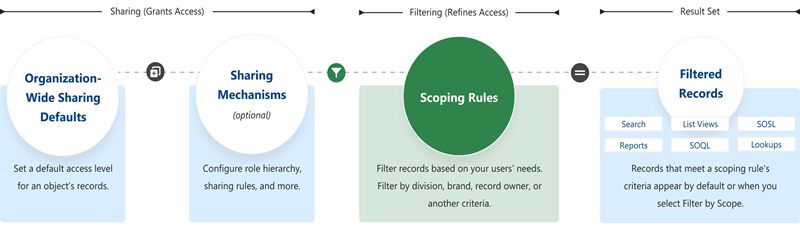
When Do I Use Scoping Rules?
Use scoping rules when you want to control the records that your users see by default. A scoping rule doesn’t restrict users’ access to other records they sometimes need.
For example, you have users who support multiple agencies in your org. Each user is assigned to a specific agency each day. You can set up scoping rules so that each morning your users see only the records associated with their specified agency in search results, list views, related lists, and reports. Users don’t need to spend time looking for the correct records, but they still have access to the other agencies’ records if they need them.
Or you have teams of advisors and their support staff spread over multiple offices. Clients can interact with multiple advisors, too, depending on their needs. To support this workflow, you could create scoping rules to allow the support staff to focus on clients of a single advisor, a team of advisors, or an entire office.
How Do Scoping Rules Affect User Access?
Scoping rules are flexible. You can enable and disable them on a query-by-query basis. Plus, they don’t restrict the access that your users have to records. Your users can still open and report on all the records that they can access according to your org’s sharing settings.
Where Are Scoping Rules Applied?
This table shows how scoping rules work with other Salesforce features.
| Feature | Description |
|---|---|
| List Views | Applied in Lightning Experience if Filter by scope is selected |
| Lookups | Applied in Lightning Experience |
| Reports | Applied in Lightning Experience if Filter by scope is selected |
| Search | Applied in Lightning Experience |
| SOQL | Applied, unless a scope is specified |
| SOSL | Applied, except for "USING ListView=" clause |