


Scoping Rules Developer Guide
 j
jNewer Version Available
Scoping Rules
| Available in: Lightning Experience in Performance,Unlimited, and Developer editions. |
. You can provide feedback and suggestions for scoping rules in Scoping Rules group in the Trailblazer Community.
When Do I Use Scoping Rules?
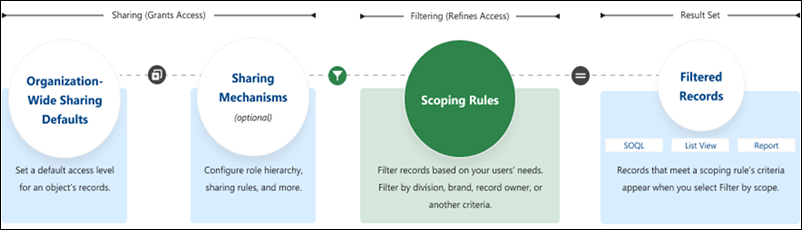
Use scoping rules when you want to let users control the record set that they see. A scoping rule doesn’t restrict users’ access to other records that they sometimes need. Instead, scoping rules let your users focus on one set of records, then change their focus or search to find a record that’s not in the scoped record set when they need to.
For example, you have users who support multiple agencies in your org. Each user is assigned to a specific agency. You can set up scoping rules so that they filter the records that your users see in list views and reports. Users don’t have to spend time looking for the correct records, but they still have access to the other agencies’ records if they need them.
You can also use scoping rules with Flow Builder to set scope according to a choice your user makes. For example, you have users who work on account records that belong to different divisions in your organization. You want to scope the account records that users see by division, giving your users an easy way to switch between different divisions’ record sets. You can set up a flow that your users access using the Lightning Utility Bar to set the scope of records that the user sees in list views, reports, and other features.
How Do Scoping Rules Affect User Access?
Scoping rules are flexible. You can enable and disable them on a query-by-query basis. Plus, they don’t restrict the access that your users have to records. Your users can still open and report on all the records that they can access according to your org’s sharing settings.
Where Are Scoping Rules Applied?
This table shows how scoping rules work with other Salesforce features.
| Feature | Description |
|---|---|
| List Views | Applied in Lightning Experience if Filter by scope is selected |
| Reports | Applied in Lightning Experience if Filter by scope is selected |
| SOQL | Applied, unless a scope other than scopingrule is specified |
How Do I Configure Scoping Rules?
When creating more than one scoping or restriction rule, configure the rules so that only one active rule applies to a given user. Salesforce doesn’t validate that only one active rule applies for a given user. If you create two active rules, and both rules apply to a given user, only one of the active rules is observed.
After creating rules, you can use a change set or unlocked package to move scoping rules from one org to another.