


Service Cloud Voice Implementation Guide
 j
jNewer Version Available
Contact Flow: Inbound Flow with Transcription
Since this contact flow is large, we break it into sections.
Create a VoiceCall Record (1 of 3)
This first section sets up the call and creates a VoiceCall record.

| Block | Description |
|---|---|
| Set contact attributes [1] | This block sets the unique ID of the queue to the BasicQueueId attribute, which is used in the “Set working queue” contact block in the next section. |
| Set logging behavior [2] | This block turns on logging in Amazon Connect for this flow. We recommend logging for debugging and evaluating the contact flow. |
| Play prompt [3] | This block plays an audio message to the customer. The message lets the customer know that the call has been picked up by the telephony system. Without this message, the customer may experience several seconds of silence without knowing that the call got picked up. |
| Loop [4] | This block sets up a loop so that we can try to invoke the Lambda function up to two times. We try twice in case that the Lambda isn’t warmed up and it times out. (See Keep the InvokeTelephonyIntegrationApiFunction Lambda Function Warm to prevent this scenario from ever occurring.) |
| Set contact attributes [5] | This block executes only if the Lambda invocation fails multiple times and the loop completes. This block adds an error attribute in the Amazon contact trace record (CTR) to help you see which calls experienced an error. Some errors are recoverable and don’t prevent the call from being handled. |
| Invoke AWS Lambda function [6] |
This block calls the provided InvokeTelephonyIntegrationApiFunction Lambda Function, which is used to create a VoiceCall record (createVoiceCall) in Salesforce. The VoiceCall record represents the calls and is essential to how Voice works. If this block is modified or removed, VoiceCall records are created through “service degradation” handling and some features, like transcription, don’t work. |
| Set contact attributes [7] | This block sets a voiceCallId attribute in the contact flow. The voiceCallId is the ID of the VoiceCall record. This value is case-sensitive and is required to fetch the VoiceCall record when the call is routed to the agent. |
Assign Queue and Prepare for Callback (2 of 3)
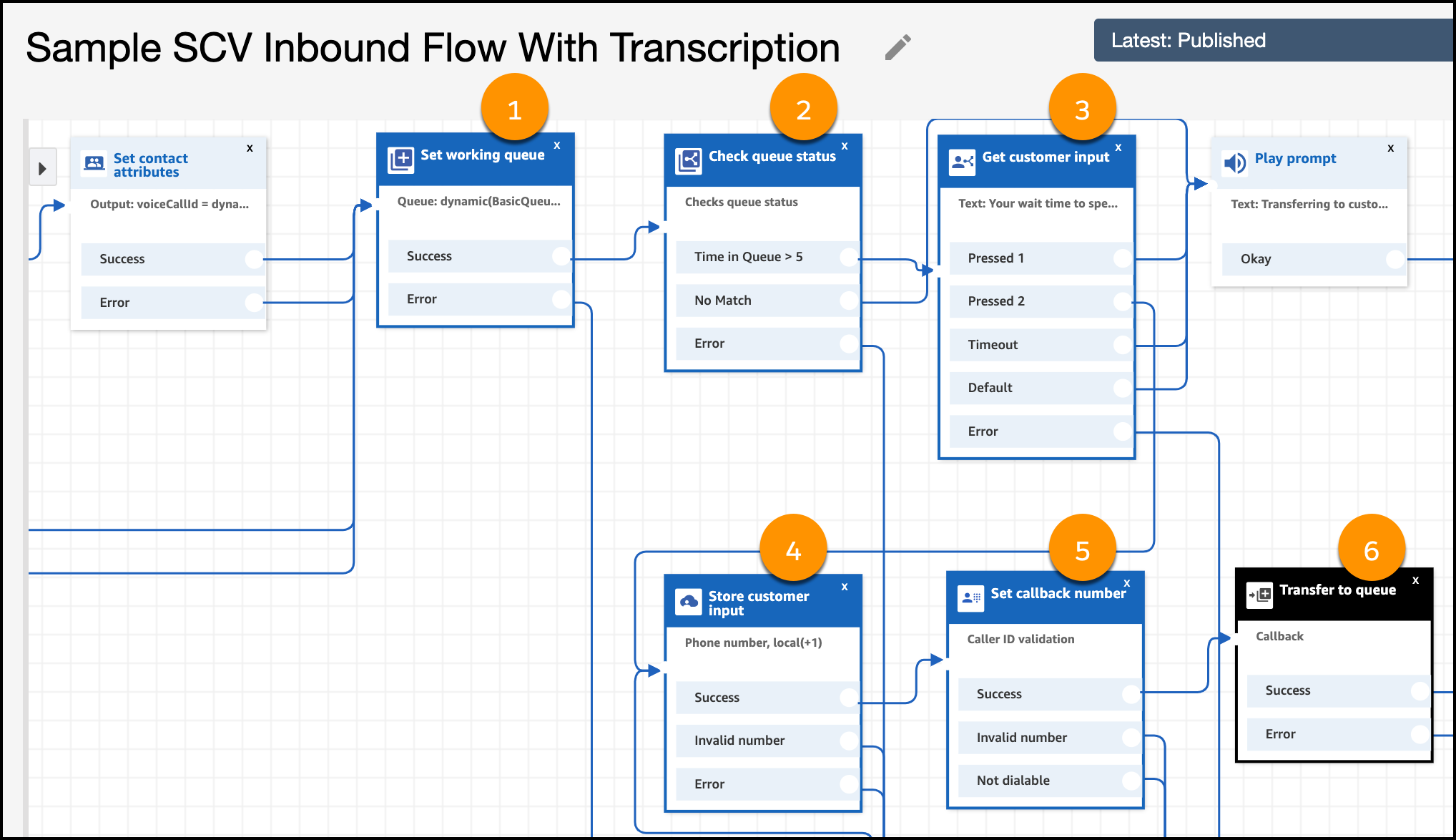
This next section of the contact flow puts the caller in the queue, and handles the scenario where the queue is full and we offer the caller a callback option.
| Block | Description |
|---|---|
| Set working queue [1] | This block specifies the queue that the call is added to. It uses the value of the BasicQueueId attribute specified in the previous section. |
| Check queue status [2] | This block determines whether the time in the queue is long enough that we want to offer a callback option. If the queue wait time isn’t too long, we put the call in the queue without offering a callback. If the wait time is substantial, we go to the “Get customer input” contact block. The wait time is set to 5 minutes but you can adjust it as necessary. |
| Get customer input [3] | This block prompts the customer about getting a callback. If they press 1 or don’t provide input, we transfer the customer to the queue. If they press 2, we get a callback phone number. |
| Store customer input [4] | This block prompts the customer for a phone number. |
| Set callback number [5] | This block sets and validates the caller phone number. |
| Transfer to queue [6] | This block transfers the callback number to the queue. With this block, you can configure the initial delay when placing the number into the queue, as well as the number of callback attempts. When the callback number gets to the top of the queue it’s routed to an agent along with inbound calls. However, the subsequent call is treated as an outbound call. See Contact Flow: Outbound Flow with Transcription for details. |
Prepare Call for Agent (3 of 3)
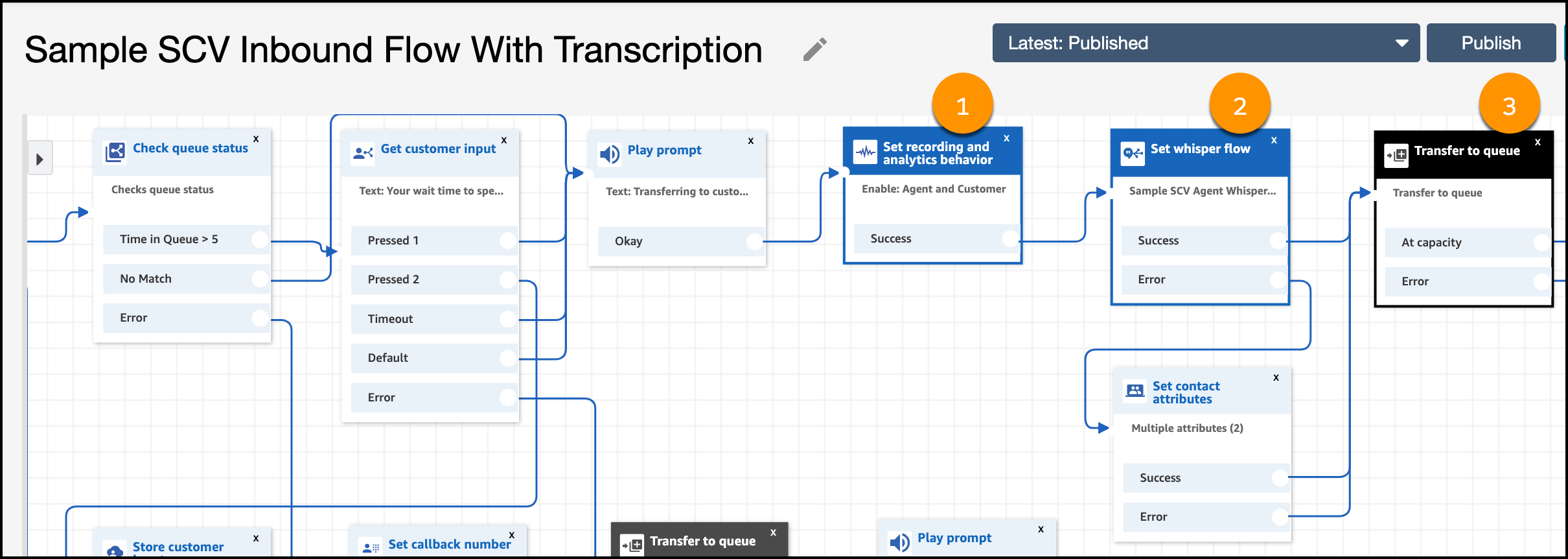
This final section of the contact flow prepares for the conversation with the agent. We set up transcription using a whisper flow.
| Block | Description |
|---|---|
| Set recording and analytics behavior [1] | This block sets the recording behavior to On. This action records the audio conversation between the agent and the customer, which can be accessed later from the VoiceCall record. |
| Set whisper flow [2] | This block assigns a whisper flow, which is launched just before the agent gets on the call. This flow gives the agent information about the caller before the call starts. This flow also turns on transcription. See Contact Flow: Agent Whisper with Transcription for details. |
| Transfer to queue [3] | This block transfers the caller to the queue. |