


Service Cloud Voice Implementation Guide
 j
jNewer Version Available
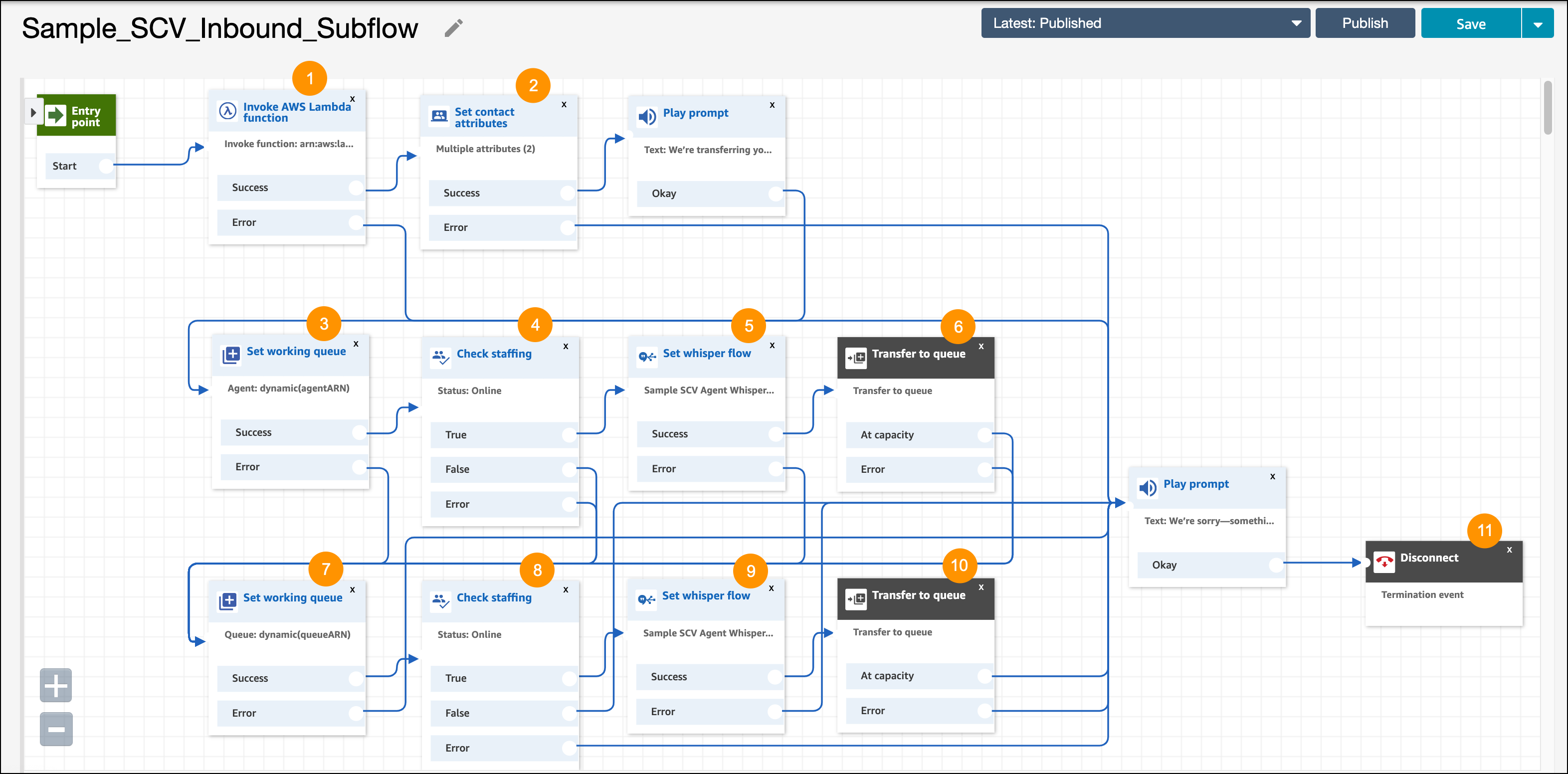
Contact Flow: Inbound Subflow
This subflow isn’t automatically called. If you want to route work based on an Omni-Channel flow, you must add this subflow to your inbound contact flow, such as Inbound Flow with Transcription. To learn how to perform this task, see Routing Calls with Omni-Channel Flows in Salesforce Help.
This subflow first checks for an agent. If no agent is specified or the agent is unavailable, it checks for a queue. If there’s a routing error, the call is transferred to the fallback queue. If the specified agent or queue is unavailable, the call is disconnected.
| Block | Description |
|---|---|
| Invoke AWS Lambda function [1] |
This block calls the provided InvokeTelephonyIntegrationApiFunction Lambda Function, which is used to call the Omni-Channel flow (executeOmniFlow) in Salesforce. |
| Set contact attributes [2] | This block sets the agentARN attribute and the queueARN attributes based on the output of the previous executeOmniFlow function call. agentARN is the agent to route calls to and queueARN is the queue to route calls to. |
| Set working queue [3] | Sets the working queue using the agentARN attribute. |
| Check staffing [4, 8] | Checks if the working queue is staffed. |
| Set whisper flow [5, 9] | This block assigns a whisper flow, which is launched just before the agent gets on the call. This flow gives the agent information about the caller before the call starts. This flow also turns on transcription. See Contact Flow: Agent Whisper with Transcription for details. |
| Transfer to queue [6, 10] | Transfers the call to the working queue. |
| Set working queue [7] | Sets the working queue queueARN attribute. This queue is the fallback queue in the event that no agent is specified or the agent is unavailable. |
| Disconnect [11] | Disconnects the call in the event that the agent and queue are unavailable. |