


Visualforce Developer Guide
 j
jNewer Version Available
Accessing Metrics for Your Visualforce Pages
To query metrics on the Visualforce pages in your org, use the VisualforceAccessMetrics object in the Salesforce SOAP
API.
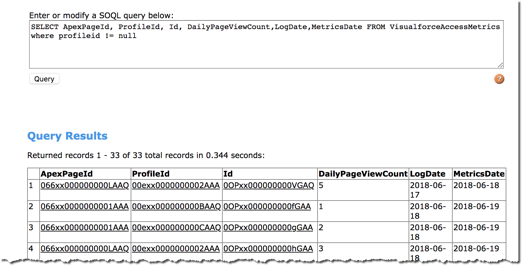
Make an SOQL query in Workbench to get information from the VisualforceAccessMetrics object.
The following is a sample SOQL call:
1SELECT ApexPageId, DailyPageViewCount, Id, ProfileId, MetricsDate, LogDate FROM VisualforceAccessMetricsThe following is an example of the query output:
| Parameter | Description |
|---|---|
| LogDate | This parameter provides the date that the page access was logged. This parameter is available for release 216 and later. |
| ProfileId | The ID of the profile associated with the users who accessed the page. This parameter is available for release 216 and later. |
| ApexPageId | The ID of the tracked Visualforce page |
| DailyPageView | Each VisualforceAccessMetrics object tracks the daily page view count in the DailyPageViewCount field. |
| MetricsDate | The date the metrics were collected is specified in MetricsDate. |
Using VisualforceAccessMetrics, you can track the number of views each Visualforce page in your org receives in a 24-hour time period. To find out how many views a page got over the course of multiple days, you can query multiple VisualforceAccessMetrics objects for the same ApexPageId.