Represents a text-based code structure of your
organization’s workspaces, organized by workspace type, and each workspace’s content
items.
Parent Type
This type extends the
Metadata metadata type and inherits its
fullName field.
File Suffix and Directory Location
DigitalExperienceBundle components have the suffix
.digitalExperience and are stored in the
digitalExperiences folder.
DigitalExperienceBundle uses workspaces and content types to organize your data in a
content-focused structure.
- Workspace: A collection of related content items that form an enhanced
Lightning Web Runtime (LWR) site when combined with data from the DigitalExperienceConfig metadata type. Every enhanced LWR site
has its own workspace.
- Workspace type: A way to categorize different kinds of workspaces. For
example, the workspace type for all enhanced LWR sites is site. The workspace type determines which
content types are available in the workspace. In the DigitalExperienceBundle
folder structure, all workspaces of a given type are under that workspace
type. site is the only supported
workspace type.
- Content types: A way to categorize different kinds of content in a
workspace. For example, all routes in an enhanced LWR site are stored under
a content type folder called sfdc_cms__route.
- Content items: The individual settings and site components that make up an
enhanced LWR site. For example, each of the routes in an enhanced LWR site
is a single content item.
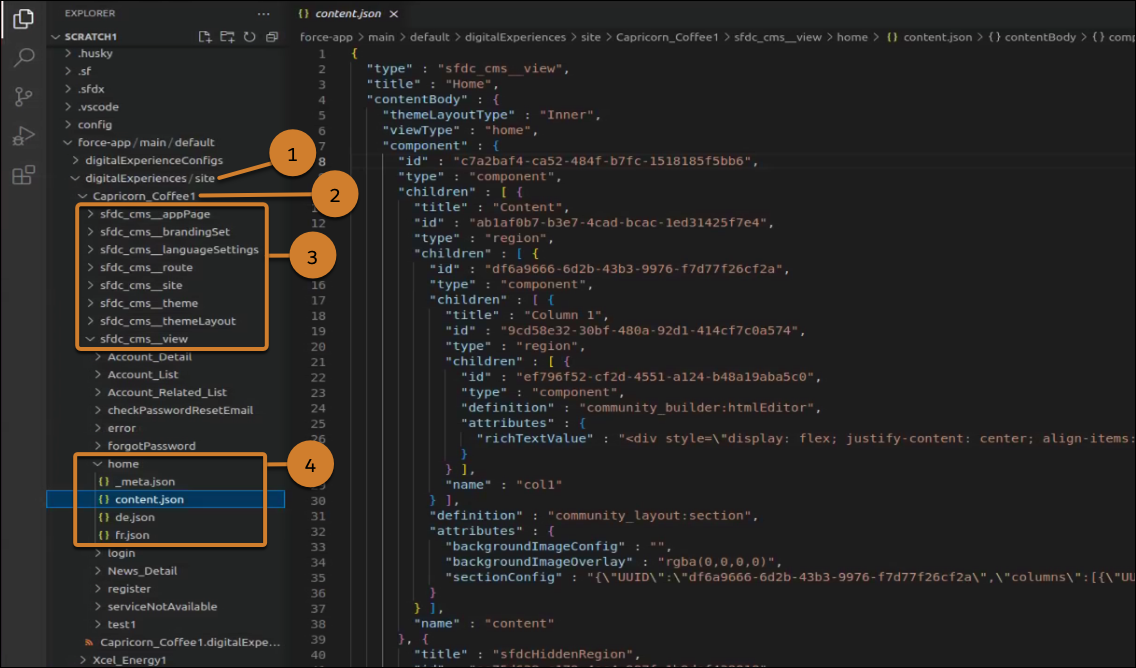
Here’s an example of the DigitalExperienceBundle structure for the example sites
Capricorn Coffee1 and Xcel Energy1.
When retrieved, the DigitalExperienceBundle contains a site workspace type folder (1)
under the digitalExperiences folder. The site folder contains one or more workspace
folders (2), each representing the workspace for an individual enhanced LWR site.
Each workspace folder contains an XML file with information
about the workspace, such as the label. Be sure to keep the label value in sync with
the site’s network name. Each workspace folder also contains several folders that
represent each of the different content types (3) used in that workspace.
Finally, each content type folder contains one or more content subfolders. Each
content subfolder contains several files that, when combined, represent an
individual content item, such as a specific view (4).
- A _meta.json file that contains the metadata for the
content item. Use the _meta.json file to learn the
location of a content item within the workspace, or to move the content item
to another location, including creating a new location for the content item.
You can also use the _meta.json file to view a content
item’s parent-child relationships, to move the content item from one parent
to another, or to remove a parent-child relationship entirely.
- A content.json file that contains the primary version
of the content item. Each content.json file includes
values for the content item’s type, title, and content body. Use this file
to edit the content’s properties on your local machine or scratch org and
then deploy.
- If applicable, additional JSON files that represent
variants of the content item, such as language translations.
The _meta.json file contains several
properties:
| apiName |
- Field Type
- string
- Description
- Required.
- The name of the associated content item. The
apiName allows only
alphanumeric and underscore characters and must
begin with a letter.
- You can use an apiName one time
per content type in a given workspace. For example,
a single workspace can contain both a view named
“home” and a route named “home” but can’t contain
two views named “home”.
|
| parent |
- Field Type
- string
- Description
- The developer name of the content item’s parent. If
the content item doesn’t have a parent, then either
the parent value is blank or the parent property
isn’t displayed at all.
|
| path |
- Field Type
- string
- Description
- The location of the content item within the
workspace’s folder structure. The value is blank for
content types at the root level, such as
appPage and
site.
|
| type |
- Field Type
- string
- Description
- Required.
- The full name of the content type from which the
content item was created.
- In site workspaces, the type is prefixed with
sfdc_cms__.
For example, all views in a site workspace have a
content type of sfdc_cms__view.
|
Version
DigitalExperienceBundle components are available in API version 56.0 and later.
Special Access Rules
You can use DigitalExperienceBundle for enhanced LWR sites created in Winter ’23 or
later. For Aura sites and other LWR sites, use the SiteDotCom or ExperienceBundle metadata types.
Fields
| description |
- Field Type
- string
- Description
- Contains the description of the workspace.
- For site workspaces, this value is empty.
|
| label |
- Field Type
- string
- Description
- Required.
- A user-friendly name for DigitalExperienceBundle, which
is defined when the DigitalExperienceBundle is
created.
|
| spaceResources |
- Field Type
- DigitalExperience[]
- Description
- The list of resources in this DigitalExperienceBundle.
Each resource represents a content type, such as
brandingSets, views, routes, themes, themeLayouts,
appPage, site, and languageSettings.
|
DigitalExperience
Represents site content in the bundle. When retrieved as part of
DigitalExperienceBundle, DigitalExperience represents all content for the requested
workspace or workspaces. When retrieved on its own, DigitalExperience represents
only the content types you specify.
This subtype extends the MetadataWithContent metadata type and inherits its
content and fullName fields.
When you retrieve DigitalExperience, the folder structure matches that of
DigitalExperienceBundle, with only the specified content returned.
| fileName |
- Field Type
- string
- Description
- Required.
- Name of the resource file.
|
| filePath |
- Field Type
- string
- Description
- Path to the file within the artifact folder.
|
| format |
- Field Type
- string
- Description
- Required.
- Only JSON is
allowed.
|
Folders and Bundled Definitions
Each DigitalExperienceBundle includes content type folders, content item subfolders,
and associated data that is contained in content.json and
_meta.json files. Each content type folder represents a
content type that is supported in a given workspace type.
sfdc_cms__appPage Folder
This content type folder exists at the root level and contains one content subfolder
that represents the site’s single-page application. Only one sfdc_cms__appPage content item is allowed per site.
The content subfolder contains two or more JSON
files:
- _meta.json
- content.json
- If applicable, additional JSON files that represent
variations of the content item
<apiName>/content.json
| currentThemeId |
- Field Type
- content link
- Description
- Represents the apiName of the
site’s active theme.
|
| headMarkup |
- Field Type
- string
- Description
- Allows the addition of custom markup to the site's
main page <head> tag. Similar to using .
- See Salesforce Help for markup
guidance.
|
| isLockerServiceEnabled |
- Field Type
- boolean
- Description
- Indicates whether Lightning Locker is enabled
(true) or not
(false). The
default value is true.
- Before disabling Lightning Locker, set
isRelaxedCSPLevel to true.
|
| isRelaxedCSPLevel |
- Field Type
- boolean
- Description
- Controls the ability to run scripts and controls
script access to third-party hosts. The default is
false.
- A false value
sets a strict CSP security level, and blocks access
to inline scripts and all hosts. A true value sets a
relaxed CSP security level, and permits access to
inline scripts and allowed hosts. To learn more, see
Select a Security Level in
Experience Builder Sites.
|
| templateName |
- Field Type
- string
- Description
- Required.
- The unique developer name of the template. Valid
values are:
-
talon-template-byo—Represents the
Build Your Own (LWR) template
-
microsite-template-marketing—Represents
the Microsite template
|
| title |
- Field Type
- string
- Description
- Required.
- Represents the label of the appPage.
|
| type |
- Field Type
- string
- Description
- Required.
- Represents the content type. The only allowed value
is sfdc_cms__appPage.
|
sfdc_cms__brandingSet Folder
This content type folder contains one content subfolder per branding set. Each
content subfolder contains two or more JSON files:
- _meta.json
- content.json
- If applicable, additional JSON files that represent
variations of the content item
<apiName>/content.json
| brandingSetType |
- Field Type
-
enumeration of type string
- Description
- Represents whether the color palette stored in the
branding set is for the entire site or a specific
section. You can’t change one branding set type to
another.
- Valid values are:
-
APP—The branding set applies to
the entire site. There can be only one branding
set of this type.
-
SCOPED—A SCOPED branding set
can be applied only to a section component.
|
| definitionName |
- Field Type
- string
- Description
- Required. Represents the name for the branding set
used in the site or template’s theme.
- There are two standard templates that have unique naming:
- Build Your Own (LWR) uses
talon-template-byo:branding
- Microsite uses
microsite-template-marketing:branding
|
| title |
- Field Type
- string
- Description
- Required.
- Represents the label of the brandingSet content
item.
- The maximum length is 100 characters. The title must
be unique within the space’s brandingSet content
items.
|
| type |
- Field Type
- string
- Description
- Required.
- Represents the content type. The only supported
value is sfdc_cms__brandingSet.
|
| values |
- Field Type
- object (map)
- Description
- Required.
- Represents a map of branding values that can be
applied to a site.
|
sfdc_cms__languageSettings Folder
This content type folder contains one content subfolder called languages. The
languages content subfolder contains two or more JSON files:
- _meta.json
- content.json
- If applicable, additional JSON files that represent
variations of the content item
<apiName>/content.json
| defaultLocale |
- Field Type
- string
- Description
- Represents the default locale for a workspace. The
language listed here is the default fallback language
for all of the workspace’s languageTypes.
|
| languages |
- Field Type
- languageType[]
- Description
- Required.
- Represents the languages available in the space. Each
languageType contains values
related to that particular language.
|
| languageType.fallbacklocale |
- Field Type
- string
- Description
- Represents the locale to use when no content is
available for the selected locale. For example, if a
site visitor chooses Japanese from the language selector
but there’s no content for that page in Japanese,
content displayed in the fallback locale.
- The fallbackLocale's
isAuthoringOnly value must be
false.
- Only one level of fallback is allowed. Here are examples
for a workspace with a locale of en_US, and with
Spanish, French, and Finnish as supported locales.
- Not allowed: Spanish falls back to French, and
French falls back to Finnish. This configuration
includes two levels of fallback.
- Allowed: Spanish falls back to French, and
French falls back to English. en_US is the
workspace’s default.
- Allowed: Spanish falls back to French, and
French has no fallback.
- This property is displayed only if the
languageType.fallbackLocale is
different from the workspace’s default locale.
|
| languageType.isActive |
- Field Type
- boolean
- Description
- Indicates whether the language is active (true) or inactive
(false). The
only supported value is true.
|
| languageType.isAuthoringOnly |
- Field Type
- boolean
- Description
- Indicates whether the language is scoped only to
authoring workspace (true) or not (false). The default value is false.
- When set to true,
the languageType and its associated
translations aren’t visible to site visitors. When set
to false, site
visitors can see the languageType
and its associated translations.
|
| languageType.label |
- Field Type
- string
- Description
- Required. Defines the display label for a language. The
display label appears in any language selector
components that you add to your site and in the language
selector in Experience Builder.
- The default value is the locale name. For example, if
languageType.locale=fr, then
languageType.label=French.
|
| languageType.locale |
- Field Type
- string
- Description
- Required. Represents the languageCode appended with the
countryCode, separated by an underscore. For example,
en_US indicates
a languageCode of English, and a countryCode of United
States.
- Defines the locale, or geographic region, of a language.
Locales determine the display format for date and time,
user names, address, and commas and periods in numbers.
- Each languageType.locale and
languageType.label combination
can be used only one time per workspace.
|
| title |
- Field Type
- string
- Description
- Required.
- Represents the label of the content item.
|
| type |
- Field Type
- Description
- Required.
- Represents the content type. The only allowed value is
sfdc_cms__languageSettings.
|
sfdc_cms__route Folder
This content type
folder contains one content subfolder for each of the site’s routes. Each route content
subfolder contains two or more
JSON files:
- _meta.json
- content.json
- If applicable, additional JSON files that represent
variations of the content item
<apiName>/content.json
| activeViewId |
- Field Type
- content link
- Description
- Required.
- Represents the apiName of the
route’s active view.
- Must reference an existing view in the same
workspace.
|
| configurationTags |
- Field Type
- string[]
- Description
- Represents the configuration tags for the route. The
only allowed value is
all-in-static-site.
-
Don’t edit this property because it’s an internal
property.
|
| pageAccess |
- Field Type
-
enumeration of type string
- Description
- Identifies the status of a route as public or private.
- When set to the default value UseParent, the status
of the site determines the status of the route. This
value isn’t editable from the user interface for routes
that are always private.
- Valid values are:
- UseParent
- Public
- RequiresLogin
-
You can change the pageAccess
value only if the site is authenticated.
|
| routeType |
- Field Type
- string
- Description
- Required.
- Identifies the type of route. The
routeType value must be unique
within a workspace. This value must match the
viewType value in the
corresponding view content item.
|
| title |
- Field Type
- string
- Description
- Required.
- Represents the label of the route.
|
| type |
- Field Type
- string
- Description
- Required.
- Represents the content type. The only supported value is
sfdc_cms__route.
|
| urlPrefix |
- Field Type
- string
- Description
- Required.
- Represents the base URL for the route.
|
sfdc_cms__site Folder
This content type folder exists at the root level and contains one content subfolder.
The content subfolder contains two or more JSON files:
- _meta.json
- content.json
- If applicable, additional JSON files that represent
variations of the content item
<apiName>/content.json
| authenticationType |
- Field Type
-
enumeration of type string
- Description
- Required.
- Indicates whether guest users have access to the site.
- Valid values are:
-
AUTHENTICATED—The site isn’t
public. Only authenticated users can access the
site after logging in.
-
AUTHENTICATED_WITH_PUBLIC_ACCESS_ENABLED—The
site is an authenticated site, but the
Public can access the site
checkbox is enabled in Experience Builder in . Guest users can access the site.
-
UNAUTHENTICATED—The
unauthenticated site is publicly available to
anyone on the web, and doesn’t support login or
authentication. UNAUTHENTICATED is a legacy value. We
recommend using AUTHENTICATED_WITH_PUBLIC_ACCESS_ENABLED
access to allow guest user access.
|
| title |
- Field Type
- string
- Description
- Required.
- Represents the label of the content item.
|
| type |
- Field Type
- string
- Description
- Required.
- Represents the content type. The only allowed value is
sfdc_cms__site.
|
sfdc_cms__theme Folder
This content type folder contains one content subfolder, representing the site’s
theme. The content subfolder contains two or more JSON files:
- _meta.json
- content.json
- If applicable, additional JSON files that represent
variations of the content item
<apiName>/content.json
| activeBrandingSetId |
- Field Type
- content link
- Description
- Required.
- Represents the apiName of the
site’s active branding set.
- Must reference an existing brandingSet with a type of
APP in the same
workspace.
|
| definitionName |
- Field Type
- string
- Description
- Required.
- Represents the definition name of a theme.
- Must match the template’s theme definition name.
|
| layouts |
- Field Type
- layout[]
- Description
- Required.
- Represents an array of the theme layouts available in
the workspace and provides details about each theme
layout.
- The template and features used in the workspace
determine which layouts are required. For example, the
ServiceNotAvailable layout is required if
the site includes a Service Not Available page.
|
| layouts.layoutId |
- Field Type
- content link
- Description
- Required.
- Represents the apiName of an
available theme layout. Must refer to an existing theme
layout in the same workspace.
|
| layouts.layoutType |
- Field Type
- string
- Description
- Represents the name of the theme layout specified in
Experience Builder.
- An inner theme layout is required. The inner theme
layout is applied by default to all of a site’s pages
except for login pages.
|
| title |
- Field Type
- string
- Description
- Required.
- Represents the name of the theme.
|
| type |
- Field Type
- string
- Description
- Required.
- Represents the content type. The only allowed value is
sfdc_cms__theme.
|
sfdc_cms__themeLayout Folder
This content type folder contains one content subfolder for each theme layout in the
site. Each content subfolder contains two or more JSON files:
- _meta.json
- content.json
- If applicable, additional JSON files that represent
variations of the content item
We recommend that you don’t add, reorder, or delete a component within a
locked region using the DigitalExperienceBundle. To find out which regions are
locked, in Experience Builder, view the Page Structure tab for the page that
you’re working on. If the region that you’re modifying has a lock icon next to
it, it’s a locked region.
<apiName>/content.json
| children |
- Field Type
- regionType[]
- Description
- Represents individual regions within a layout.
|
| component |
- Field Type
- componentType
- Description
- Required.
- Contains the layout details for this theme layout in
regions and components.
|
| componentType.attributes |
- Field Type
- map
- Description
- A map of design attribute values used by the component
definition to render the definition.
|
| componentType.children |
- Field Type
- regionType[]
- Description
- Represents regions within a component.
|
| componentType.definition |
- Field Type
- string
- Description
- Required.
- Represents the name of the Lightning Web Component (LWC)
using the format namespace:componentName.
- Must be one of the theme layouts defined as part of the
default theme, or use the target lightningCommunity__Theme_Layout. The
default theme layouts differ per theme. For example, the
Build Your Own (BYO) template uses the BYO theme, with
the allowed theme layouts community_byo:scopedHeaderandFooter and
community_layout:simpleThemeLayout.
|
| componentType.id |
- Field Type
- UUID
- Description
- Required.
- Represents the UUID of a component.
|
| componentType.scopedBrandingSetId |
- Field Type
- content link
- Description
- Represents the brandingSet that applies to this
component. The brandingSet must be of type SCOPED.
- This property is applicable only if the component’s
definitionName is community_layout:section.
|
| componentType.type |
- Field Type
- string
- Description
- Required.
-
component is the
only allowed value.
|
| regionType.children |
- Field Type
- componentType[]
- Description
- Represents individual components within the region.
|
| regionType.id |
- Field Type
- UUID
- Description
- Required.
- Represents the UUID of a region.
|
| regionType.name |
- Field Type
- string
- Description
- Required.
- Represents the name of the region.
|
| regionType.title |
- Field Type
- string
- Description
- Represents the label for a region.
|
| regionType.type |
- Field Type
- string
- Description
- Required.
-
region is the only
allowed value.
|
| title |
- Field Type
- string
- Description
- Required.
- Represents the label of the content item.
|
| type |
- Field Type
- string
- Description
- Required.
- Represents the content type. The only allowed value is
sfdc_cms__themeLayout.
|
sfdc_cms__view Folder
This content type folder contains one content subfolder per view. Each content
subfolder contains two or more JSON files:
- _meta.json
- content.json
- If applicable, additional JSON files that represent
variations of the content item
Each Experience Builder site is built from single-page applications, which are web
apps that load a single HTML page. Single-page applications consist of multiple
views that update the page dynamically as the user interacts with it. A view is made
up of regions that contain other regions or components in the rendered page for the
user. Single-page applications in your site are defined in the sfdc_cms__appPage folder.
Each content.json file in the sfdc_cms__view folder contains a
hidden region named sfdcHiddenRegion. The
hidden region contains a component with a definition of community_builder:seoAssistant that represents the SEO assistant
component. This component corresponds to the SEO page properties that you can
configure in Experience Builder and isn't visible on your pages. To improve search
engine results, use the SEO assistant component to set the
customHeadTags, description, and
pageTitle properties for your public and custom site pages.
You can’t edit the other properties associated with the SEO assistant component. To
learn more about what the title, description, and custom head tags properties
represent and which head tags are allowed, see SEO
Page Properties in Experience Builder.
We recommend that you don’t add, reorder, or delete a component within a
locked region using the DigitalExperienceBundle. To find out which regions are
locked, in Experience Builder, view the Page Structure tab for the page that
you’re working on. If the region that you’re modifying has a lock icon next to
it, it’s a locked region.
<apiName>/content.json
| children |
- Field Type
- regionType[]
- Description
- Represents individual regions within a view.
|
| component |
- Field Type
- componentType
- Description
- Required.
- Represents the view layout and contains regions and
components that help render a view.
|
| componentType.attributes |
- Field Type
- map
- Description
- A map of design attribute values used by the component
definition to render the definition.
|
| componentType.children |
- Field Type
- regionType[]
- Description
- Represents regions within a component.
|
| componentType.definition |
- Field Type
- string
- Description
- Required.
- Represents the name of the Lightning Web Component (LWC)
in the format namespace:componentName.
|
| componentType.id |
- Field Type
- UUID
- Description
- Required.
- Represents the UUID of a component.
|
| componentType.scopedBrandingSetId |
- Field Type
- content link
- Description
- Represents the brandingSet that applies to this
component. The brandingSet must be of type SCOPED.
- This property is applicable only if the component’s
definitionName is community_layout:section.
|
| componentType.type |
- Field Type
- string
- Description
- Required.
-
component is the
only allowed value.
|
| regionType.children |
- Field Type
- componentType[]
- Description
- Represents individual components within the region.
|
| regionType.id |
- Field Type
- UUID
- Description
- Required.
- Represents the UUID of a region.
|
| regionType.name |
- Field Type
- string
- Description
- Required.
- Represents the name of the region.
|
| regionType.title |
- Field Type
- string
- Description
- Represents the label for a region.
|
| regionType.type |
- Field Type
- string
- Description
- Required.
-
region is the only
allowed value.
|
| themeLayoutType |
- Field Type
- string
- Description
- Required.
- Represents the apiName of the
view’s active theme layout.
- Must reference an existing theme layout in the same
workspace.
|
| title |
- Field Type
- string
- Description
- Represents the name of the view. Limited to 80
characters.
-
We recommend keeping the
title value and the
pageTitle value in sync. If
you update either value for a view, ensure that you
manually update the other value in the same
content.json file to match.
|
| type |
- Field Type
- string
- Description
- Required.
- Represents the content type. The only allowed value is
sfdc_cms__view.
|
| viewType |
- Field Type
- string
- Description
- Required.
- Identifies the type of view. The
viewType value must be unique
within a workspace. This value must match the
routeType value in the
corresponding route content item.
|
Declarative Metadata Sample Definition
The following is an example of a DigitalExperienceBundle component.
The following is an example package.xml that
references the previous definition.
Usage
Before you update the JSON files of an
Experience Builder site, we recommend making a copy of the site’s folder as a
backup.
To retrieve and deploy DigitalExperienceBundle, use legacy sfdx commands.


 j
j