


Metadata API Developer Guide
 j
jNewer Version Available
DigitalExperienceBundle
Parent Type
File Suffix and Directory Location
DigitalExperienceBundle components have the suffix .digitalExperience and are stored in the digitalExperiences folder.
DigitalExperienceBundle uses workspaces and content types to organize your data in a content-focused structure.
- Workspace: For enhanced Lightning Web Runtime (LWR) sites, a collection of related content
items that form the site when combined with data from the DigitalExperienceConfig metadata type. Every
enhanced LWR site has its own workspace.
For Marketing Cloud Growth, a collection of content contained in the marketing workspace.
- Workspace type: A way to categorize different kinds of workspaces. For example, the workspace type for enhanced LWR sites is site, and the workspace type for marketing workspaces in Marketing Cloud Growth is marketing. The workspace type determines which content types are available in the workspace. In the DigitalExperienceBundle folder structure, all workspaces of a given type are under that workspace type. site and marketing are the only supported workspace types.
- Content types: A way to categorize different kinds of content in a workspace. For example, all routes in an enhanced LWR site are stored under a content type folder called sfdc_cms__route. Similarly, forms for a marketing workspace in Marketing Cloud Growth are stored under a content type folder called sfdc_cms__form.
- Content items: For enhanced LWR sites, the individual settings and site components that make
up an enhanced LWR site. For example, each of the routes in an enhanced LWR site
is a single content item.
For marketing workspaces, the content items used in marketing campaigns. For example, each form in a workspace is a single content item.
Here’s an example of the DigitalExperienceBundle structure.
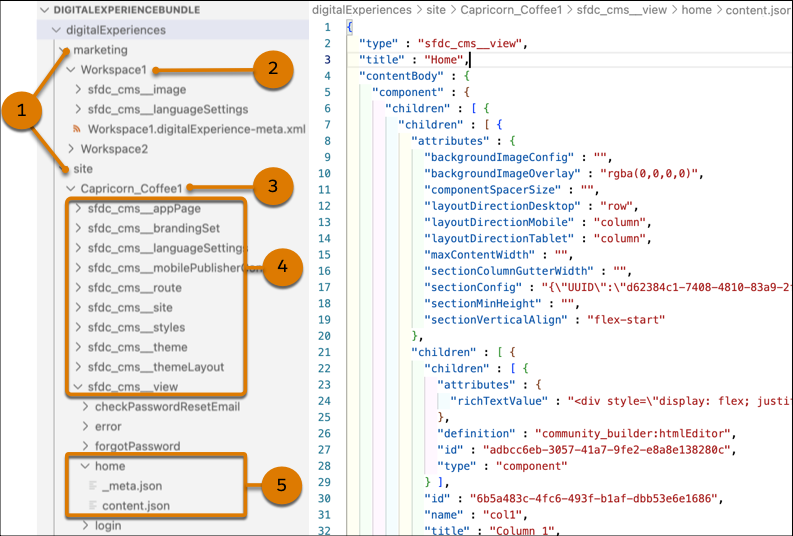
When retrieved, the DigitalExperienceBundle contains workspace type folders (1) under the digitalExperiences folder.
The marketing folder contains one or more workspace folders (2), each representing a marketing workspace in Marketing Cloud Growth. The site folder contains one or more workspace folders (3), each representing the workspace for an individual enhanced LWR site. Each workspace folder contains an XML file with information about the workspace, such as the label. For enhanced LWR sites, be sure to keep the label value in sync with the site’s network name.
Each workspace folder also contains several content type folders that represent each of the different content types (4) used in that workspace. For marketing workspaces, forms and referenced images are the only supported content types in DigitalExperienceBundle.
Finally, each content type folder can contain one or more content subfolders. Each content subfolder can contain additional subfolders and several files that, when combined, represent an individual content item, such as a specific view (5).
- A _meta.json file that contains the metadata for the content item. Use the _meta.json file to learn the location of a content item within the workspace, or to move the content item to another location, including creating a new location for the content item. You can also use the _meta.json file to view a content item’s parent-child relationships, to move the content item from one parent to another, or to remove a parent-child relationship entirely.
- A content.json file that contains the primary version of the content item. Each content.json file includes values for the content item’s type, title, and content body. Use this file to edit the content’s properties on your local machine or scratch org and then deploy.
- If applicable, additional JSON files that represent variants of the content item, such as language translations.
The _meta.json file contains several properties:
| Property | Description |
|---|---|
| apiName |
|
| parent |
|
| path |
|
| type |
|
Version
DigitalExperienceBundle components are available in API version 56.0 and later.
Special Access Rules
In Experience Cloud, can use DigitalExperienceBundle for enhanced LWR sites created in Winter ’23 or later. For Aura sites and other LWR sites, use the ExperienceBundle or SiteDotCom metadata types.
In Marketing Cloud Growth, you must have a contributor role in a marketing workspace to retrieve it.
Fields
| Field Name | Description |
|---|---|
| description |
|
| digitalExperienceFolderShares |
|
| label |
|
| spaceResources |
|
DigitalExperience
Represents content in the bundle. When retrieved as part of DigitalExperienceBundle, DigitalExperience represents all content for the requested workspace or workspaces. When retrieved on its own, DigitalExperience represents only the content types you specify.
This subtype extends the MetadataWithContent metadata type and inherits its content and fullName fields.
When you retrieve DigitalExperience, the folder structure matches that of DigitalExperienceBundle, with only the specified content returned.
| Field Name | Description |
|---|---|
| fileName |
|
| filePath |
|
| format |
|
Folders and Bundled Definitions
Each DigitalExperienceBundle includes content type folders, content item subfolders, and associated data that is contained in content.json and _meta.json files. Each content type folder represents a content type that is supported in a given workspace type.
sfdc_cms__appPage Folder
This content type folder exists at the root level and contains one content subfolder that represents the site’s single-page application. Only one sfdc_cms__appPage content item is allowed per site.
The content subfolder contains two or more JSON files:
- _meta.json
- content.json
- If applicable, additional JSON files that represent variations of the content item
<apiName>/content.json
| Property | Description |
|---|---|
| currentThemeId |
|
| headMarkup |
|
| isLockerServiceEnabled |
|
| isRelaxedCSPLevel |
|
| templateName |
|
| title |
|
| type |
|
1{
2  "type" : "sfdc_cms__appPage",
3  "title" : "main",
4  "contentBody" : {
5    "currentThemeId" : "Build_Your_Own_LWR",
6    "headMarkup" : "<meta charset=\"UTF-8\" />\n<meta name=\"viewport\" content=\"width=device-width, initial-scale=1\" />\n<title>Welcome to LWC Communities!</title>\n\n<link rel=\"stylesheet\" href=\"{ basePath }/assets/styles/styles.css?{ versionKey }\" />\n\n\n<!-- webruntime-branding-shared stylesheets -->\n<link rel=\"stylesheet\" href=\"{ basePath }/assets/styles/salesforce-lightning-design-system.min.css?{ versionKey }\" />\n<link rel=\"stylesheet\" href=\"{ basePath }/assets/styles/dxp-site-spacing-styling-hooks.min.css?{ versionKey }\" />\n<link rel=\"stylesheet\" href=\"{ basePath }/assets/styles/dxp-styling-hooks.min.css?{ versionKey }\" />\n<link rel=\"stylesheet\" href=\"{ basePath }/assets/styles/dxp-slds-extensions.min.css?{ versionKey }\" />\n\n\n<!-- webruntime-branding-shared stylesheets -->",
7    "isLockerServiceEnabled" : true,
8    "isRelaxedCSPLevel" : false,
9    "templateName" : "talon-template-byo"
10  }
11}
sfdc_cms__brandingSet Folder
This content type folder contains one content subfolder per branding set. Each content subfolder contains two or more JSON files:
- _meta.json
- content.json
- If applicable, additional JSON files that represent variations of the content item
<apiName>/content.json
| Property | Description |
|---|---|
| brandingSetType |
|
| definitionName |
|
| title |
|
| type |
|
| values |
|
1{
2  "type" : "sfdc_cms__brandingSet",
3  "title" : "Build Your Own (LWR)",
4  "contentBody" : {
5    "brandingSetType" : "APP",
6    "definitionName" : "talon-template-byo:branding",
7    "values" : {
8      "BackgroundColor" : "#ffffff",
9      "BaseFontSize" : "1rem",
10      "BodyFont" : "Salesforce Sans",
11      "BodyFontSize" : "1rem",
12      "BodyFontStyle" : "normal",
13      "BodyFontWeight" : "400",
14      "BodyLetterSpacing" : "0em",
15      "BodyLineHeight" : "1.5",
16      "BodySmallFont" : "Salesforce Sans",
17      "BodySmallFontSize" : "0.75rem",
18      "BodySmallFontStyle" : "normal",
19      "BodySmallFontWeight" : "400",
20      "BodySmallLetterSpacing" : "0em",
21      "BodySmallLineHeight" : "1.25",
22      "BodySmallTextColor" : "var(--dxp-g-root-contrast)",
23      "BodySmallTextDecoration" : "none",
24      "BodySmallTextTransform" : "none",
25      "BodyTextColor" : "var(--dxp-g-root-contrast)",
26      "BodyTextDecoration" : "none",
27      "BodyTextTransform" : "none",
28      "ButtonActiveColor" : "var(--dxp-s-button-color-1)",
29      "ButtonBorderRadius" : "4px",
30      "ButtonColor" : "var(--dxp-g-brand)",
31      "ButtonFocusColor" : "var(--dxp-s-button-color-1)",
32      "ButtonFont" : "Salesforce Sans",
33      "ButtonFontSize" : "1rem",
34      "ButtonFontStyle" : "normal",
35      "ButtonFontWeight" : "400",
36      "ButtonHoverColor" : "var(--dxp-s-button-color-1)",
37      "ButtonLargeBorderRadius" : "4px",
38      "ButtonLargeFontSize" : "1.25rem",
39      "ButtonLargePadding" : "1.25rem",
40      "ButtonLetterSpacing" : "0em",
41      "ButtonLineHeight" : "2",
42      "ButtonPadding" : "1rem",
43      "ButtonSmallBorderRadius" : "4px",
44      "ButtonSmallFontSize" : "0.75rem",
45      "ButtonSmallPadding" : "0.75rem",
46      "ButtonTextTransform" : "none",
47      "ColumnSpacerSizeDesktop" : "1rem",
48      "ColumnSpacerSizeMobile" : "0.75rem",
49      "ComponentSpacerSizeDesktop" : "1.5rem",
50      "ComponentSpacerSizeMobile" : "1.5rem",
51      "DropdownBackgroundColor" : "var(--dxp-g-root)",
52      "DropdownBackgroundHoverColor" : "var(--dxp-g-neutral)",
53      "DropdownBorderColor" : "var(--dxp-g-neutral)",
54      "DropdownTextColor" : "var(--dxp-g-root-contrast)",
55      "DropdownTextHoverColor" : "var(--dxp-g-neutral-contrast)",
56      "FormElementBackgroundColor" : "var(--dxp-g-root)",
57      "FormElementBorderColor" : "var(--dxp-g-neutral-3)",
58      "FormElementBorderRadius" : "4px",
59      "FormElementBorderWidth" : "1px",
60      "FormElementLabelColor" : "var(--dxp-g-root-contrast)",
61      "FormElementTextColor" : "var(--dxp-g-root-contrast)",
62      "HeadingExtraLargeColor" : "var(--dxp-g-root-contrast)",
63      "HeadingExtraLargeFont" : "Salesforce Sans",
64      "HeadingExtraLargeFontSize" : "2.5rem",
65      "HeadingExtraLargeFontStyle" : "normal",
66      "HeadingExtraLargeFontWeight" : "300",
67      "HeadingExtraLargeLetterSpacing" : "0em",
68      "HeadingExtraLargeLineHeight" : "1.25",
69      "HeadingExtraLargeTextDecoration" : "none",
70      "HeadingExtraLargeTextTransform" : "none",
71      "HeadingLargeColor" : "var(--dxp-g-root-contrast)",
72      "HeadingLargeFont" : "Salesforce Sans",
73      "HeadingLargeFontSize" : "1.75rem",
74      "HeadingLargeFontStyle" : "normal",
75      "HeadingLargeFontWeight" : "300",
76      "HeadingLargeLetterSpacing" : "0em",
77      "HeadingLargeLineHeight" : "1.25",
78      "HeadingLargeTextDecoration" : "none",
79      "HeadingLargeTextTransform" : "none",
80      "HeadingMediumColor" : "var(--dxp-g-root-contrast)",
81      "HeadingMediumFont" : "Salesforce Sans",
82      "HeadingMediumFontSize" : "1.25rem",
83      "HeadingMediumFontStyle" : "normal",
84      "HeadingMediumFontWeight" : "300",
85      "HeadingMediumLetterSpacing" : "0em",
86      "HeadingMediumLineHeight" : "1.25",
87      "HeadingMediumTextDecoration" : "none",
88      "HeadingMediumTextTransform" : "none",
89      "HeadingSmallColor" : "var(--dxp-g-root-contrast)",
90      "HeadingSmallFont" : "Salesforce Sans",
91      "HeadingSmallFontSize" : "1.125rem",
92      "HeadingSmallFontStyle" : "normal",
93      "HeadingSmallFontWeight" : "300",
94      "HeadingSmallLetterSpacing" : "0em",
95      "HeadingSmallLineHeight" : "1.25",
96      "HeadingSmallTextDecoration" : "none",
97      "HeadingSmallTextTransform" : "none",
98      "HorizontalRowPaddingDesktop" : "1rem",
99      "HorizontalRowPaddingMobile" : "0.75rem",
100      "LinkColor" : "var(--dxp-g-brand)",
101      "LinkHoverColor" : "var(--dxp-s-link-text-color-1)",
102      "LinkTextDecoration" : "none",
103      "LinkTextDecorationFocus" : "underline",
104      "LinkTextDecorationHover" : "underline",
105      "MaxContentWidthDesktop" : "1800px",
106      "MaxContentWidthMobile" : "none",
107      "MobileBaseFontSize" : "1rem",
108      "PrimaryAccentColor" : "#005fb2",
109      "PrimaryAccentForegroundColor" : "#ffffff",
110      "SiteLogo" : "",
111      "TextColor" : "#1a1b1e",
112      "VerticalRowPaddingDesktop" : "1rem",
113      "VerticalRowPaddingMobile" : "0.75rem",
114      "_BackgroundColor1" : "#ebebeb",
115      "_BackgroundColor2" : "#c2c2c2",
116      "_BackgroundColor3" : "#858585",
117      "_ButtonActiveColorContrast" : "var(--dxp-g-brand-contrast-1)",
118      "_ButtonColor1" : "var(--dxp-g-brand-1)",
119      "_ButtonColorContrast" : "var(--dxp-g-brand-contrast)",
120      "_ButtonFocusColorContrast" : "var(--dxp-g-brand-contrast-1)",
121      "_ButtonHoverColorContrast" : "var(--dxp-g-brand-contrast-1)",
122      "_DestructiveColor" : "#c23934",
123      "_DestructiveColor1" : "#a2302b",
124      "_DestructiveColor2" : "#611d1a",
125      "_DestructiveColor3" : "#010000",
126      "_DestructiveForegroundColor" : "#ffffff",
127      "_DestructiveForegroundColor1" : "#ffffff",
128      "_DestructiveForegroundColor2" : "#ffffff",
129      "_DestructiveForegroundColor3" : "#ffffff",
130      "_InfoColor" : "#16325c",
131      "_InfoColor1" : "#0e203b",
132      "_InfoColor2" : "#000000",
133      "_InfoColor3" : "#000000",
134      "_InfoForegroundColor" : "#ffffff",
135      "_InfoForegroundColor1" : "#ffffff",
136      "_InfoForegroundColor2" : "#ffffff",
137      "_InfoForegroundColor3" : "#ffffff",
138      "_LinkColor1" : "var(--dxp-g-brand-1)",
139      "_NeutralColor" : "#ecebea",
140      "_NeutralColor1" : "#d9d7d5",
141      "_NeutralColor2" : "#b2aeaa",
142      "_NeutralColor3" : "#76716b",
143      "_NeutralForegroundColor" : "#000000",
144      "_NeutralForegroundColor1" : "#000000",
145      "_NeutralForegroundColor2" : "#000000",
146      "_NeutralForegroundColor3" : "#ffffff",
147      "_OfflineColor" : "#444444",
148      "_OfflineColor1" : "#303030",
149      "_OfflineColor2" : "#070707",
150      "_OfflineColor3" : "#000000",
151      "_OfflineForegroundColor" : "#ffffff",
152      "_OfflineForegroundColor1" : "#ffffff",
153      "_OfflineForegroundColor2" : "#ffffff",
154      "_OfflineForegroundColor3" : "#ffffff",
155      "_PrimaryAccentColor1" : "#004989",
156      "_PrimaryAccentColor2" : "#001e38",
157      "_PrimaryAccentColor3" : "#000000",
158      "_PrimaryAccentForegroundColor1" : "#ffffff",
159      "_PrimaryAccentForegroundColor2" : "#ffffff",
160      "_PrimaryAccentForegroundColor3" : "#ffffff",
161      "_SiteLogoUrl" : "",
162      "_SuccessColor" : "#4bca81",
163      "_SuccessColor1" : "#36b66c",
164      "_SuccessColor2" : "#237747",
165      "_SuccessColor3" : "#07190f",
166      "_SuccessForegroundColor" : "#000000",
167      "_SuccessForegroundColor1" : "#000000",
168      "_SuccessForegroundColor2" : "#ffffff",
169      "_SuccessForegroundColor3" : "#ffffff",
170      "_TextColor1" : "#000000",
171      "_TextColor2" : "#000000",
172      "_TextColor3" : "#000000",
173      "_WarningColor" : "#ffb75d",
174      "_WarningColor1" : "#ffa534",
175      "_WarningColor2" : "#e27d00",
176      "_WarningColor3" : "#673900",
177      "_WarningForegroundColor" : "#000000",
178      "_WarningForegroundColor1" : "#000000",
179      "_WarningForegroundColor2" : "#000000",
180      "_WarningForegroundColor3" : "#ffffff"
181    }
182  }
183}
sfdc_cms__languageSettings Folder
This content type folder contains one content subfolder called languages. The languages content subfolder contains two or more JSON files:
- _meta.json
- content.json
- If applicable, additional JSON files that represent variations of the content item
<apiName>/content.json
| Property | Description |
|---|---|
| defaultLocale |
|
| languages |
|
| languageType.fallbacklocale |
|
| languageType.isActive |
|
| languageType.isAuthoringOnly |
|
| languageType.label |
|
| languageType.locale |
|
| title |
|
| type |
|
1{
2  "type" : "sfdc_cms__languageSettings",
3  "title" : "LanguageContent",
4  "contentBody" : {
5    "languages" : [ {
6      "locale" : "en_US",
7      "label" : "English (US)",
8      "isActive" : true,
9      "isAuthoringOnly" : false
10    } ],
11    "defaultLocale" : "en_US"
12  }
13}
sfdc_cms__route Folder
- _meta.json
- content.json
- If applicable, additional JSON files that represent variations of the content item
<apiName>/content.json
| Property | Description |
|---|---|
| activeViewId |
|
| configurationTags |
|
| pageAccess |
|
| routeType |
|
| title |
|
| type |
|
| urlPrefix |
|
1{
2  "type" : "sfdc_cms__route",
3  "title" : "Error",
4  "contentBody" : {
5    "activeViewId" : "error",
6    "configurationTags" : [ ],
7    "pageAccess" : "UseParent",
8    "routeType" : "error",
9    "urlPrefix" : "error"
10  }
11}
sfdc_cms__site Folder
This content type folder exists at the root level and contains one content subfolder. The content subfolder contains two or more JSON files:
- _meta.json
- content.json
- If applicable, additional JSON files that represent variations of the content item
<apiName>/content.json
| Property | Description |
|---|---|
| authenticationType |
|
| title |
|
| type |
|
1{
2  "type" : "sfdc_cms__site",
3  "title" : "Capricorn_Coffee",
4  "contentBody" : {
5    "authenticationType" : "AUTHENTICATED"
6  }
7}
sfdc_cms__theme Folder
This content type folder contains one content subfolder, representing the site’s theme. The content subfolder contains two or more JSON files:
- _meta.json
- content.json
- If applicable, additional JSON files that represent variations of the content item
<apiName>/content.json
| Property | Description |
|---|---|
| activeBrandingSetId |
|
| definitionName |
|
| layouts |
|
| layouts.layoutId |
|
| layouts.layoutType |
|
| title |
|
| type |
|
1{
2  "type" : "sfdc_cms__theme",
3  "title" : "Build Your Own (LWR)",
4  "contentBody" : {
5    "activeBrandingSetId" : "Build_Your_Own_LWR",
6    "definitionName" : "byo",
7    "layouts" : [ {
8      "layoutId" : "snaThemeLayout",
9      "layoutType" : "ServiceNotAvailable"
10    }, {
11      "layoutId" : "scopedHeaderAndFooter",
12      "layoutType" : "Inner"
13    } ]
14  }
15}
sfdc_cms__themeLayout Folder
This content type folder contains one content subfolder for each theme layout in the site. Each content subfolder contains two or more JSON files:
- _meta.json
- content.json
- If applicable, additional JSON files that represent variations of the content item
<apiName>/content.json
| Property | Description |
|---|---|
| children |
|
| component |
|
| componentType.attributes |
|
| componentType.attributes.dxpStyle |
|
| componentType.children |
|
| componentType.definition |
|
| componentType.id |
|
| componentType.scopedBrandingSetId |
|
| componentType.customCssClasses |
|
| componentType.title |
|
| componentType.type |
|
| componentType.variations |
|
| componentVariationType.rule |
|
| componentVariationType.variationId |
|
| contentOperations |
|
| contentOperationsType.operations |
|
| expressionCriteriaType.criterionNumber |
|
| expressionCriteriaType.operator |
|
| expressionCriteriaType.resource |
|
| expressionCriteriaType.value |
|
| operationsType.isActive |
|
| operationsType.isHiddenOnOperationSuccess |
|
| operationsType.rule |
|
| operationsType.ruleToVariationList |
|
| operationsType.targetId |
|
| regionType.children |
|
| regionType.id |
|
| regionType.name |
|
| regionType.title |
|
| regionType.type |
|
| regionType.variations |
|
| ruleType.criteriaType |
|
| ruleType.customFormula |
|
| ruleType.description |
|
| ruleType.expressionCriteria |
|
| ruleType.name |
|
| title |
|
| type |
|
1{
2  "type" : "sfdc_cms__themeLayout",
3  "title" : "Service Not Available Theme Layout",
4  "contentBody" : {
5    "component" : {
6      "id" : "50458146-12d8-4dd7-a37b-62f71615c1a0",
7      "type" : "component",
8      "children" : [ {
9        "title": "Theme Header",
10          "id": "8fc2497b-fae7-4570-bc69-63a7a229e6fc",
11          "type": "region",
12          "name": "header",
13          "children": [
14            {
15              "id": "05224a3a-8044-9h2h-9187-b3f43155344d",
16              "type": "component",
17              "definition": "community_builder:htmlEditor",
18              "attributes": {
19                "richTextValue": "<div style=\"display: flex; justify-content: center; align-items: center; margin: 50px 0; flex-direction: column; text-align: center;\"><div style=\"background-image: url(assets/img/desert.svg); background-size: cover; background-position: center; height: 300px; width: 100%; max-width: 600px; min-width: 300px;\"></div><h1 class=\"slds-text-heading_medium slds-p-bottom_x-small\">Start Building Your Page</h1> <div>Drag and drop a component into the content slots.</div></div>"
20              },
21              "variations": [
22                {
23                  "id": "5d700461-4c2a-4930-98e5-366ec2a4d41e",
24                  "title": "Variation Country USA",
25                  "type": "mutationComponent",
26                  "definition": "community_builder:htmlEditor",
27                  "attributes": {
28                    "richTextValue": "<div style=\"display: flex; justify-content: center; align-items: center; margin: 50px 0; flex-direction: column; text-align: center;\"><div style=\"background-image: url(assets/img/desert.svg); background-size: cover; background-position: center; height: 300px; width: 100%; max-width: 600px; min-width: 300px;\"></div><h1 class=\"slds-text-heading_medium slds-p-bottom_x-small\">Start Building Your Page</h1> <div>Drag and drop a component into the content slots.</div></div>"
29                  }
30                }
31              ]
32            }
33          ]
34        },
35        {
36        "title" : "Theme Footer",
37        "id" : "05224a3a-8044-9h2h-9187-b3f43155344d",
38        "type" : "region",
39        "name" : "footer"
40      } ],
41      "definition" : "community_layout:simpleThemeLayout",
42      "attributes": {}
43    },    "contentOperations": {
44      "operations": [
45        {
46          "targetId": "05224a3a-8044-9h2h-9187-b3f43155344d",
47          "isHiddenOnOperationSuccess": false,
48          "isActive": true,
49          "rule": {
50            "name": "708b6ff0-d50c-4cea-a492-kkjk4b174e86",
51            "description": "",
52            "criteriaType": "AllCriteriaMatch",
53            "expressionCriteria": [
54              {
55                "resource": "User.Record.FirstName",
56                "operator": "Equal",
57                "value": "Clark"
58              }
59            ]
60          }
61        },
62        {
63          "targetId": "05224a3a-8044-9h2h-9187-b3f43155344d",
64          "ruleToVariationList": [
65            {
66              "variationId": "5d700461-4c2a-4930-98e5-366ec2a4d41e",
67              "rule": {
68                "name": "6e1ea488-13d8-477a-a9d7-93f442cc7936",
69                "description": "",
70                "criteriaType": "CustomLogicMatches",
71                "customFormula": "(1 && 3) || 2",
72                "expressionCriteria": [
73                  {
74                    "resource": "User.Record.Country",
75                    "operator": "Equal",
76                    "value": "USA",
77                    "criterionNumber": 1
78                  },
79                  {
80                    "resource": "User.Record.City",
81                    "operator": "Equal",
82                    "value": "Chicago",
83                    "criterionNumber": 2
84                  },
85                  {
86                    "resource": "User.Record.PostalCode",
87                    "operator": "Equal",
88                    "value": "60131",
89                    "criterionNumber": 3
90                  }
91                ]
92              }
93            }
94          ]
95        }
96      ]
97    }
98  }
99}
sfdc_cms__view Folder
This content type folder contains one content subfolder per view. Each content subfolder contains two or more JSON files:
- _meta.json
- content.json
- If applicable, additional JSON files that represent variations of the content item
Each Experience Builder site is built from single-page applications, which are web apps that load a single HTML page. Single-page applications consist of multiple views that update the page dynamically as the user interacts with it. A view is made up of regions that contain other regions or components in the rendered page for the user. Single-page applications in your site are defined in the sfdc_cms__appPage folder.
Each content.json file in the sfdc_cms__view folder contains a hidden region named sfdcHiddenRegion. The hidden region contains a component with a definition of community_builder:seoAssistant that represents the SEO assistant component. This component corresponds to the SEO page properties that you can configure in Experience Builder and isn't visible on your pages. To improve search engine results, use the SEO assistant component to set the customHeadTags, description, and pageTitle properties for your public and custom site pages. You can’t edit the other properties associated with the SEO assistant component. To learn more about what the title, description, and custom head tags properties represent and which head tags are allowed, see SEO Page Properties in Experience Builder.
<apiName>/content.json
| Property | Description |
|---|---|
| children |
|
| component |
|
| componentType.attributes |
|
| componentType.attributes.dxpStyle |
|
| componentType.children |
|
| componentType.definition |
|
| componentType.id |
|
| componentType.scopedBrandingSetId |
|
| componentType.customCssClasses |
|
| componentType.title |
|
| componentType.type |
|
| componentType.variations |
|
| componentVariationType.rule |
|
| componentVariationType.variationId |
|
| contentOperations |
|
| expressionCriteriaType.criterionNumber |
|
| contentOperationsType.operations |
|
| expressionCriteriaType.operator |
|
| expressionCriteriaType.resource |
|
| expressionCriteriaType.value |
|
| operationsType.isActive |
|
| operationsType.isHiddenOnOperationSuccess |
|
| operationsType.rule |
|
| operationsType.ruleToVariationList |
|
| operationsType.targetId |
|
| regionType.children |
|
| regionType.id |
|
| regionType.name |
|
| regionType.title |
|
| regionType.type |
|
| regionType.variations |
|
| ruleType.criteriaType |
|
| ruleType.customFormula |
|
| ruleType.description |
|
| ruleType.expressionCriteria |
|
| ruleType.name |
|
| themeLayoutType |
|
| title |
|
| type |
|
| viewType |
|
1{
2  "type" : "sfdc_cms__view",
3  "title" : "Home",
4  "contentBody" : {
5    "themeLayoutType" : "Inner",
6    "viewType" : "home",
7    "component" : {
8      "id" : "40c14c97-1846-4872-8e9e-cdf3d11beb34",
9      "type" : "component",
10      "children" : [ {
11        "title" : "Content",
12        "id" : "c507f23d-6e2a-457a-9656-2377846dd639",
13        "type" : "region",
14        "children" : [ {
15          "id" : "21f99012-3a2f-488e-bf48-f782dc7b4300",
16          "type" : "component",
17          "children" : [ {
18            "title" : "Column 1",
19             "id": "05224a3a-8044-4bfb-9187-b3f43155344d",
20            "type" : "region",
21            "children" : [ {
22              "id" : "05224a3a-8044-4bfb-9187-b3f43155344d",
23              "type" : "component",
24              "definition" : "community_builder:htmlEditor",
25              "attributes" : {
26                "dxpStyle" : {
27                  "isVisible" : false,
28                  "margin" : {
29                    "bottom" : "20px",
30                    "left" : "20px",
31                    "right" : "20px",
32                    "top" : "20px"
33                  },
34                  "padding" : {
35                    "bottom" : "20px",
36                    "left" : "20px",
37                    "right" : "20px",
38                    "top" : "20px"
39                  }
40                },
41                "richTextValue" : "<div style=\"display: flex; justify-content: center; align-items: center; margin: 50px 0; flex-direction: column; text-align: center;\"><div style=\"background-image: url(assets/img/desert.svg); background-size: cover; background-position: center; height: 300px; width: 100%; max-width: 600px; min-width: 300px;\"></div><h1 class=\"slds-text-heading_medium slds-p-bottom_x-small\">Start Building Your Page</h1> <div>Drag and drop a component into the content slots.</div></div>"
42              },
43               "variations": [
44                        {
45                          "id": "5d700461-4c2a-4930-98e5-366ec2a4d41e",
46                          "title": "Variation Country USA",
47                          "type": "mutationComponent",
48                          "definition": "community_builder:htmlEditor",
49                          "attributes": {
50                            "richTextValue": "<div style=\"display: flex; justify-content: center; align-items: center; margin: 50px 0; flex-direction: column; text-align: center;\"><div style=\"background-image: url(assets/img/desert.svg); background-size: cover; background-position: center; height: 300px; width: 100%; max-width: 600px; min-width: 300px;\"></div><h1 class=\"slds-text-heading_medium slds-p-bottom_x-small\">Start Building Your Page</h1> <div>Drag and drop a component into the content slots.</div></div>"
51                          }
52                        }
53                      ]
54              "customCssClasses": "myClass"
55            } ],
56            "name" : "col1"
57          } ],
58          "definition" : "community_layout:section",
59          "attributes" : {
60            "backgroundImageConfig" : "",
61            "backgroundImageOverlay" : "rgba(0,0,0,0)",
62            "sectionConfig" : "{\"UUID\":\"21f99012-3a2f-488e-bf48-f782dc7b4300\",\"columns\":[{\"UUID\":\"5019aeeb-6437-4194-8369-22c19aa45dc9\",\"columnName\":\"Column 1\",\"columnKey\":\"col1\",\"columnWidth\":\"12\",\"seedComponents\":null}]}"
63          }
64        } ],
65        "name" : "content"
66      }, {
67        "title" : "sfdcHiddenRegion",
68        "id" : "8157e041-9c41-460a-b596-c45babbbd53b",
69        "type" : "region",
70        "children" : [ {
71          "id" : "2d536aae-a859-4264-ba9e-9a569daf7213",
72          "type" : "component",
73          "definition" : "community_builder:seoAssistant",
74          "attributes" : {
75            "customHeadTags" : "",
76            "description" : "",
77            "pageTitle" : "Home",
78            "recordId" : "{!recordId}"
79          }
80        } ],
81        "name" : "sfdcHiddenRegion"
82      } ],
83      "definition": "community_layout:sldsFlexibleLayout"
84    },
85    "contentOperations": {
86      "operations": [
87        {
88          "targetId": "05224a3a-8044-4bfb-9187-b3f43155344d",
89          "isHiddenOnOperationSuccess": false,
90          "isActive": true,
91          "rule": {
92            "name": "a53bb452-003f-4015-a751-0403c70731a1",
93            "description": "",
94            "criteriaType": "AllCriteriaMatch",
95            "expressionCriteria": [
96              {
97                "resource": "User.isGuest",
98                "operator": "Equal",
99                "value": false
100              }
101            ]
102          }
103        },
104        {
105          "targetId": "05224a3a-8044-9h2h-9187-b3f43155344d",
106          "ruleToVariationList": [
107            {
108              "variationId": "5d700461-4c2a-4930-98e5-366ec2a4d41e",
109              "rule": {
110                "name": "6e1ea488-13d8-477a-a9d7-93f442cc7936",
111                "description": "",
112                "criteriaType": "CustomLogicMatches",
113                "customFormula": "(1 && 3) || 2",
114                "expressionCriteria": [
115                  {
116                    "resource": "User.Record.Country",
117                    "operator": "Equal",
118                    "value": "USA",
119                    "criterionNumber": 1
120                  },
121                  {
122                    "resource": "User.Record.City",
123                    "operator": "Equal",
124                    "value": "Chicago",
125                    "criterionNumber": 2
126                  },
127                  {
128                    "resource": "User.Record.PostalCode",
129                    "operator": "Equal",
130                    "value": "60131",
131                    "criterionNumber": 3
132                  }
133                ]
134              }
135            }
136          ]
137        }
138      ]
139    }
140  }
141}
Declarative Metadata Sample Definition
The following is an example of a DigitalExperienceBundle component.
1<?xml version="1.0" encoding="UTF-8"?>
2<DigitalExperienceBundle xmlns="http://soap.sforce.com/2006/04/metadata">
3    <description>content</description>
4<label>isv1</label>
5</DigitalExperienceBundle>
The following is an example package.xml that references the previous definition.
1<?xml version="1.0" encoding="UTF-8"?>
2<Package xmlns="http://soap.sforce.com/2006/04/metadata">
3    <types>
4        <members>site/isv1</members>
5        <name>DigitalExperienceBundle</name>
6    </types>
7    <version>56.0</version>
8</Package>
Usage
To retrieve and deploy DigitalExperienceBundle, use legacy sfdx commands.
Wildcard Support in the Manifest File
This metadata type supports the wildcard character * (asterisk) in the package.xml manifest file. For information about using the manifest file, see Deploying and Retrieving Metadata with the Zip File.