


Analytics SAQL Developer Guide
 j
jNote: This release is in preview. Features described here don’t become generally available until the latest general availability date that Salesforce announces for this release. Before then, and where features are noted as beta, pilot, or developer preview, we can’t guarantee general availability within any particular time frame or at all. Make your purchase decisions only on the basis of generally available products and features.
union
Syntax
1result = union resultSetA, resultSetB [, resultSetC ...];Example
1q = union q1, q2, q3;Example
You want to see how each rep compares to the average for deals won. You can make this comparison by appending these two result sets together:Then use union to append the two result sets.
- Total amount of opportunities won for each rep
- Average amount of opportunities won for all reps
First, show the total amount of won opportunities for each rep.
1opt = load "DTC_Opportunity_SAMPLE";
2opt = filter opt by 'Won' == "true";
3
4-- group by owner
5rep = group opt by 'Account_Owner';
6
7-- project the sum of amount for each rep
8rep = foreach rep generate 'Account_Owner' as 'Account_Owner', sum('Amount') as 'sum_Amount';
9
10rep = order rep by 'sum_Amount' desc;
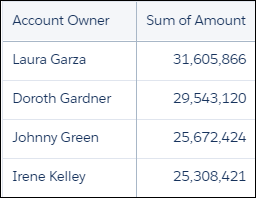
The resulting graph shows the sum of amount for each rep.
1-- grouping rep by all returns all the data in a single row.
2avg_rep = group rep by all;
3
4-- Calculate the average of the Sum of Amount column.
5-- Use the text ‘Average Deal Size’ in the ‘Account Owner’ column
6avg_rep = foreach avg_rep generate "Average deal size" as 'Account_Owner', avg('sum_Amount') as 'sum_Amount';
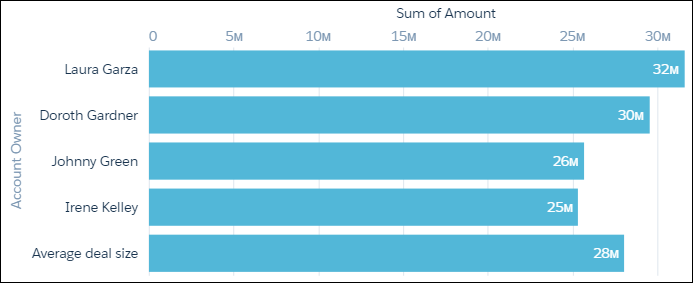
Because the two data streams have the same field names and structure, you can use union to combine them.
1q = union rep, avg_rep;The resulting graph contains the sum of amounts by each rep together with the average amount per rep.
Combine the SAQL fragments to get the complete SAQL statement.
1opt = load "DTC_Opportunity_SAMPLE";
2opt = filter opt by 'Won' == "true";
3
4-- group by owner
5rep = group opt by 'Account_Owner';
6
7-- project the sum of amount for each rep
8rep = foreach rep generate 'Account_Owner' as 'Account_Owner', sum('Amount') as 'sum_Amount';
9
10rep = order rep by 'sum_Amount' desc;
11
12-- grouping rep by all returns all the data in a single row.
13avg_rep = group rep by all;
14
15
16-- Calculate the average of the Sum of Amount column.
17-- Use the text ‘Average Deal Size’ in the ‘Account Owner’ column
18avg_rep = foreach avg_rep generate "Average deal size" as 'Account_Owner', avg('sum_Amount') as 'sum_Amount';
19
20q = union rep, avg_rep;
Considerations
Using a union statement and a join statement in the same query has strict enforcements. When a semi or anti join statement is present, the union statement returns an error if there are:
- mismatched number of columns
- mismatched data types
The errors appear as "Different number of fields found across union streams" or "Different types found for field 1: 'fieldName' in different union inputs."
1q1 = load "Opportunity";
2q2 = load "Opportunity";
3
4q1 =join q1 by (AccountId) semi, q3 by (AccountId);
5
6q2 = group q2 by all;
7q1 = foreach q1 generate q1.'AccountId' as 'AccountId',q1.StageName as 'StageName', q1.'Description' as 'Description', q1.'Id' as 'Id',q1.'Amount' as 'Amount', q1.'Probability' as 'Probability';
8q2 = foreach q2 generate null as 'AccountId', null as 'StageName',null as 'Description',null as 'Id', sum(unique('Amount')) over([..] partition by all) as 'Amount_total',sum(unique('Probability')) over([..] partition by all) as 'Probability';
9q1 = limit q1 5;
10
11qU = union q1, q2;