Note: This release is in preview. Features described here don’t become generally available until the latest general availability date that Salesforce announces for this release. Before then, and where features are noted as beta, pilot, or developer preview, we can’t guarantee general availability within any particular time frame or at all. Make your purchase decisions only on the basis of generally available products and features.

Render a Visualforce Page as a PDF File

You can generate a downloadable, printable PDF file of a Visualforce page using the PDF rendering service.
Convert a page to PDF by changing the <apex:page> tag.
1<apex:page renderAs="pdf">
A Visualforce page rendered as a PDF file displays either in the browser or is downloaded, depending on the browser’s settings. Specific behavior depends on the browser, version, and user settings, and is outside the control of Visualforce.
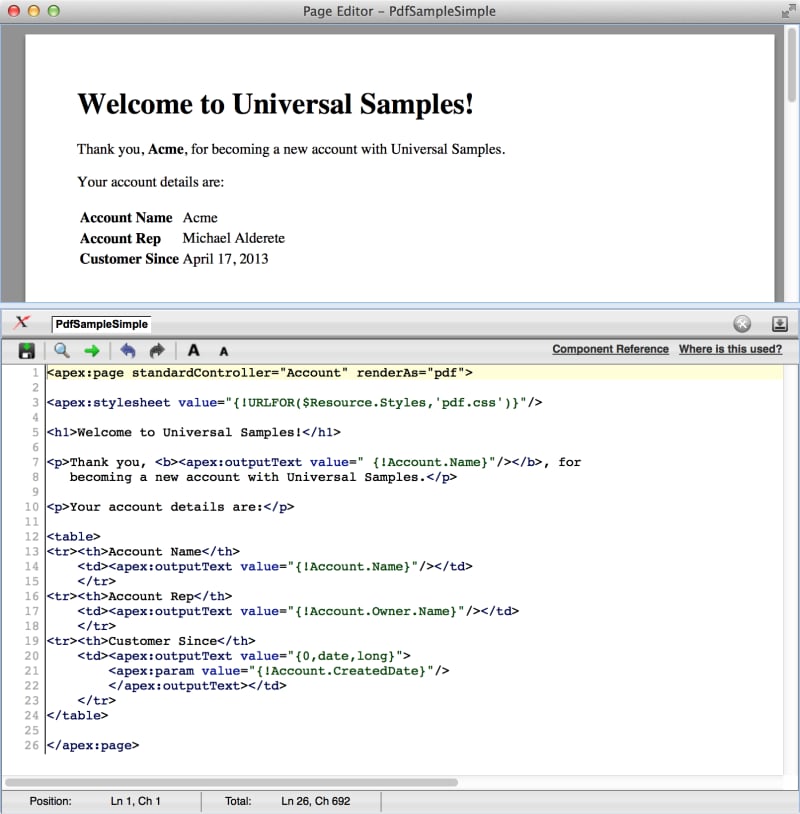
The following page includes some account details and renders as a PDF file.
1<apex:page standardController="Account" renderAs="pdf">
2
3<-- Placeholder CSS file, supply your own, with your branding, etc. -->
4<apex:stylesheet value="{!URLFOR($Resource.Styles,'pdf.css')}"/>
5
6<h1>Welcome to Universal Samples!</h1>
7
8<p>Thank you, <b><apex:outputText value=" {!Account.Name}"/></b>, for 
9   becoming a new account with Universal Samples.</p>
10
11<p>Your account details are:</p>
12
13<table>
14<tr><th>Account Name</th>
15    <td><apex:outputText value="{!Account.Name}"/></td>
16    </tr>
17<tr><th>Account Rep</th>
18    <td><apex:outputText value="{!Account.Owner.Name}"/></td>
19    </tr>
20<tr><th>Customer Since</th>
21    <td><apex:outputText value="{0,date,long}">
22        <apex:param value="{!Account.CreatedDate}"/>
23        </apex:outputText></td>
24    </tr>
25</table>
26    
27</apex:page>
A Visualforce Page Rendered as a PDF File A Visualforce page rendered as a PDF