


Public Sector Developer Guide
 j
jInterest Tagging Business APIs
| Available in: Lightning Experience |
| Available in: Interest Tagging is available with Enterprise, Unlimited, and Performance Editions with the Financial Services Cloud. |
Here are some examples on how the Salesforce UI interacts with the Interest Tags
resources: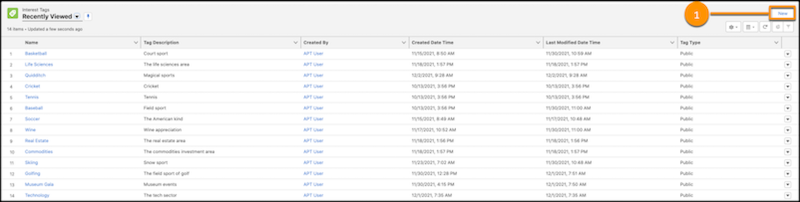
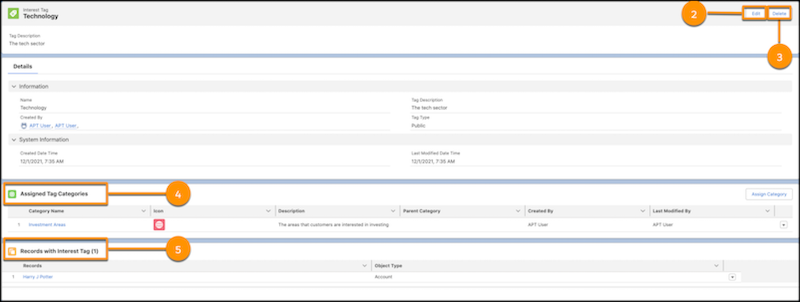
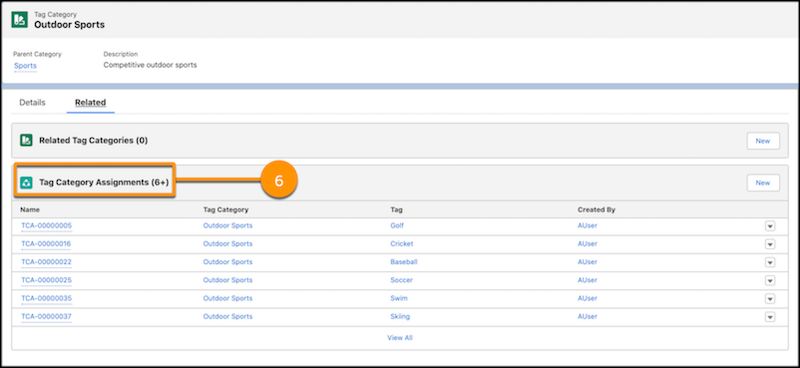
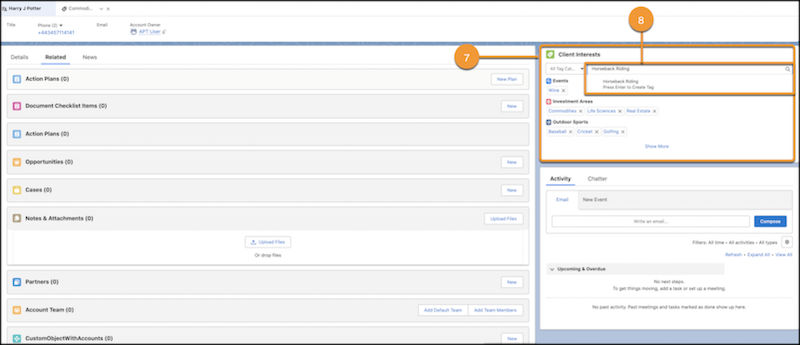
Following are the available Interest Tags resources as numbered in the Salesforce UI:
| Label Number in the UI | Resource | Description |
|---|---|---|
| 1 | /connect/interest-tags/tags | Create an Interest Tag. |
| 2 | /connect/interest-tags/tags/${tagId} | Update an Interest Tag. |
| 3 | /connect/interest-tags/tags?tagId=tagId1 | Delete Interest Tags by tag IDs. |
| 4 | /connect/interest-tags/categories | Retrieve a list of categories assigned to an Interest Tag. |
| 5 | /connect/interest-tags/assignments/tag/${tagId} | Retrieve a list of assignments by an Interest Tag ID. |
| 6 | /connect/interest-tags/tags?categoryId={categoryId} | Retrieve a list of Interest Tags by a tag category ID. |
| 7 | /connect/interest-tags/assignments/entity/${recordId} | Retrieve a list of interest tags grouped by tag categories that are assigned to a Salesforce object record. |
| 8 | /connect/interest-tags/assignments | Create assignments for Interest Tags and the Salesforce object record. |