Validation When You Save Code Changes
Aura component JavaScript code is validated when you save it. Validation ensures that your components are written using best practices and avoid common pitfalls that can make them incompatible with Lightning Locker. Validation happens automatically when you save Aura component resources in the Developer Console, in your favorite IDE, and via API.
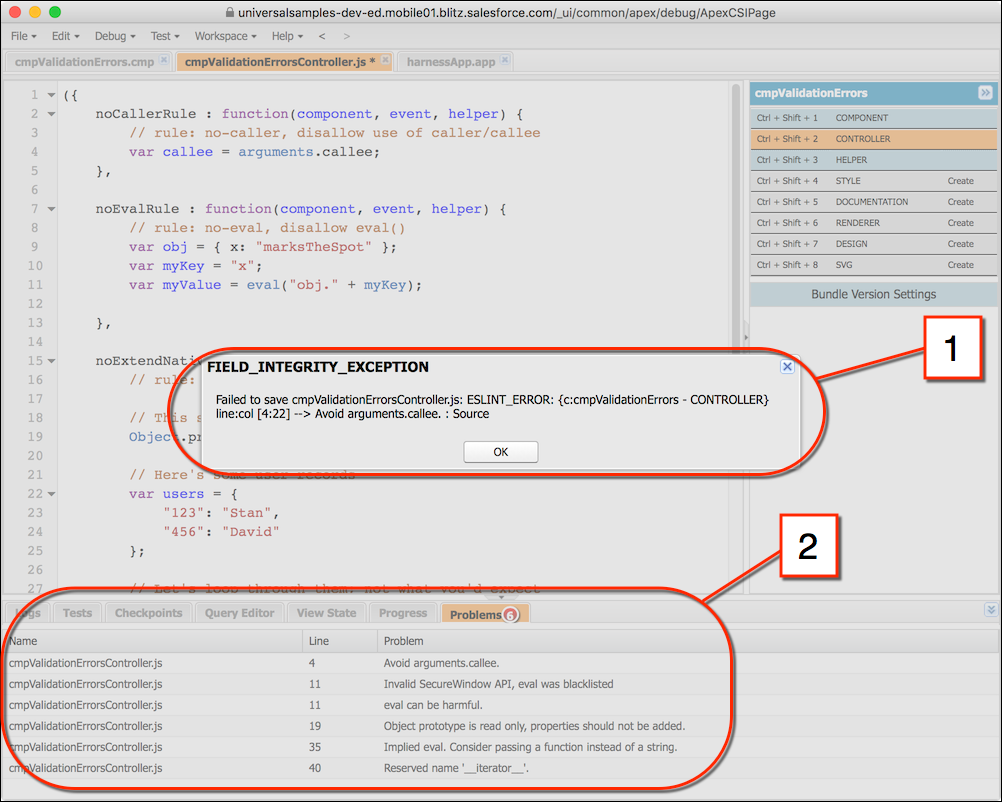
Validation failures are treated as errors and block changes from being saved. Error messages explain the failures. Depending on the tool you’re using, these errors are presented in different ways. For example, the Developer Console shows an alert for the first error it encounters (1), and lists all of the validation errors discovered in the Problems tab (2).
Validations are applied only to components set to API version 41.0 and later. If the validation service prevents you from saving important changes, set the component version to API 40.0 or earlier to disable validations temporarily. When you’ve corrected the coding errors, return your component to API 41.0 or later to save it with passing validations.


 j
j