


Mobile SDK Development Guide
 j
jSDK Manager Classes
| Swift | Objective-C |
|---|---|
| SalesforceManager | SalesforceSDKManager |
| SmartStoreSDKManager | SmartStoreSDKManager |
| MobileSyncSDKManager | MobileSyncSDKManager |
| SalesforceHybridSDKManager | SalesforceHybridSDKManager |
| SalesforceReactSDKManager | SalesforceReactSDKManager |
- SmartStoreSDKManager—subclass of SalesforceManager. For native apps that use SmartStore but not Mobile Sync. Replaces the deprecated SalesforceSDKManagerWithSmartStore class.
- MobileSyncSDKManager—subclass of SmartStoreSDKManager. Provides access to the full range of available Mobile SDK native features.
- SalesforceHybridSDKManager—subclass of MobileSyncSDKManager. For hybrid Cordova apps only. Includes all available Mobile SDK hybrid features.
- SalesforceReactSDKManager—subclass of MobileSyncSDKManager. For React Native apps only. Includes all available Mobile SDK React Native features.
All Mobile SDK apps use SalesforceManager or one of its subclasses to initialize Mobile SDK. To use one of these classes, you call its initializeSDK method in the initialization of your AppDelegate class. Apps normally don’t call SDK manager methods outside of AppDelegate. Apps created with the Mobile SDK native templates use an instance of MobileSyncSDKManager. The effect of this choice is that Mobile SDK internally configures SalesforceSDKManager to use MobileSyncSDKManager as its instance class.
Swift Example
1import Foundation
2import UIKit
3import MobileSync
4
5
6class AppDelegate : UIResponder, UIApplicationDelegate
7{
8    var window: UIWindow?
9
10    override
11    init()
12    {
13        super.init()
14        MobileSyncSDKManager.initializeSDK()
15...
The initializeSDK() call ensures that the correct pieces are in place for using SmartStore, Mobile Sync, and everything in the core SDK. To use a different SDK manager object, import its module and replace MobileSyncSDKManager in your code with the name of the appropriate manager class.
Objective-C Example
1#import <SalesforceSDKCore/SalesforceSDKManager.h>
2...
3#import <MobileSync/MobileSyncSDKManager.h>
4...
5
6@implementation AppDelegate
7
8@synthesize window = _window;
9
10- (instancetype)init
11{
12    self = [super init];
13    if (self) {
14        [MobileSyncSDKManager initializeSDK];
15...
The [MobileSyncSDKManager initializeSDK] message ensures that the correct pieces are in place for using SmartStore, Mobile Sync, and everything in the core SDK. To use a different SDK manager object, import its header file and replace MobileSyncSDKManager in your code with the name of the appropriate manager class.
Application Launch Flow
When the application(_:didFinishLaunchingWithOptions:) message arrives, you initialize the app window and set your root view controller. If appropriate, Mobile SDK executes its login and authentication flow. If the app’s connected app requires a passcode, the passcode verification screen appears before the bootstrap process can continue. The following diagram shows this flow.
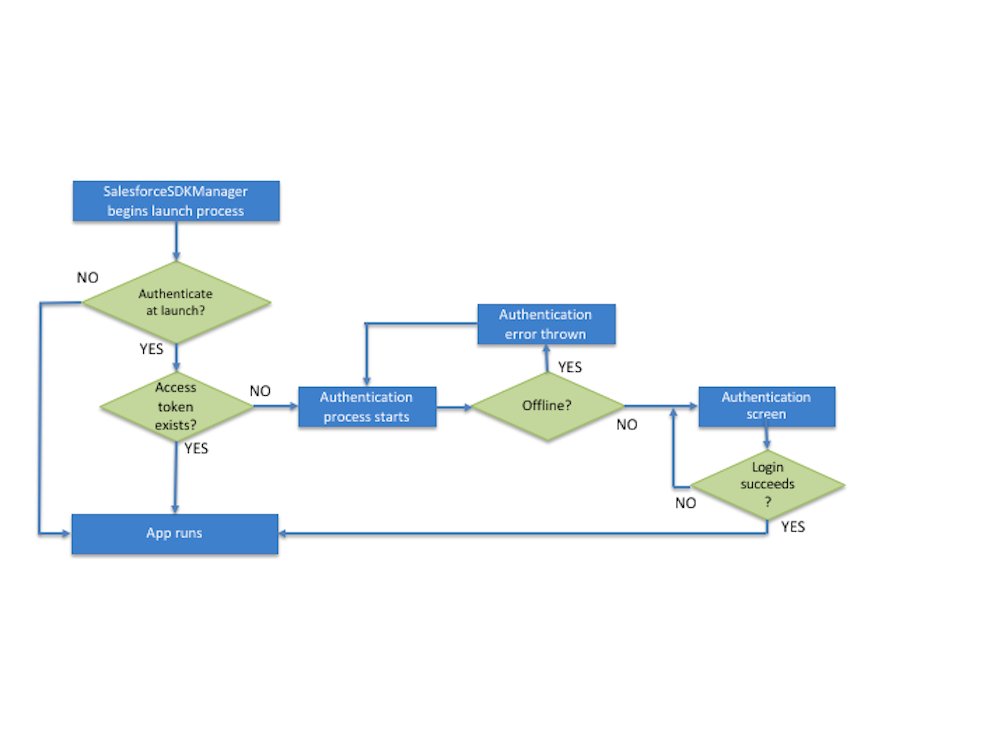
- If a valid access token is found, the flow bypasses Salesforce authentication.
- If no access token is found and the device is offline, the authentication module throws an error and returns the user to the login screen. SalesforceSDKManager doesn’t reflect this event to the app.
Besides what’s shown in the diagram, the SalesforceSDKManager launch process also delegates identity provider and push notification setup to apps that support those features. If the user fails or cancels either the passcode challenge or Salesforce authentication, an internal event fires. Control then returns to AppDelegate.
The SalesforceSDKManager object doesn’t reappear until a user logout, user switch, or token expiration occurs.
Auth Helper Object
| Swift | Objective-C |
|---|---|
| AuthHelper | SFSDKAuthHelper |
- General Logout
-
1handleLogout(completionBlock: (() → Void)!) - For performing operations that apply to all logout scenarios. Use only this method if your app doesn’t support user switching.
- Change Current User
-
1registerBlock(forCurrentUserChangeNotifications(completionBlock: (() → Void)!) - For using a single completion block for logout and user switching operations. Calls the Logout Only method and then the Switch User method, passing your completion block to both methods.
- Logout Only
-
1registerBlock(forLogoutNotifications(completionBlock: (() → Void)!) - For handling logout operations in user-switching scenarios. Forwards your completion block to the handleLogout notification.
- Switch User
-
1registerBlock(forSwitchUserNotifications(completionBlock: (() → Void)!) - For handling user switching and initialization after a logout occurs.