


Force.com Apex コード開発者ガイド
 j
jクラスとキャスト
通常、すべての型情報は実行時に利用できます。つまり、Apex はキャストを許可しています。キャストとは、あるクラスのデータ型を別のクラスのデータ型として割り当てることです。ただし、割り当てるクラスが元のクラスの子である場合に限ります。あるデータ型のオブジェクトを別のデータ型に変換する場合にキャストを使用します。
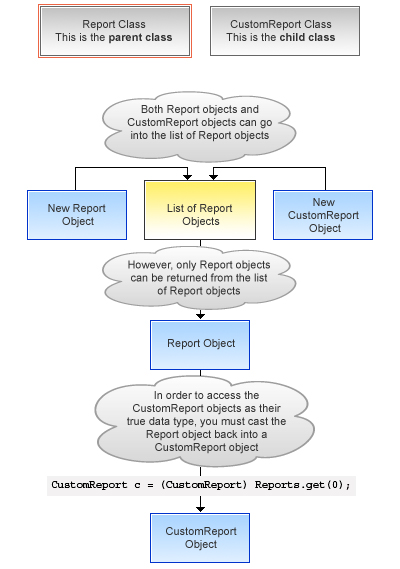
次の例では、CustomReport が Report クラスを拡張しています。そのため、そのクラスの子となっています。つまり、親のデータ型 (Report) のオブジェクトを、子のデータ型 (CustomReport) のオブジェクトにキャストできます。
次のコードブロックでは、まずレポートオブジェクトのリストにカスタムレポートオブジェクトが追加されます。その後、カスタムレポートオブジェクトがレポートオブジェクトとして返され、カスタムレポートオブジェクトとして再度キャストされます。
1swfobject.registerObject("clippy.codeblock-0", "9");
2
3
4
5
6
7
8
9
10
11
12
13
14
15
16
17Public virtual class Report {
18
19   Public class CustomReport extends Report {
20   // Create a list of report objects
21      Report[] Reports = new Report[5];
22
23   // Create a custom report object
24      CustomReport a = new CustomReport();
25
26   // Because the custom report is a sub class of the Report class,
27   // you can add the custom report object a to the list of report objects
28      Reports.add(a);
29
30   // The following is not legal, because the compiler does not know that what you are
31   // returning is a custom report. You must use cast to tell it that you know what
32   // type you are returning
33   // CustomReport c = Reports.get(0);
34
35   // Instead, get the first item in the list by casting it back to a custom report object
36      CustomReport c = (CustomReport) Reports.get(0);
37   }
38}
39
キャストの例
さらに、インターフェース型は、サブインターフェースまたはそのインターフェースを実装しているクラス型にキャストできます。