


Lightning コンポーネント開発者ガイド
 j
jLightning データサービスの例
ここでは、Lightning データサービスを使用して「Quick Contact (取引先責任者のクイック作成)」アクションパネルを作成する詳細な例を示します。
例
この例は、Lightning アクションとして取引先オブジェクトに追加されることを意図しています。取引先レイアウトのアクションのボタンをクリックすると、取引先責任者を新規作成するパネルが開きます。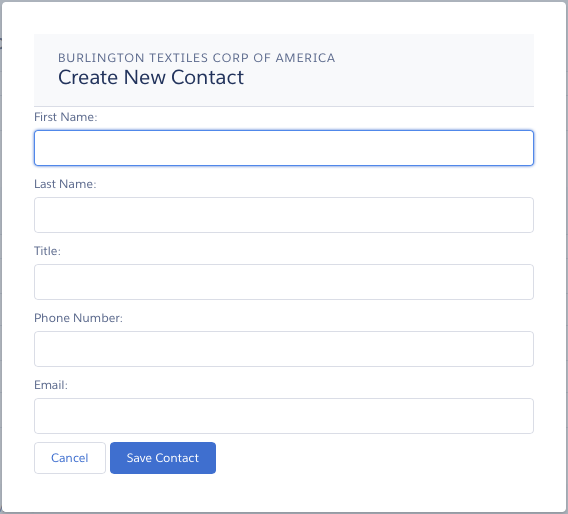
この例は、「レコード固有のアクションのコンポーネントの設定」に記載の例と極めてよく似ています。この 2 つの例を比較すると、@AuraEnabled Apex コントローラを使用した場合と Lightning データサービスを使用した場合の違いがよくわかります。
ldsQuickContact.cmp
1<aura:component implements="force:lightningQuickActionWithoutHeader,force:hasRecordId">
2
3    <aura:attribute name="account" type="Object"/>
4    <aura:attribute name="accountError" type="String"/>
5    <force:recordData aura:id="accountRecordLoader"
6      recordId="{!v.recordId}"
7      fields="Name,BillingCity,BillingState"
8      targetRecord="{!v.account}"
9      targetError="{!v.accountError}"
10      />
11
12    <aura:attribute name="newContact" type="Object" access="private"/>
13    <aura:attribute name="newContactError" type="String" access="private"/>
14    <force:recordData aura:id="contactRecordCreator"
15        layoutType="FULL"
16        targetRecord="{!v.newContact}"
17        targetError="{!v.newContactError}"
18        />
19
20    <aura:handler name="init" value="{!this}" action="{!c.doInit}"/>
21
22    <!-- Display a header with details about the account -->
23    <div class="slds-page-header" role="banner">
24        <p class="slds-text-heading--label">{!v.account.Name}</p>
25        <h1 class="slds-page-header__title slds-m-right--small
26            slds-truncate slds-align-left">Create New Contact</h1>
27    </div>
28
29    <!-- Display Lightning Data Service errors, if any -->
30    <aura:if isTrue="{!not(empty(v.accountError))}">
31        <div class="recordError">
32            <ui:message title="Error" severity="error" closable="true">
33                {!v.accountError}
34            </ui:message>
35        </div>
36    </aura:if>
37    <aura:if isTrue="{!not(empty(v.newContactError))}">
38        <div class="recordError">
39            <ui:message title="Error" severity="error" closable="true">
40                {!v.newContactError}
41            </ui:message>
42        </div>
43    </aura:if>
44
45    <!-- Display the new contact form -->
46     <lightning:input aura:id="contactField" name="firstName" label="First Name"
47                     value="{!v.newContact.FirstName}" required="true"/>
48
49    <lightning:input aura:id="contactField" name="lastname" label="Last Name"
50                  value="{!v.newContact.LastName}" required="true"/>
51
52    <lightning:input aura:id="contactField" name="title" label="Title"
53                  value="{!v.newContact.Title}" />
54
55    <lightning:input aura:id="contactField" type="phone" name="phone" label="Phone Number"
56                     pattern="^(1?(-?\d{3})-?)?(\d{3})(-?\d{4})$"
57                     messageWhenPatternMismatch="The phone number must contain 7, 10, or 11 digits. Hyphens are optional."
58                   value="{!v.newContact.Phone}" required="true"/>
59
60    <lightning:input aura:id="contactField" type="email" name="email" label="Email"
61                value="{!v.newContact.Email}" />
62
63    <lightning:button label="Cancel" onclick="{!c.handleCancel}" class="slds-m-top--medium" />
64    <lightning:button label="Save Contact" onclick="{!c.handleSaveContact}"
65               variant="brand" class="slds-m-top--medium"/>
66
67
68</aura:component>
ldsQuickContactController.js
1({
2    doInit: function(component, event, helper) {
3        component.find("contactRecordCreator").getNewRecord(
4            "Contact",
5            null,
6            null,
7            false,
8            $A.getCallback(function() {
9                var rec = component.get("v.newContact");
10                var error = component.get("v.newContactError");
11                if(error || (rec === null)) {
12                    console.log("Error initializing record template: " + error);
13                }
14                else {
15                    console.log("Record template initialized: " + rec.sobjectType);
16                }
17            })
18        );
19    },
20
21    handleSaveContact: function(component, event, helper) {
22        if(helper.validateContactForm(component)) {
23            component.set("v.newContact.AccountId", component.get("v.recordId"));
24            component.find("contactRecordCreator").saveRecord(function(saveResult) {
25                if (saveResult.state === "SUCCESS" || saveResult.state === "DRAFT") {
26
27                    // Success! Prepare a toast UI message
28                    var resultsToast = $A.get("e.force:showToast");
29                    resultsToast.setParams({
30                        "title": "Contact Saved",
31                        "message": "The new contact was created."
32                    });
33
34                    // Update the UI: close panel, show toast, refresh account page
35                    $A.get("e.force:closeQuickAction").fire();
36                    resultsToast.fire();
37
38                    // Reload the view so components not using force:recordData
39                    // are updated
40                    $A.get("e.force:refreshView").fire();
41                }
42                else if (saveResult.state === "INCOMPLETE") {
43                    console.log("User is offline, device doesn't support drafts.");
44                }
45                else if (saveResult.state === "ERROR") {
46                    console.log('Problem saving contact, error: ' +
47                                 JSON.stringify(saveResult.error));
48                }
49                else {
50                    console.log('Unknown problem, state: ' + saveResult.state +
51                                ', error: ' + JSON.stringify(saveResult.error));
52                }
53            });
54        }
55    },
56
57    handleCancel: function(component, event, helper) {
58        $A.get("e.force:closeQuickAction").fire();
59    },
60})
ldsQuickContactHelper.js
1({
2    validateContactForm: function(component) {
3        var validContact = true;
4
5         // Show error messages if required fields are blank
6        var allValid = component.find('contactField').reduce(function (validFields, inputCmp) {
7            inputCmp.showHelpMessageIfInvalid();
8            return validFields && inputCmp.get('v.validity').valid;
9        }, true);
10
11        if (allValid) {
12            // Verify we have an account to attach it to
13            var account = component.get("v.account");
14            if($A.util.isEmpty(account)) {
15                validContact = false;
16                console.log("Quick action context doesn't have a valid account.");
17            }
18        	return(validContact);
19
20        }
21	}
22
23})