


Point of Sale API Developer Guide for Hyperforce Users
Accessing Point of Sale APIs externally from Hyperforce involves a secure, token-based authentication process. This guide outlines the steps required to generate a JSON Web Token (JWT) and invoke the Point of Sale API.
For a comprehensive list of APIs and SPIs, see Point of Sale API Specifications.
Note
Configuration and Setup
Step 1: Configure External Client App
Create an External Client App with OAuth and JWT enabled. See Create a Local External Client App in Salesforce Help.
Required OAuth Scopes
When you create the External Client App, select these OAuth scopes:
- Manage user data via APIs (api) - Provides access to user data
- Perform requests at any time (refresh_token, offline_access) - Allows obtaining OAuth access tokens
- Access the Salesforce API Platform (sfap_api) - Enables REST API platform access
Required OAuth Settings
Select these additional OAuth settings:
- Enable Client Credentials Flow - Permits the app to exchange client credentials for access tokens
- Issue JSON Web Token (JWT)-based access tokens for named users - Allows token issuance for named users
Policies Configuration
After creating the app, configure the Policies tab:
- Navigate to the Policies tab of your External Client App and click Edit.
- Select the Enable Client Credentials Flow checkbox.
- Set a Run As user.
- Select the Issue JSON Web Token (JWT)-based access tokens checkbox. By default, this token expires in 30 minutes.
Step 2: Retrieve Key Values
JWT generation requires the domain, consumer key, and consumer secret, all sourced from the Salesforce Org where the merchant is configured.
The API token must come from the same Salesforce Org as the merchant. Tokens from a different Org fail authentication.
Important
- Log into the Organization or Sandbox Organization where the merchant was created.
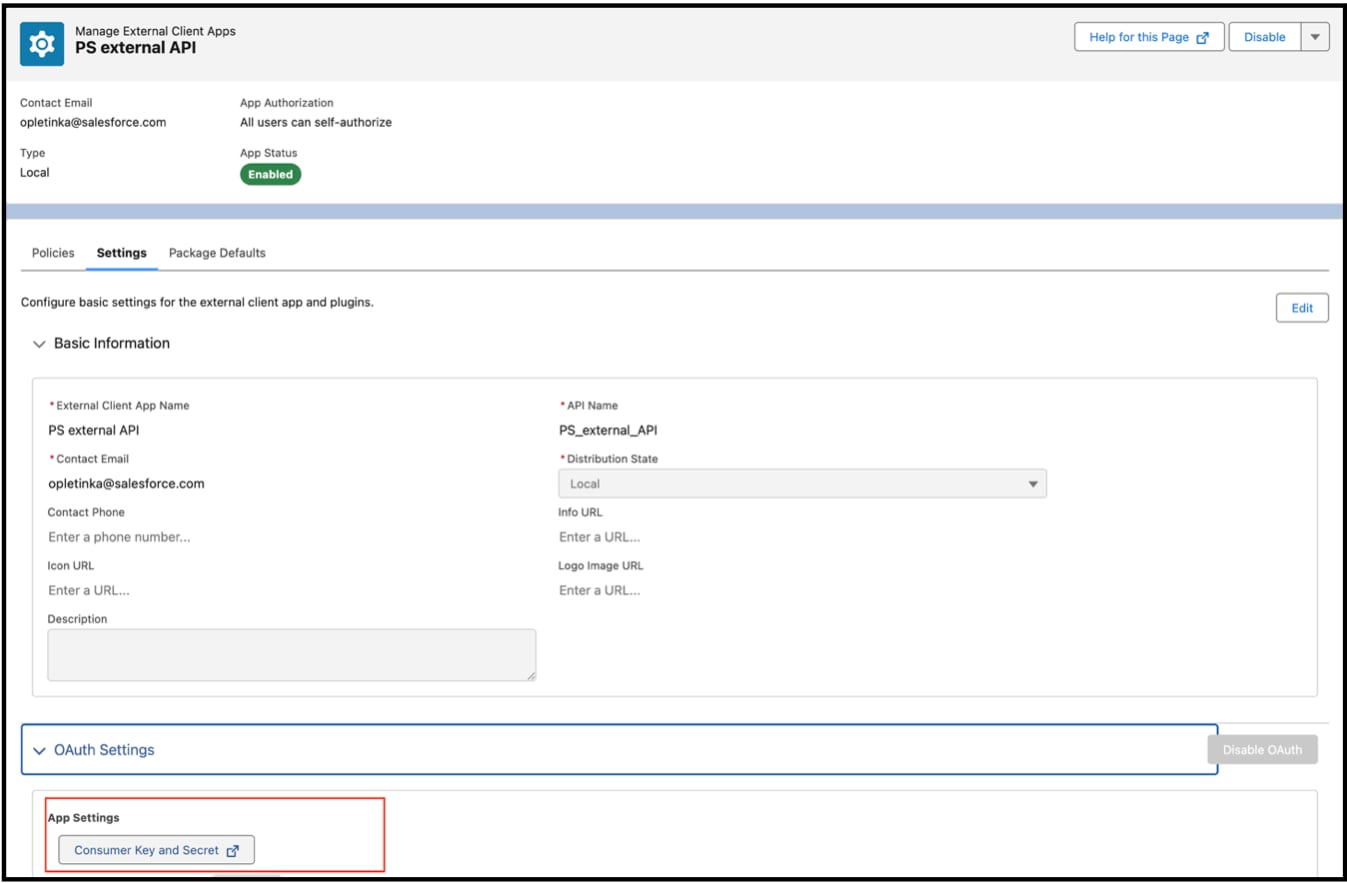
- From Setup, in the Quick Find box, enter “External Client Apps”, and then select External Client Apps Manager.
- Select the merchant’s app, and click the Settings tab.
- Expand the OAuth Settings section.
- Click the Consumer Key and Secret button, and copy the key and secret. Save these values in a secure location.
- From Setup, in the Quick Find box, enter “My Domain”, and then select My Domain.
- Copy the value shown in the Current My Domain URL field. Save this value in a secure location.
Step 3: Request JWT
Request a JWT from Salesforce. Use this example POST request as a starting point. Replace the domain, client ID, and client Secret with the values you copied from Step 1.
Sample Token Request
1curl -X POST https://{my_domain}/services/oauth2/token -d "grant_type=client_credentials&client_id={consumer_key}&client_secret={consumer_secret}"Sample Response
1{
2  "access_token": "eyJhbGciOiJIUzI1NiIsInR5cCI6IkpXVCJ9.eyJzdWIiOiIxMjM0NTY3ODkwIiwibmFtZSI6IlNBTVBMRSBKV1QgRk9SIERFTU8gUFVSUE9TRVMiLCJpYXQiOjE1MTYyMzkwMjJ9.XYwlhE_q0-yVwswgaXuOx2nbXRFpEbagcScXnjWt2yo",
3  "signature": "uSs/SAlD/i+pL93EdLVUUY4F8uqfHHtteFii2E3zkhc=",
4  "token_format": "jwt",
5  "scope": "sfap_api einstein_gpt_api api",
6  "instance_url": "https://sample-company.my.salesforce.com",
7  "id": "https://login.pc-rnd.salesforce.com/id/XYZ/ABC",
8  "token_type": "Bearer",
9  "issued_at": "1713195676742",
10  "api_instance_url": "https://api.salesforce.com"
11}
Extract the access token value from the response. This token is used for the Authorization header in the API requests.
Sample Authorization Header
1Authorization: Bearer {access_token}Step 4: Make a Request
API requests require the headers in this list. The x-locale and x-region headers are merchant-specific, not Org-specific. A single Org (or Sandbox Org) can contain multiple merchants. These headers help route the request to the correct merchant within the Org.
- x-salesforce-region
- Content-Type
- x-locale
- x-region
- Authorization
Make sure that Content-Type is set to application/json in all requests.
Important
Environment-Specific API Endpoints
The base URL and x-salesforce-region header value depend on the merchant’s environment. Use the correct values for successful API requests. Make sure that the region and locale values match the region and locale for the merchant.
| Environment | Production Endpoint (Non-Sandbox) | Sandbox Endpoint | Required x-salesforce-region Value |
|---|---|---|---|
| Production | https://api.salesforce.com/commerce/retailcloud/v1-alpha.1 | https://api.salesforce.com/commerce/retailcloud/v1-alpha.1/sandbox | US: us-east-2 EU/EMEA: eu-north-1 APAC: ap-southeast-2 |
| Staging | https://stage.api.salesforce.com/commerce/retailcloud/v1-alpha.1 | https://stage.api.salesforce.com/commerce/retailcloud/v1-alpha.1/sandbox | us-east-2 |
| Test | https://test.api.salesforce.com/commerce/retailcloud/v1-alpha.1 | https://test.api.salesforce.com/commerce/retailcloud/v1-alpha.1/sandbox | us-west-2 |
| Dev | https://dev.api.salesforce.com/commerce/retailcloud/v1-alpha.1 | https://dev.api.salesforce.com/commerce/retailcloud/v1-alpha.1/sandbox | us-west-2 |
In Production, use the x-salesforce-region value that matches the region where the merchant is hosted (US, EU/EMEA, or APAC).
Example Request
This example targets a Production Sandbox environment.
1curl --location 'https://api.salesforce.com/commerce/retailcloud/v1-alpha.1/sandbox/merchant/v2/users' \
2--header 'x-salesforce-region: us-east-1' \
3--header 'Content-Type: application/json' \
4--header 'x-locale: en_US' \
5--header 'x-region: US' \
6--header 'Authorization: Bearer <NEW_TOKEN_GENERATED_FROM_CORRECT_ORG>' j
j