


Code Extension in Data 360
As of October 14, 2025, Data Cloud has been rebranded to Data 360. During this transition, you may see references to Data Cloud in our application and documentation. While the name is new, the functionality and content remains unchanged.
Note
Code extension isn’t currently supported in orgs that have Bring Your Own Key (BYOK) enabled.
Note
You can bring your custom Python code into Data 360 to extend Data 360’s native capabilities by using code extension. If the native Data 360 features don’t meet your business requirements, deploy your custom logic to supported Data 360 features.
Code extension supports two types of custom code, which differ in how they run:
- Scripts run as a batch data transform—a job that you run on demand or schedule. See Use Custom Scripts in Data 360.
- Functions run as part of the search index pipeline, where they control how content is chunked for search and AI retrieval. See Use Custom Functions in Data 360.
Code Extension Workflow
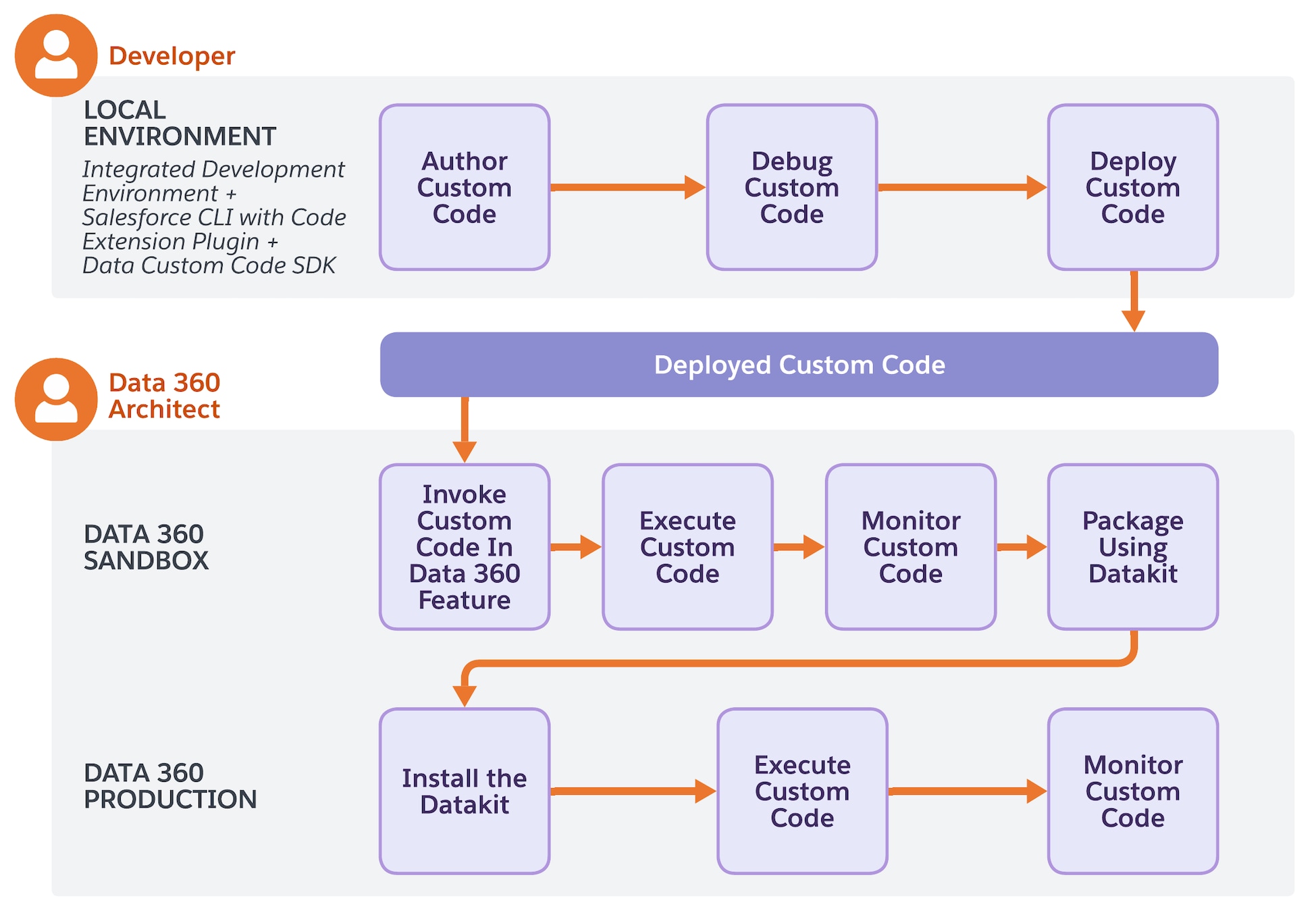
The code extension workflow spans local development, sandbox validation, and production deployment. Developers author and debug code locally, then deploy to Data 360 sandbox. Users with a Data Cloud Architect permission set manage code execution, monitoring, and migration in Data 360 environments.
-
Write and Validate a Code Extension: Developers write Python code in their local integrated development environment (IDE) and validate it locally by using Salesforce CLI against a sandbox org. See Set Up Salesforce CLI for Code Extension.
-
Deploy to Sandbox: Developers deploy their validated code to Data 360 sandbox by using the Web UI, API, or Salesforce CLI.
-
Invoke Code Extension in Sandbox: Data 360 users invoke the deployed code extension in a Data 360 feature. For a custom script, create a batch data transform that uses it. For a custom function, select it as the chunking strategy when you create a search index.
-
Run Code Extension in Sandbox: Data 360 users run the Data 360 feature to execute the code extension in the sandbox environment. For a custom script, run or schedule the batch data transform. For a custom function, the function runs when the search index builds.
-
Monitor and Validate in Sandbox: Data 360 users review execution logs, performance metrics, and output data to verify that the code extension works as expected.
-
Package for Production: After successful validation in the sandbox, Data 360 users package the code extension, the Data 360 features that use it, and their dependencies into a data kit for migration to production.
-
Install Data Kit in Production: Data 360 users install the packaged data kit containing the validated components into the production environment.
-
Invoke Code Extension in Production (if needed): If only the code extension was migrated, Data 360 users invoke it in a Data 360 feature. For a custom script, create a batch data transform that uses it. For a custom function, select it as the chunking strategy in a search index.
-
Run Code Extension in Production: Data 360 users run the Data 360 feature to execute the code extension and process live production data. For a custom script, run or schedule the batch data transform. For a custom function, the function runs when the search index builds.
-
Monitor in Production: Data 360 users monitor execution logs, performance metrics, and output data to ensure reliable operation in production.
Next Step
- Set Up Salesforce CLI for Code Extension
- Use Custom Scripts in Data 360
- Use Custom Functions in Data 360
See Also
 j
j