Care Management (Managed Package)
Clinical data from electronic health records (EHR) or other clinical systems is critical to planning, executing, and managing coordinated care plans for patients. You can integrate clinical data with Salesforce using several standard APIs to map messages from EHR systems into Health Cloud objects and fields.
| Required Editions |
|---|
| Available in: Lightning Experience Available in: Enterprise and Unlimited Editions with Health Cloud |
- Starting with the Spring ’23 release, all development in Health Cloud will be built on the FHIR R4-aligned Integrated Care Management data model. Integrated Care Management is a care plan solution built directly on the core Salesforce platform. Unlike the older Care Plans model, there is no dependency on the Health Cloud managed package. The packaged objects in the Care Plans data model won’t be used for future development.
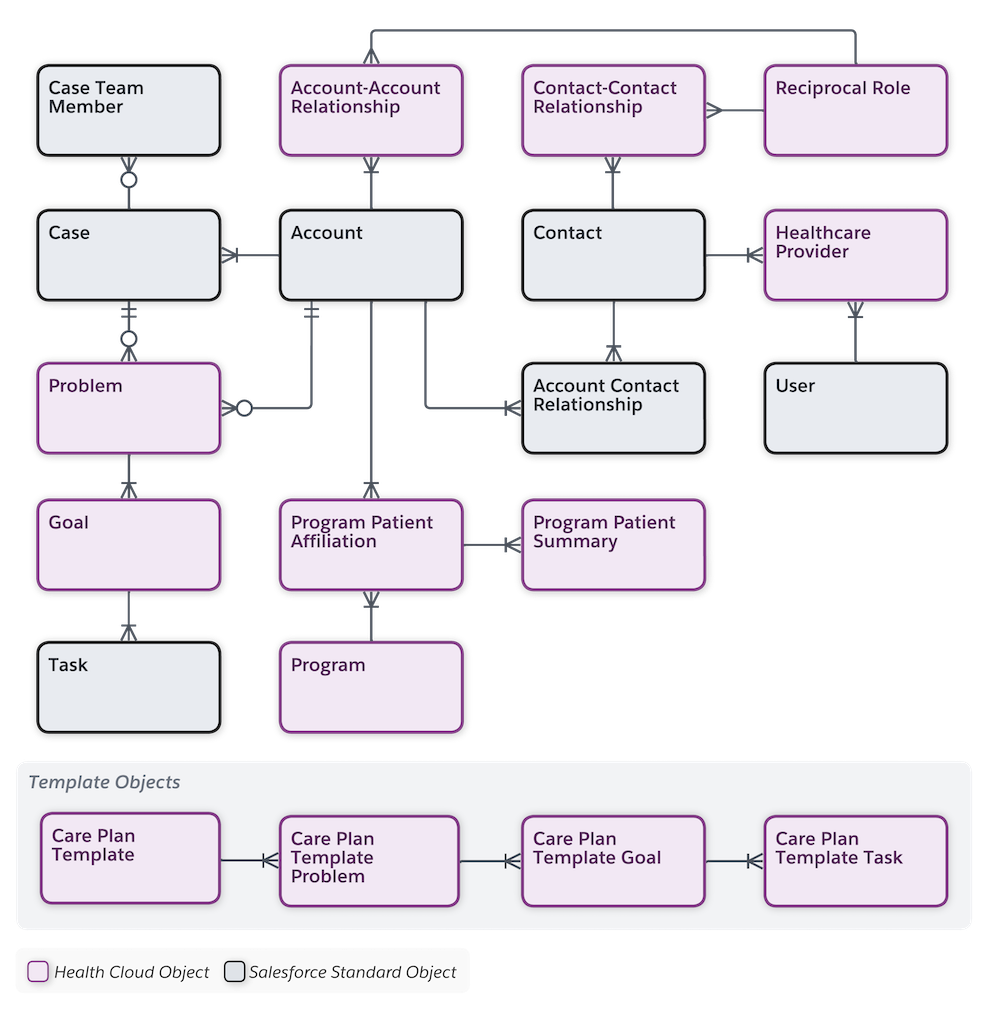
The Health Cloud clinical data model is similar to the FHIR® standard. This supports easier and more straightforward clinical data integration from other source systems. When devising an implementation strategy, you or your integration partner map messages from the EHR system to the correct Health Cloud object. Data is replicated into the clinical data model with read-only access. Data that originates in the EHR or other clinical systems is view-only, so the source system remains the system of record.
-
Represents the template used to create a care plan including the problems, goals, and tasks that care coordinators use to manage and mitigate a medical condition.
-
Represents a goal included in the care plan template.
-
Represents a problem included in the care plan template.
-
Represents a task that’s included in the care plan template.
-
Represents a one-to-one relationship between two accounts, each with a distinct role in relation to the other.
-
Represents the demographics and other administrative information about a patient who’s receiving health-related services.
-
Defines a tab navigation menu option on the patient card to open standard and custom pages or URLs as either primary or secondary tabs. Clicking an item in the menu opens a new tab or subtab for that patient.
-
Represents the intended objectives of carrying out a care plan.
-
Represents the conditions, problems, concerns, diagnoses, and so on, that this plan manages and mitigates.
-
Represents a mapping of patient conditions to Hierarchical Condition Category (HCC) codes.
-
Represents a relationship between two contacts, each with a distinct role in relation to the other.
-
Represents a relationship between two objects (for example, patient Account and EhrPatient__c) used in patient list view pages.
-
Represents a custom grouping of fields.
-
Represents a custom label in Health Cloud.
-
Represents the column used by filter criteria for the patient segmentation functionality.
-
Represents the condition used by filter criteria for the patient segmentation functionality.
-
Represents the filter criteria for the patient segmentation functionality. Consists of a list of filter conditions and a list of columns that display as part of the filter view on the patient list view page.
-
PatientCardViewConfiguration__c
Represents configuration options for the patient card.
-
Represents the life events of an individual, such as marriage, birth of a child, birthday, engagement.
-
Represents an inverse role. For example, if one role is parent, the reciprocal role is child.
-
Represents the program that the patient is affiliated with.
-
Represents a record that contains calculated values for the relevant program that the patient is enrolled in.
-
Represents a person providing healthcare.
-
Represents an event type on the timeline view in the patient care console.