To save assessment responses from the runtime Omniscript on the Omni Assessment Task page to the AssessmentResponses class, implement the VlocityOpenInterface interface.
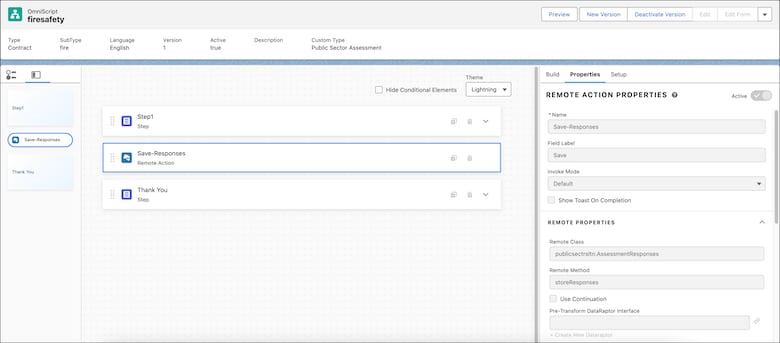
Specify the implemented Apex class name in the Remote Actions section of the OmniScript page. A Remote Action calls the specified Apex class and its method to save the assessment form in the Assessment and AssessmentQuestionResponse Salesforce objects.
This screenshot shows the Apex class name and its method as specified in the Omniscript Remote Action Properties section:
Special Access Rules
Public Sector and Dynamic Assessment permission sets are required to use this Apex class.
Example
1global class OmniSave implements<Vlocity_Namespace>.VlocityOpenInterface{2 public Boolean invokeMethod(String methodName, Map<String,Object>input, Map<String,Object>output, Map<String,Object>options){3 PublicSectrSltn.AssessmentResponses.storeResponses(input,output,options);4 return true;5}6}


 j
j