


 j
jBig Objects Best Practices
Deploying and Retrieving Metadata with the Zip File
Delete Data in a Custom Big Object
Big Objects Queueable Example
Big Object Query Examples
View Big Object Data in Reports and Dashboards
Previous Versions
You can define custom big objects with Metadata API or in Setup. After you define and deploy a big object, you can view it or add fields in Setup. After you’ve deployed a big object, you can’t edit or delete the index. To change the index, start over with a new big object. To define a big object in Setup, see Salesforce Help.
| Required Editions |
|---|
| Available in: both Salesforce Classic and Lightning Experience |
| Available in: Enterprise, Performance, Unlimited, and Developer Editions for up to 1 million records. |
Define a custom big object through Metadata API by creating XML files that contain its definition, fields, and index.
While custom big objects use the CustomObject metadata type, some parameters are unique to big objects and others aren’t applicable. The specific metadata parameters that apply to big objects are outlined in this document.
Note
Object names must be unique across all standard objects, custom objects, external objects, and big objects in the org. In the API, the names of custom big objects have a suffix of two underscores immediately followed by a lowercase “b” (__b). For example, a big object named “HistoricalInventoryLevels” is seen as HistoricalInventoryLevels__b in that organization’s WSDL. We recommend that you make object labels unique across all objects in the org - standard, custom, external and big objects.
| Field Name | Field Type | Description |
|---|---|---|
deploymentStatus | DeploymentStatus (enumeration of type string) | Custom big object’s deployment status (Deployed for all big objects) |
fields | CustomField[] | Definition of a field in the big object |
fullName | string | Unique API name of the big object |
indexes | Index[] | Definition of the index |
label | string | Big object’s name as displayed in the UI |
pluralLabel | string | Field plural name as displayed in the UI |
| Field Name | Field Type | Description |
|---|---|---|
fullName | string | Unique API name of a field. |
label | string | Field name as displayed in the UI. |
length | int | Length of a field in characters (Text and LongTextArea fields only). The total number of characters across all text fields in an index can’t exceed 100. To increase this value, contact Salesforce Customer Support. Email fields are 80 characters. Phone fields are 40 characters. Keep these lengths in mind when designing your index because they count toward the 100 character limit. |
pluralLabel | string | Field plural name as displayed in the UI. |
precision | int | Number of digits for a number value. For example, the number 256.99 has a precision of 5 (number fields only). |
referenceTo | string | Related object type for a lookup field (lookup fields only). |
relationshipName | string | Name of a relationship as displayed in the UI (lookup fields only). |
required | boolean | Specifies whether the field is required. All fields that are part of the index must be marked as required. |
scale | int | Number of digits to the right of the decimal point for a number value. For example, the number 256.99 has a scale of 2 (number fields only). |
type | FieldType | Field type. Supports DateTime, Email, Lookup, Number, Phone, Text, LongTextArea, and URL. You can’t include LongTextArea and URL fields in the index. |
Uniqueness isn’t supported for custom fields.
Note
Represents an index defined within a custom big object. Use this metadata type to define the composite primary key (index) for a custom big object.
| Field Name | Field Type | Description |
|---|---|---|
fields | IndexField[] | The definition of the fields in the index. |
label | string | Required. This name is used to refer to the big object in the user interface. Available in API version 41.0 and later. |
Defines which fields make up the index, their order, and sort direction. The order in which the fields are defined determines the order fields are listed in the index.
The total number of characters across all text fields in an index can’t exceed 100. To increase this value, contact Salesforce Customer Support.
Note
| Field Name | Field Type | Description |
|---|---|---|
name | string | Required. The API name for the field that’s part of the index. This value must match the fullName value for the corresponding field in the fields section and be marked as required. It’s important to note that when querying a big object record via SOQL and passing the results as arguments to the delete API, if any index field name has a leading or trailing white space, you can’t delete the big object record. |
sortDirection | string | Required. The sort direction of the field in the index. Valid values are ASC for ascending order and DESC for descending order. |
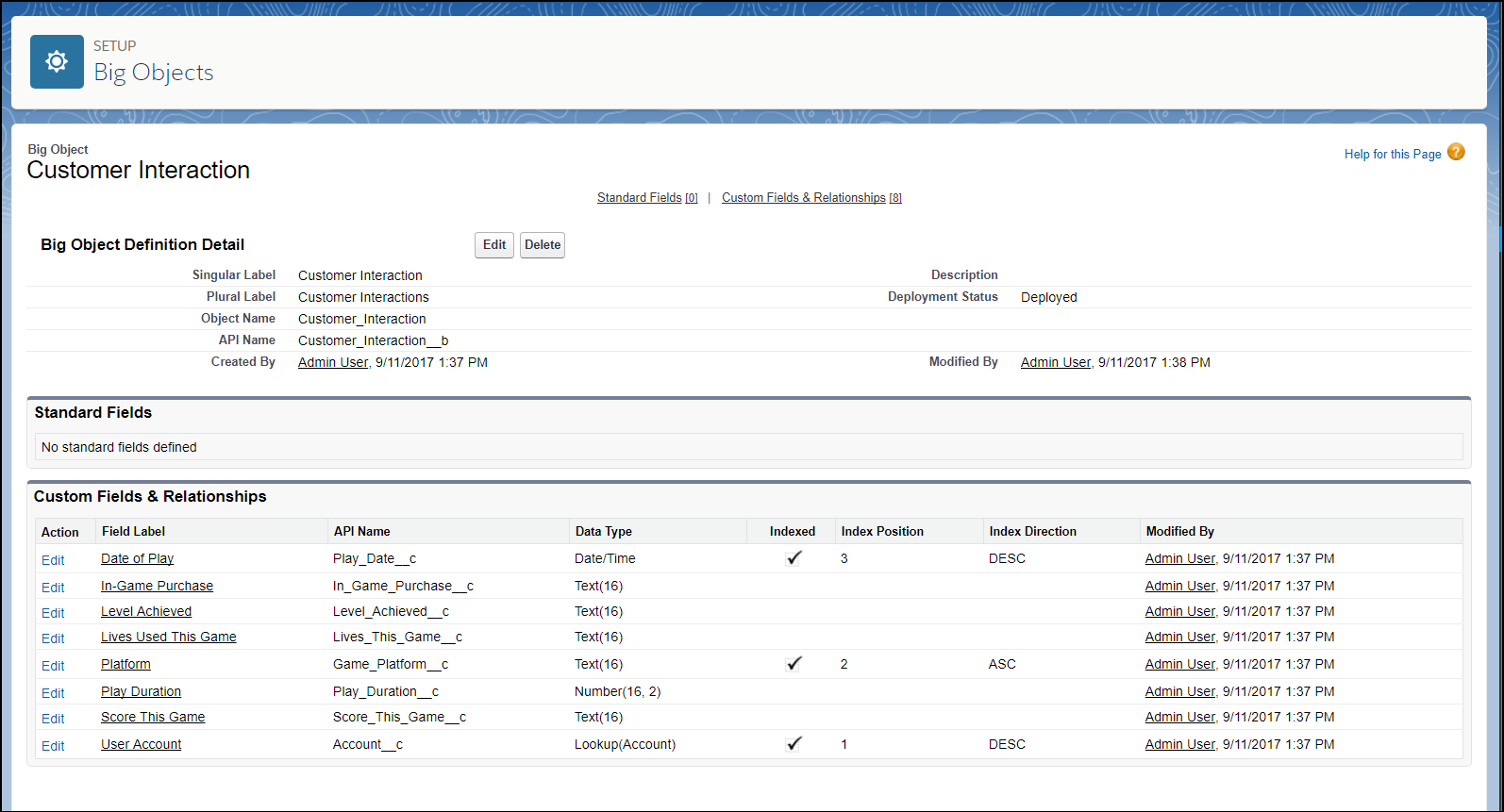
The following XML excerpts create metadata files that you can deploy. Each Customer Interaction object represents customer data from a single session in an online video game. The Account__c, Game_Platform__c, and Play_Date__c fields define the index, and a lookup field relates the Customer Interactions to the Account object.
Customer_Interaction__b.object
1<?xml version="1.0" encoding="UTF-8"?>
2<CustomObject xmlns="http://soap.sforce.com/2006/04/metadata">
3    <deploymentStatus>Deployed</deploymentStatus>
4
5    <fields>
6        <fullName>In_Game_Purchase__c</fullName>
7        <label>In-Game Purchase</label>
8        <length>16</length>
9        <required>false</required>
10        <type>Text</type>
11        <unique>false</unique>
12    </fields>
13
14    <fields>
15        <fullName>Level_Achieved__c</fullName>
16        <label>Level Achieved</label>
17        <length>16</length>
18        <required>false</required>
19        <type>Text</type>
20        <unique>false</unique>
21    </fields>
22
23    <fields>
24        <fullName>Lives_This_Game__c</fullName>
25        <label>Lives Used This Game</label>
26        <length>16</length>
27        <required>false</required>
28        <type>Text</type>
29        <unique>false</unique>
30    </fields>
31
32    <fields>
33        <fullName>Game_Platform__c</fullName>
34        <label>Platform</label>
35        <length>16</length>
36        <required>true</required>
37        <type>Text</type>
38        <unique>false</unique>
39    </fields>
40
41     <fields>
42        <fullName>Score_This_Game__c</fullName>
43        <label>Score This Game</label>
44        <length>16</length>
45        <required>false</required>
46        <type>Text</type>
47        <unique>false</unique>
48    </fields>
49
50    <fields>
51        <fullName>Account__c</fullName>
52        <label>User Account</label>
53        <referenceTo>Account</referenceTo>
54        <relationshipName>Game_User_Account</relationshipName>
55        <required>true</required>
56        <type>Lookup</type>
57    </fields>
58
59    <fields>
60        <fullName>Play_Date__c</fullName>
61        <label>Date of Play</label>
62        <required>true</required>
63        <type>DateTime</type>
64    </fields>
65
66    <fields>
67        <fullName>Play_Duration__c</fullName>
68        <label>Play Duration</label>
69        <required>false</required>
70        <type>Number</type>
71        <scale>2</scale>
72        <precision>18</precision>
73    </fields>
74
75    <indexes>
76        <fullName>CustomerInteractionsIndex</fullName>
77        <label>Customer Interactions Index</label>
78        <fields>
79            <name>Account__c</name>
80            <sortDirection>DESC</sortDirection>
81        </fields>
82        <fields>
83            <name>Game_Platform__c</name>
84            <sortDirection>ASC</sortDirection>
85        </fields>
86        <fields>
87        <name>Play_Date__c</name>
88        <sortDirection>DESC</sortDirection>
89        </fields>
90    </indexes>
91
92    <label>Customer Interaction</label>
93    <pluralLabel>Customer Interactions</pluralLabel>
94</CustomObject>
package.xml
1<?xml version="1.0" encoding="UTF-8"?>
2<Package xmlns="http://soap.sforce.com/2006/04/metadata">
3    <types>
4        <members>*</members>
5        <name>CustomObject</name>
6    </types>
7    <types>
8        <members>*</members>
9        <name>PermissionSet</name>
10    </types>
11    <version>41.0</version>
12</Package>
Customer_Interaction_BigObject.permissionset
1<?xml version="1.0" encoding="UTF-8"?>
2<PermissionSet xmlns="http://soap.sforce.com/2006/04/metadata">
3
4    <label>Customer Interaction Permission Set</label>
5
6    <fieldPermissions>
7        <editable>true</editable>
8        <field>Customer_Interaction__b.In_Game_Purchase__c</field>
9        <readable>true</readable>
10    </fieldPermissions>
11
12    <fieldPermissions>
13        <editable>true</editable>
14        <field>Customer_Interaction__b.Level_Achieved__c</field>
15        <readable>true</readable>
16    </fieldPermissions>
17
18    <fieldPermissions>
19        <editable>true</editable>
20        <field>Customer_Interaction__b.Lives_This_Game__c</field>
21        <readable>true</readable>
22    </fieldPermissions>
23
24
25    <fieldPermissions>
26        <editable>true</editable>
27        <field>Customer_Interaction__b.Play_Duration__c</field>
28        <readable>true</readable>
29    </fieldPermissions>
30
31    <fieldPermissions>
32        <editable>true</editable>
33        <field>Customer_Interaction__b.Score_This_Game__c</field>
34        <readable>true</readable>
35    </fieldPermissions>
36
37
38</PermissionSet>Use Metadata API and the Ant Migration Tool to deploy. When building files to deploy a custom big object, make sure the object file is in a folder called objects and the permissionset file is in a folder called permissionsets. Put the package.xml file in the root directory and not in a subfolder.
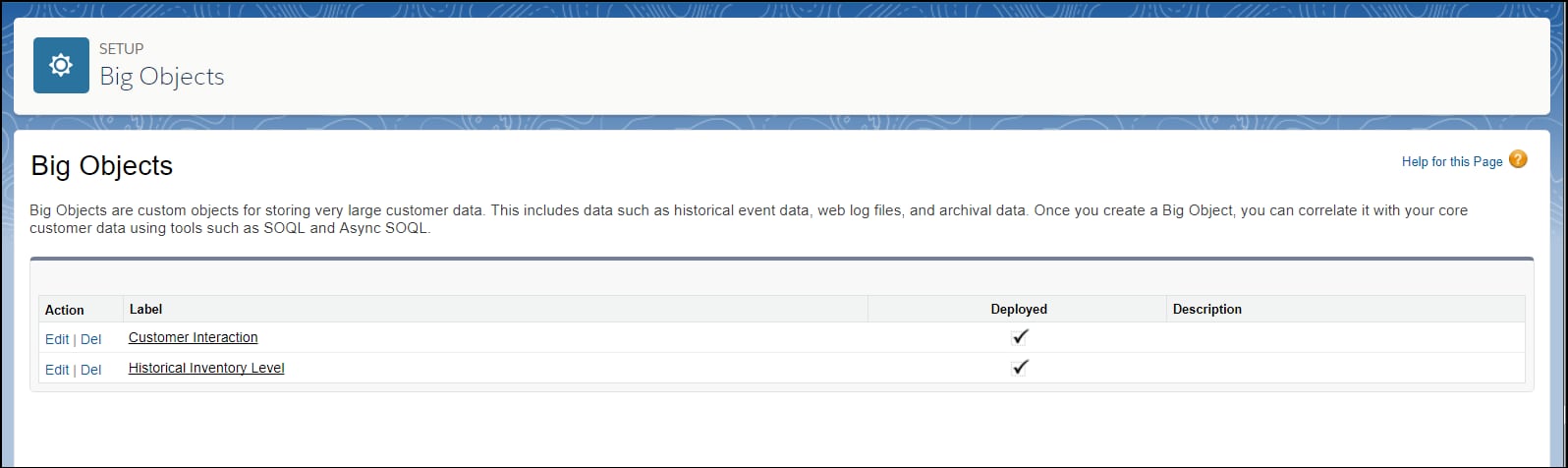
After you’ve deployed your custom big object, you can view it by logging in to your organization and, from Setup, entering Big Objects in the Quick Find box, then selecting Big Objects.
To see its fields and relationships, click the name of a big object.
See Also
j