An action link is a button on a feed element. Clicking an action link can take a user to a Web page, initiate a file download, or invoke an API call to Salesforce or to an external server. An action link includes a URL and an HTTP method, and can include a request body and header information, such as an OAuth token for authentication. Use action links to integrate Salesforce and third-party services into the feed so that users can drive productivity and accelerate innovation.
Workflow
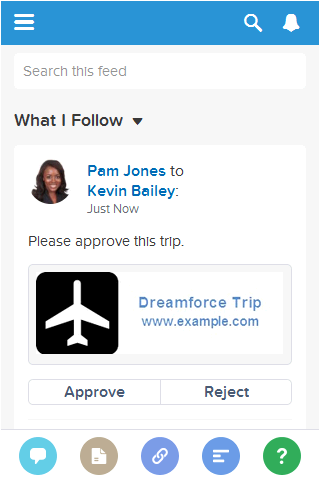
This feed item contains one action link group with two action links: Approve and Reject.
The workflow to create and post action links with a feed element:
Make a request to /connect/action-link-group-definitions to define an action link group or to instantiate an action link group from a template. An action link group contains at least one action link.
Make a request to /chatter/feed-elements to post a feed element and associate the action link with it.
Create an action link group definition. To associate an action link with a feed element, first create an action link group definition. Then post a feed element with an associated actions capability.
Get information about the status of an action link. The status of the action link in combination with the labelKey property of the Action Link Definition Input determines the text that displays in the UI.
Get information about an action link group definition. To get the action link group definition, the client must be the same client app that created the definition and the user must either be the user who created the definition or have View all Data permission.
Delete an action link group definition. Deleting an action link group definition removes all references to it from feed elements. To delete the action link group definition, the client must be the same client app that created the definition and the user must either be the user who created the definition or have View all Data permission.
Get the feed elements of a specified feed type. If a feed element has action links associated with it, the action links data is returned in the associated actions capability.
Get the feed elements of a specified feed type. If a feed element has action links associated with it, the action links data is returned in the associated actions capability.
Action Links Use Cases
Use action links to integrate Salesforce and third-party services with a feed. An action link can make an HTTP request to a Salesforce or third-party API. An action link can also download a file or open a web page. This topic contains two use case examples.


 j
j