Building a Table of Data in a Page
Some Visualforce components, such as <apex:pageBlockTable> or <apex:dataTable>, allow you to display information from multiple records at a time by iterating over a collection of records. To illustrate this concept, the following page uses the <apex:pageBlockTable> component to list the contacts associated with an account that is currently in context:
1<apex:page standardController="Account">
2   <apex:pageBlock title="Hello {!$User.FirstName}!">
3      You are viewing the {!account.name} account.
4   </apex:pageBlock>
5   <apex:pageBlock title="Contacts">
6      <apex:pageBlockTable value="{!account.Contacts}" var="contact">
7         <apex:column value="{!contact.Name}"/>
8         <apex:column value="{!contact.MailingCity}"/>
9         <apex:column value="{!contact.Phone}"/>
10      </apex:pageBlockTable>
11   </apex:pageBlock>
12</apex:page>
Remember, for this page to display account data, the ID of a valid account record must be specified as a query parameter in the URL for the page. For example:
1https://MyDomain_login_URL/apex/myPage?id=001x000xxx3Jsxb
Displaying Field Values with Visualforce has more information about retrieving the ID of a record.
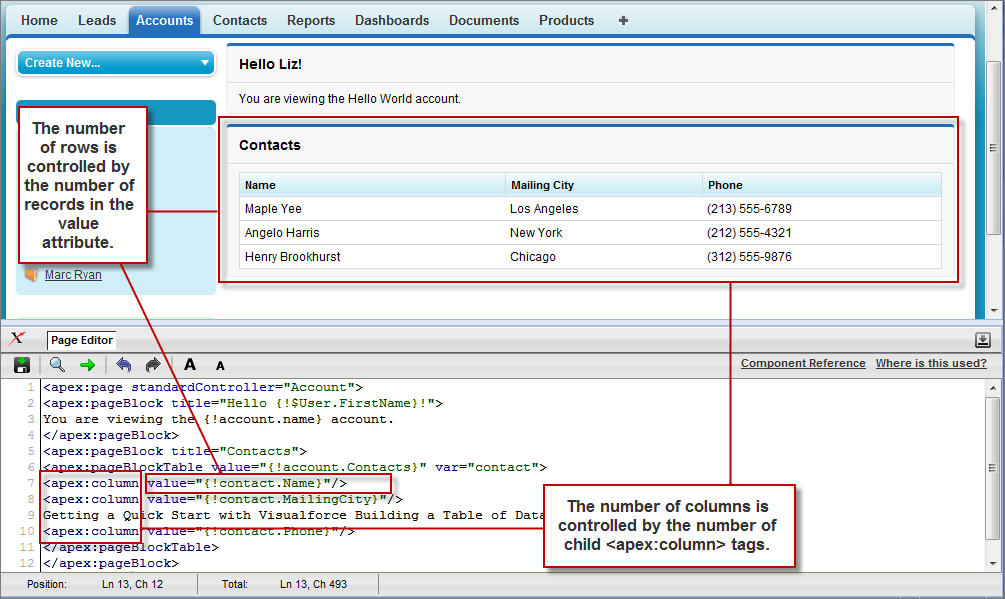
Like other iteration components, <apex:pageBlockTable> includes two required attributes, value and var:
value takes a list of sObject records or values of any other Apex type. In the example above, {!account.Contacts} retrieves the ID of the account that is currently in context and then traverses the relationship to retrieve the list of the associated contacts.var specifies the name of the iteration variable. This variable is used within the body of the <apex:pageBlockTable> tag to access the fields on each contact. In this example, value="{!contact.Name}" is used on the <apex:column> tag to display the name of the contact.
The <apex:pageBlockTable> component takes one or more child <apex:column> components. The number of rows in the table is controlled by the number of records returned with the value attribute.
The <apex:pageBlockTable> component automatically takes on the styling of a standard Salesforce list. To display a list with your own styling, use <apex:dataTable> instead.


 j
j