


Sharing Rows
Each sharing row includes the:
-
ID of the record to which the row grants access
-
ID of the user or group to whom the row grants access
-
Level of access the row allows, such as Read Only or Full Access
-
Row cause, which indicates the reason Salesforce grants the user or group access to the record
For example, when a record owner manually shares a record with a user or group, Salesforce creates a sharing row with a
Manualrow cause. When a sharing rule shares the record with a user or group, Salesforce creates a sharing row with aRulerow cause.
The simplified tables in the following examples demonstrate how Salesforce creates sharing rows under the hood.
For readability, these tables don’t contain all of the actual database values and structure.
Note
Example 1
Maria, whose role is Sales Executive, creates an Account record (ID=A1) for a company called “Acme.” Under the hood, Salesforce creates a sharing row for her as the record owner in the Account Sharing table, the Object Sharing table for the Account object.

Example 2
Maria manually shares the Acme account record with Frank, the services executive. Under the hood, Salesforce adds a sharing row for Frank.

While only one account record exists for Acme, the Account Sharing table now contains two entries for the Acme record. This update happens because Salesforce grants access to the Acme account record twice: one time to Maria as the owner and one time to Frank.
Example 3
An administrator creates a sharing rule that shares the Sales Executive’s records with the Strategy group, giving them Read Only access. Under the hood, Salesforce adds a sharing row that gives the Strategy group access to Maria’s Acme account record.
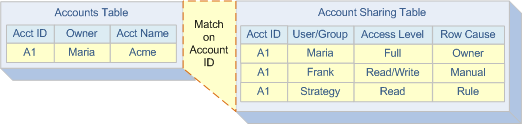
For users with multiple access grants to a record, Salesforce uses the most permissive grant when determining record access. For example, if Frank joins the Strategy group, he still maintains the Read/Write access that Maria granted him in Example 2.
If many users have the same record access requirements, it’s efficient to place those users in a group and grant access to the group instead of to the individuals. This practice saves time and results in fewer sharing rows, thus reducing your organization’s record access data volume.
 j
j