


Data Access in Salesforce
To meet your company’s security needs, it’s important to understand what data access means to your users and to you.
Data Access: User’s Perspective
If you put yourself in your users’ shoes, you won’t necessarily know or care how you’re getting access to records, but you might want to understand what having access means within the context of your organization. The following graph can help users visualize the different kinds of access that can be configured in Salesforce.
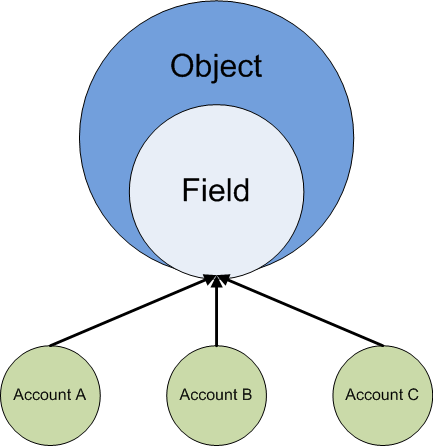
For example, if a user has access to an account field, then they have access to both the account field and the account object itself. However, a specific account record, such as “Account A”, might not be accessible to that user due to additional access control applied via sharing rules or other tools.
Data Access: Architect’s Perspective
As an architect, you must both understand your user’s perspective and know how to grant users only the appropriate level of access to the data that they should be able to access.
From an architect’s perspective, data access in Salesforce falls into two main categories: object-level access, which includes field-level access, and record-level access.
Object-level access determines whether a user has access to a particular object, which fields they can see on that object, and which actions they can perform. You configure object level access on user profiles.
- Restricting access
The “Read,” “Create,” “Edit,” and “Delete” object permissions determine which actions a user can perform on any of the object's records to which they have access. Field-Level Security allows you to prevent certain users from seeing sensitive or confidential information contained in records they can see.
- Opening up access
The “View All” and “Modify All” object permissions give users access to all of an object’s records, regardless of record-level access settings.
Record-level access (called “Sharing” in Salesforce) determines which records a user can see for a particular object, using the following tools:
- Organization-wide defaults
- Role hierarchy
- Territory hierarchy
- Sharing rules
- Teams
- Manual sharing
- Programmatic sharing
Because you have so many options for managing record-level access — and because some of these options are affected by organizational dependencies — determining which records users can access can quickly become complicated. Additionally, you might also be changing your sharing configuration frequently in response to new business requirements. This can trigger record access changes that ripple through your organization. These changes have an even greater impact in very large organizations, where it can take some time to recalculate access for a large number of users, and adjust the tables that record their access rights. For these reasons, it’s important to understand how Salesforce calculates and grants access at the database level.
 j
j