Decomposition refers to splitting a single, often large, metadata XML file into smaller XML files based on its subtypes. The result is referred to as source format. By default, a Salesforce DX project always decomposes custom objects and custom object translations. You can also optionally specify that other metadata types, such as permission sets and custom labels, be decomposed.
Start Decomposing the Optional Metadata Types (Beta)
The Salesforce DX project file (sfdx-project.json) determines which of the optional metadata types are decomposed. But don’t update it manually. Rather, run the project convert source-behavior Salesforce CLI command which updates the project file for you, and also breaks up the associated metadata file XML into smaller files.
Decomposition of permission sets, custom labels, sharing rules, and workflows is a pilot or beta service that is subject to the Beta Services Terms at Agreements - Salesforce.com or a written Unified Pilot Agreement if executed by Customer, and applicable terms in the Product Terms Directory. Use of this pilot or beta service is at the Customer’s sole discretion.
Note
Before you begin, commit all your DX project source files to your version control system. Committing the files ensures that you can easily see what changed in your project. You can also revert the changes if necessary.
Open a terminal or command prompt and change to your Salesforce DX project directory.
Optionally execute a dry run of the CLI command to display what it does before it actually changes your DX project. For example, to dry run the decomposition of permission sets, run this command:
If your default org is enabled for source tracking, the CLI command returns an error. This error is expected, because decomposing your local metadata causes the source tracking system to get out of sync with the org. Follow the directions in the error message and try again.
If you deleted your default org, recreate it and deploy your local source.
When the project convert source-behavior command finishes, your sfdx-project.json file is updated to always decompose permission sets, or whatever type you specified. The existing source files in your local package directories are converted into the new decomposed format. You can now deploy and retrieve your metadata as usual.
If you change your mind and don’t want to decompose the optional types, revert the changes made by the project convert source-behavior and recreate your source-tracking orgs.
Metadata Types Composed by Default or Optionally
This table provides the list of metadata types that are decomposed by default and the types that you can optionally decompose. For optional metadata types, the table also shows the corresponding --behavior flag value.
Source Format Structure of Decomposed Metadata Types
This section provides details about how the decomposed metadata types are broken down into their local source format structure.
Decomposition of the optional metadata types (custom labels, permission sets, sharing rules, and workflows) is a pilot or beta service that is subject to the Beta Services Terms at Agreements - Salesforce.com or a written Unified Pilot Agreement if executed by Customer, and applicable terms in the Product Terms Directory. Use of this pilot or beta service is at the Customer’s sole discretion.
Note
Custom Objects
Custom objects are decomposed by default.
When you convert from metadata format to source format, your custom objects are placed in the PACKAGE_DIRECTORY/main/default/objects directory. Each object has its own subdirectory that reflects the type of custom object. Some parts of the custom objects are extracted into in these subdirectories:
businessProcesses
compactLayouts
fields
fieldSets
indexes
listViews
recordTypes
sharingReasons
validationRules
webLinks
The parts of the custom object that aren’t extracted are placed in a OBJECT_NAME.object-meta.xml file.
Custom Object Translations
Custom object translations are decomposed by default.
Custom object translations reside in the PACKAGE_DIRECTORY/main/default/objectTranslations directory, each in their own subdirectory named after the custom object translation. Custom object translations and field translations are extracted into their own files within the custom object translation’s directory.
For field names, <field_name>.fieldTranslation-meta.xml
For object names, <object_name>.objectTranslation-meta.xml
The remaining pieces of the custom object translation that aren’t field translations are placed in a file called OBJECTTRANSLATION_NAME.objectTranslation-meta.xml.
By default, all custom labels for your entire org are contained in a single file called CustomLabels.labels-meta.xml that resides in the PACKAGE_DIRECTORY/labels directory. Each package directory can have its own CustomLabels.labels-meta.xml file.
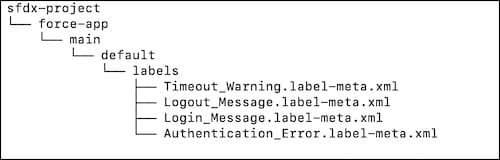
If you choose to decompose custom labels, individual CustomLabel components appear one time in a dedicated *.label-meta.xml source file. The name of each *.label-meta.xml source file is derived from the fullName of the CustomLabel component it contains. This example shows four custom label files in the default package directory.
You can further organize custom labels in your DX project, as long as you follow these guidelines:
All *.label-meta.xml source files must be contained by a labels source directory.
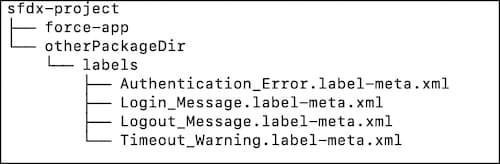
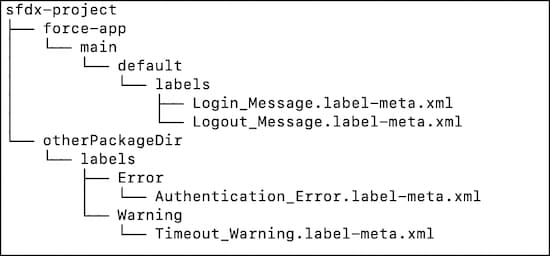
You can create a labels source directory in each of your multiple package directories in your DX project.
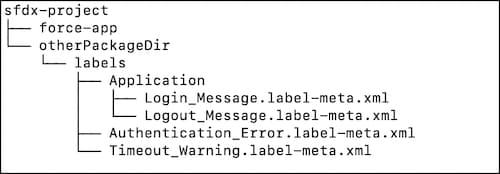
You can create subdirectories of the labels source directory to further organize your *.label-meta.xml files.
Here are some examples of different ways you can organize custom labels.
By default, an external service registration is contained in a file called EXTERNAL_SERVICE_REGISTRATION_NAME.externalServiceRegistration-meta.xml that resides in the PACKAGE_DIRECTORY/main/default/externalServiceRegistrations directory.
If you choose to decompose external service registrations, they’re still stored in the top-level PACKAGE_DIRECTORY/main/default/externalServiceRegistrations directory. But each registration is decomposed into two source files when you retrieve it to your Salesforce DX project. One of the files is in YAML format and contains an OpenAPI spec. When you deploy the registration to your org, the two files are re-converted into the one metadata API XML file.
For example, let’s say the name of your external service registration metadata component is BankService. The two source files after decomposition are:
BankService.yaml : A YAML file that contains the contents of the schema metadata component field. This field contains an OpenAPI 2.0.x or OpenAPI 3.0.x schema in JSON or YAML format. If the field’s content is in JSON format in your org, it’s always converted to YAML format when retrieved to your DX project.
BankService.externalServiceRegistration-meta.xml : A standard metadata API XML file that contains all the fields exceptschema.
By default, a permission set is contained in a file called PERMISSION_SET_NAME.permissionset-meta.xml that resides in the PACKAGE_DIRECTORY/main/default/permissionsets directory.
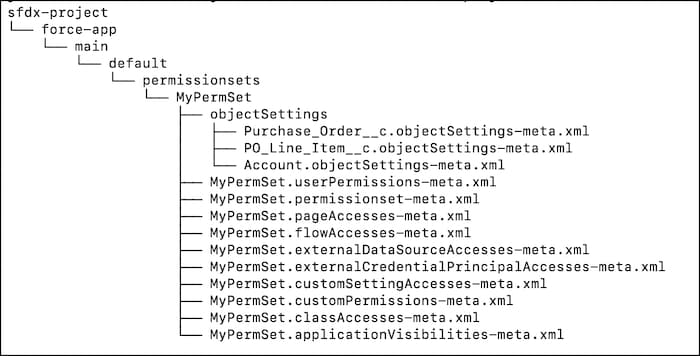
If you choose to decompose permission sets, they’re still stored in the top-level PACKAGE_DIRECTORY/main/default/permissionsets directory. This graphic shows how a sample permission set called MyPermSet is then decomposed into its smaller XML files.
Here are some highlights about the decomposition:
The decomposed files for a specific permission set are contained in a subdirectory named the same as the permission set, MyPermSet in our example.
The specific permission set directory contains a single file called NAME.permissionset-meta.xml file, where NAME is the directory name. This XML file contains information such as the permission set label, description, and license. In our example, the file is called MyPermSet.permissionset-meta.xml.
The objectSettings directory consolidates object-related permissions and settings into a single file for each object, with name OBJECT_NAME.objectSettings-meta.xml.
The remaining permissions and settings are in focused files with a category-specific extension, such as MyPermSet.applicationVisibilities-meta.xml or MyPermSet.flowAccesses-meta.xml.
By default, all sharing rules for an object are contained in a file called OBJECT_NAME.sharingRules-meta.xml that resides in the PACKAGE_DIRECTORY/main/default/sharingRules directory. The OBJECT_NAME refers to the object to which the sharing rule applies.
If you choose to decompose sharing rules, they’re still stored in the top-level PACKAGE_DIRECTORY/main/default/sharingRules directory. But the sharing rules are grouped into subdirectories with the same name as the object that the sharing rule is associated with. Within this object subdirectory, parts of the sharing rule are extracted into these subdirectories.
sharingCriteriaRules
sharingGuestRules
sharingOwnerRules
sharingTerritoryRules
The parts of the sharing rule that aren’t extracted are placed in a OBJECT_NAME.sharingRules-meta.xml file.
By default, all workflows for an object are contained in a file called OBJECT_NAME.workflow-meta.xml that resides in the PACKAGE_DIRECTORY/main/default/workflows directory. The OBJECT_NAME refers to the object to which the workflow applies.
If you choose to decompose workflows, they’re still stored in the top-level PACKAGE_DIRECTORY/main/default/workflows directory. But the workflows are grouped into subdirectories with the same name as the object that the workflow is associated with. Within this object subdirectory, parts of the workflow are extracted into these subdirectories.
workflowAlerts
workflowFieldUpdates
workflowKnowledgePublishes
workflowOutboundMessages
workflowRules
workflowSends
workflowTasks
The parts of the workflow that aren’t extracted are placed in a OBJECT_NAME.workflow-meta.xml file.


 j
j