Learn how to start, confirm, and end a Chat session with the Chat REST API.
The legacy chat product is scheduled for retirement on February 14, 2026, and is in maintenance mode until then. During this phase, you can continue to use chat, but we no longer recommend that you implement new chat channels. To avoid service interruptions to your customers, migrate to Messaging for In-App and Web. Messaging offers many of the chat features that you love plus asynchronous conversations that can be picked back up at any time. Learn about chat retirement in Help.
Note
Retrieve Your Chat API Endpoint
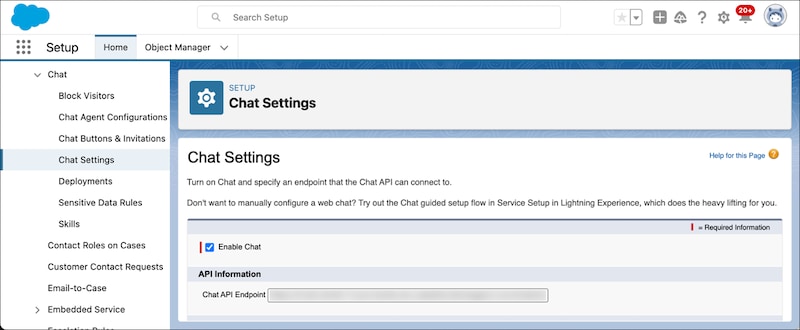
Your Chat API endpoint is a unique URL that lets you access data from your organization’s Chat sessions. To find your organization’s Chat API endpoint:
From Setup, in the Quick Find box, enter Chat Settings, and then select Chat Settings.
Retrieve the hostname from the Chat API Endpoint. The hostname is the URL without “/chat/rest/” at the end, for example, “https://yourChatApiEndpoint.com”. Substitute HOSTNAME in the Chat API endpoints with this URL.
Start a Chat Session
To start a Chat session, send a SessionId request. Replace HOSTNAME with the URL that you retrieved from Chat API Endpoint.
Now you’re ready to send, for example, Messages requests. Before you send further requests, wait until you receive the ChatRequestSuccess and ChatEstablished responses, otherwise the API throws a Null Pointer exception, and you receive a 500 error.
End the Chat Session
The Chat session ends when you send a ChatEnd request or send a DELETESessionId request. In both request types, X-LIVEAGENT-SESSION-KEY is the unique ID of the Chat session that you want to end.


 j
j