
Appearance
Step 2: Create the App
In this step, you'll register an external client app for OAuth access. Salesforce uses this app to let Claude sign in securely and call Salesforce Hosted MCP servers as the logged-in user.
How it works
The external client app is the trust configuration between Claude and Salesforce. It tells Salesforce which client can start OAuth and where to send the user after sign-in.
Claude uses the Consumer Key as its OAuth Client ID. The callback URL brings the user back to Claude, and the mcp_api scope allows calls to Salesforce Hosted MCP servers.
Salesforce still controls login, token issuance, and permissions. Hosted MCP calls run as the signed-in user, not as a shared integration user.

Create the external client app
From Setup, in the Quick Find box, enter
External Client, then select External Client App Manager.Click New External Client App.
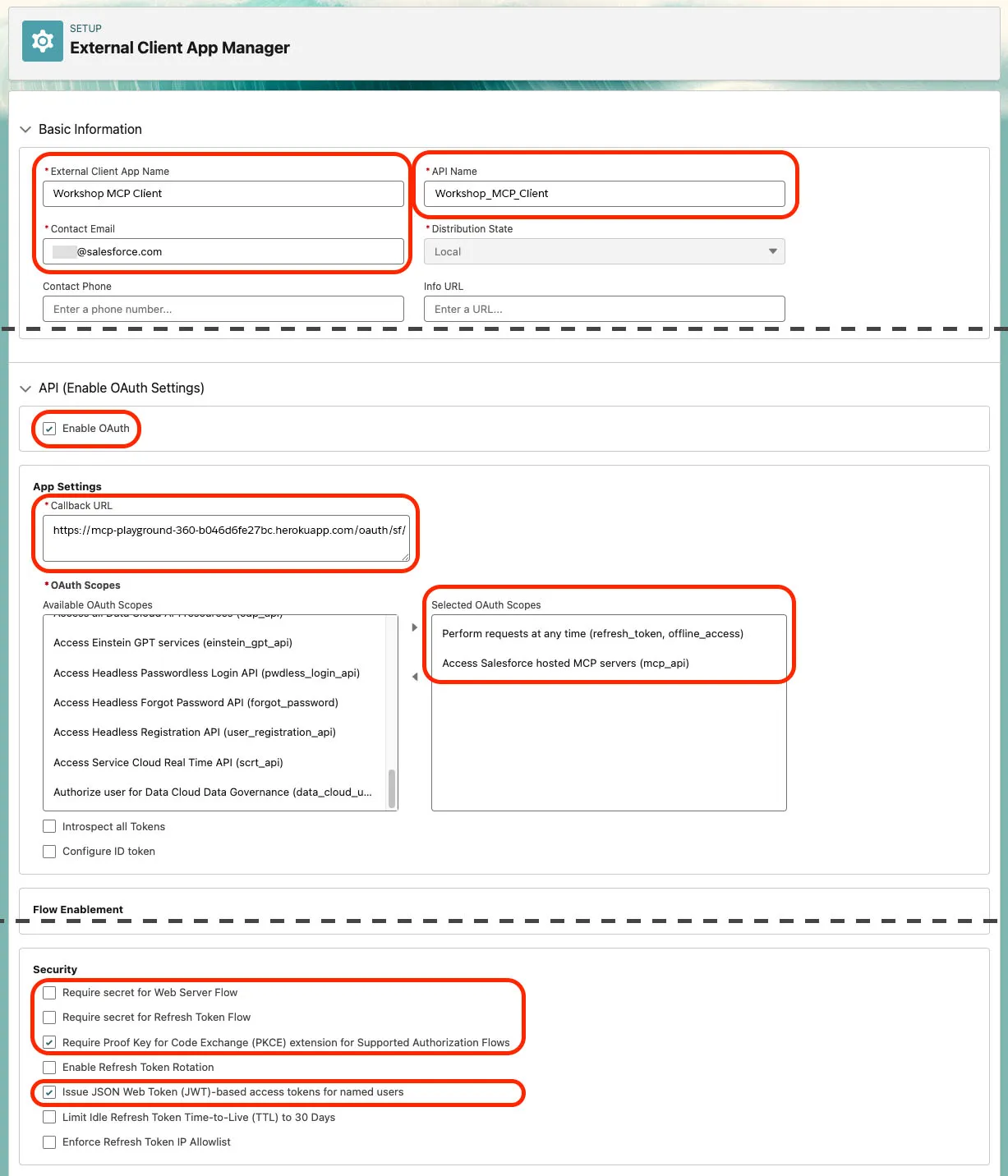
Under Basic Information, enter:
Field Value App Name Headless 360 Quick StartAPI Name Headless_360_Quick_StartContact Email Your email address Expand API (Enable OAuth Settings).
Check Enable OAuth.
For Callback URL, enter Claude's callback URL:
txthttps://claude.ai/api/mcp/auth_callbackAdd these OAuth scopes:
- Perform requests at any time (
refresh_token, offline_access) - Access Salesforce hosted MCP servers (
mcp_api)
- Perform requests at any time (
Under Security, uncheck:
- Require secret for Web Server Flow
- Require secret for Refresh Token Flow
Under Security, check:
- Require Proof Key for Code Exchange (PKCE) extension for Supported Authorization Flows
- Issue JSON Web Token (JWT)-based access tokens for named users
Your configuration should look similar to this, with your own app name, callback URL, and contact email:
WARNING
Salesforce Hosted MCPs require JWT-shaped bearer tokens. If JWT-based access tokens are not enabled, OAuth can appear to succeed, but MCP calls can fail with INVALID_AUTH_HEADER or INVALID_JWT_FORMAT.
Copy the client ID
Click Create.
Click Settings, then under OAuth Settings click Consumer Key and Secret.
Complete the email verification prompt if Salesforce asks for a code.
Copy the Consumer Key into a secure temporary note. Claude uses it as the OAuth Client ID.
Copy the Consumer Secret only if Claude explicitly asks for it in your environment.
TIP
The external client app can take several minutes to become available. If Claude fails with invalid_client_id, wait a few minutes and try again.
Keep these values handy
You'll use these values in the next step:
| Value | Where it comes from |
|---|---|
| Consumer Key | External client app OAuth settings; used as the OAuth Client ID |
| Salesforce MCP server URL | Step 3 |
| Claude callback URL | https://claude.ai/api/mcp/auth_callback |
Summary
You created the app that lets Claude authenticate into Salesforce. Next, connect Claude to the Salesforce Hosted MCP sobject-reads server.
Continue learning
Go deeper with official Salesforce learning, API docs, Hosted MCP references, and agent skills.
TrailheadIntroduction to Salesforce Headless 360Learn the core Headless 360 concepts and when to use a headless approach.Start learningDeveloper DocsSalesforce APIsExplore the Salesforce API library for data, metadata, automation, and integration.Browse APIsReferenceHosted MCP ServersReview the standard Salesforce Hosted MCP servers and their capabilities.View referenceGitHubSalesforce Skills LibraryBrowse Salesforce skills for building with agents, AI tools, and Salesforce metadata.Explore skills