
Appearance
Step 3: Connect Claude
In this step, you'll add the Salesforce Hosted MCP server to Claude, authenticate with Salesforce, and test a live record query.
TIP
Claude is available in multiple surfaces, including Claude web, Claude Desktop, and Claude Code. This quick start uses the Claude connector setup flow. Salesforce also has a deeper Claude walkthrough in the Salesforce Developers blog.
How it works
Claude does not connect directly to your Salesforce data. It calls the Salesforce Hosted MCP server through the connector you configure in this step.
The connector uses the external client app from Step 2 to send the user through Salesforce login. Salesforce issues the access token and keeps control of the session.
When Claude asks for records, Salesforce checks object permissions, field-level security, and sharing rules. Claude only receives data the logged-in user can access, then uses that data to ground its answer.

Start a new Claude connector
Open Claude.
In the left sidebar, click Customize.
Click Connectors.
Click +.
Click Add custom connector.
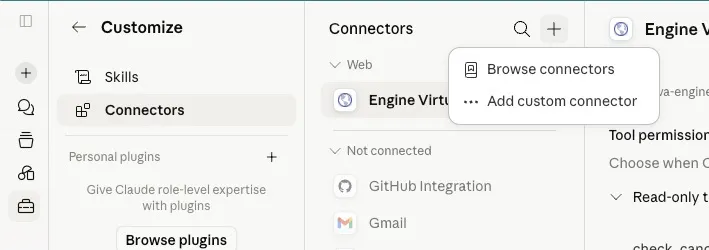
Enter:
Field Value Name Salesforce SObject ReadDescription Read Salesforce records through Headless 360
Add the Salesforce server URL
For Server URL, enter the Salesforce Hosted MCP
sobject-readsendpoint.For Developer Edition and other production orgs, use:
txthttps://api.salesforce.com/platform/mcp/v1/platform/sobject-readsFor sandbox or scratch orgs, add
/sandbox/before the server name:txthttps://api.salesforce.com/platform/mcp/v1/sandbox/platform/sobject-readsConfirm the server name portion is the server you activated in Salesforce.
Server Server name in URL SObject reads platform/sobject-readsSObject all platform/sobject-allSalesforce API context platform/salesforce-api-contextMetadata experts platform/metadata-experts
Add the OAuth client
Open Advanced settings.
Paste the Consumer Key from the external client app into OAuth Client ID.
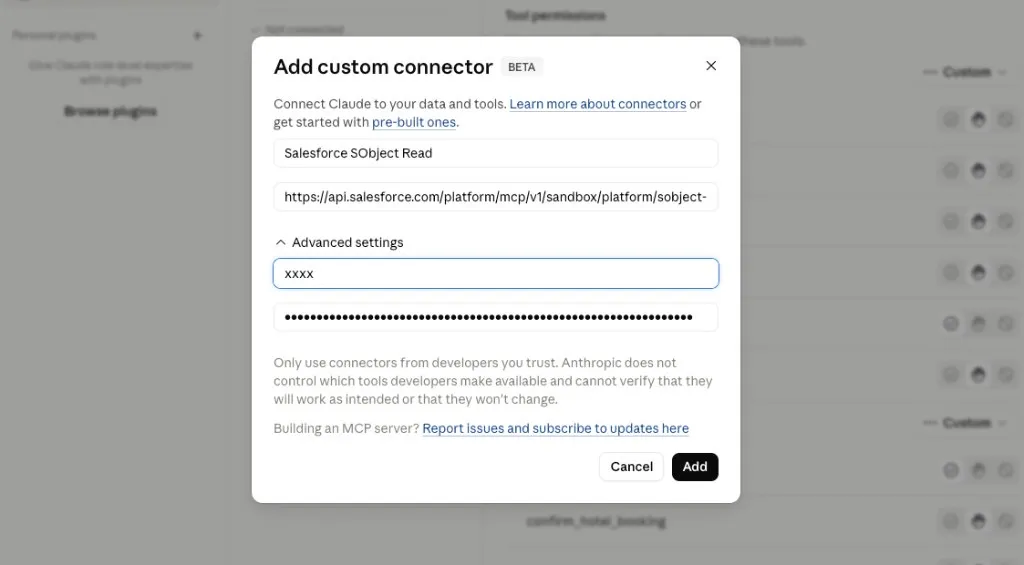
Click Add.
TIP
For Claude connector setup, the Consumer Key is the OAuth Client ID. You do not need to paste the Consumer Secret in this flow unless Claude explicitly asks for it in your environment.
Connect and authorize
Click Connect next to the connector you created.
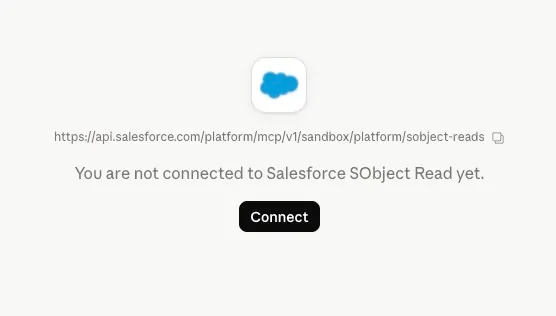
Claude redirects you to the Salesforce org that contains the external client app from Step 2.
Log in and approve access if Salesforce prompts you.
Return to Claude when the OAuth flow completes.
TIP
If you are already logged in to the org that contains the external client app, Salesforce may skip the user challenge and proceed directly to Claude with an access token.
Test the connector
Start a new Claude chat and ask:
txt
List the first 10 Account records you can access in Salesforce. Show the name, type, industry, and annual revenue when available.Claude should ask permission to use the Salesforce connector or show a tool call before it answers.
Then ask a follow-up:
txt
Which two accounts look most important based on the fields available? Explain your reasoning from Salesforce data only.The answer should be grounded in records returned from Salesforce. If Claude answers without calling the connector, ask it to use the Salesforce SObject Read connector explicitly.
Troubleshoot common issues
| Symptom | What to check |
|---|---|
OAuth fails with invalid_client_id | Wait for the external client app to finish propagating, then retry. |
| OAuth redirects fail | Confirm the app includes Claude's callback URL: https://claude.ai/api/mcp/auth_callback. |
| MCP calls fail with JWT errors | Confirm Issue JSON Web Token (JWT)-based access tokens for named users is enabled. |
| Claude cannot see Account records | Confirm the logged-in Salesforce user has Account object and field access. |
| Claude sees fewer fields than expected | Check field-level security for the logged-in Salesforce user. |
Summary
You connected Claude to Headless 360 through the Salesforce Hosted MCP sobject-reads server. Claude is now authenticating through Salesforce and using the logged-in user's Salesforce permissions.
Continue learning
Go deeper with official Salesforce learning, API docs, Hosted MCP references, and agent skills.
TrailheadIntroduction to Salesforce Headless 360Learn the core Headless 360 concepts and when to use a headless approach.Start learningDeveloper DocsSalesforce APIsExplore the Salesforce API library for data, metadata, automation, and integration.Browse APIsReferenceHosted MCP ServersReview the standard Salesforce Hosted MCP servers and their capabilities.View referenceGitHubSalesforce Skills LibraryBrowse Salesforce skills for building with agents, AI tools, and Salesforce metadata.Explore skills