Agentforce agents excel at streamlining Salesforce-native operations, from surfacing CRM insights and querying knowledge bases to automating complex record workflows. Using new MCP (Model Context Protocol) capabilities, these agents can now seamlessly interact with external utilities.
This provides your agents with the capacity to execute external computational logic, access third-party data repositories, or trigger microservices hosted on disparate platforms. The integration bypasses traditional Apex callouts or intricate middleware, utilizing a standardized protocol to link your agent with any remote MCP-compatible tool.
In this post, we will demonstrate how to deploy a timezone MCP server utilizing MuleSoft CloudHub, register the service within your Salesforce environment, and empower an Agentforce agent to leverage these tools through the robust MCP architecture.
Why MCP matters for developers
When Agentforce agents can call MCP-compliant tools, you gain:
- Standardized tool discovery: MCP servers advertise capabilities via tools/list. Salesforce automatically discovers available tools during registration.
- Zero custom Apex: MCP tool calls are JSON-RPC over HTTP. The platform handles serialization, authentication, and error handling.
- Secure external context: MCP servers can be secured with OAuth 2.0. Salesforce manages token acquisition and refresh automatically.
- Reusable infrastructure: One MCP server can serve multiple agents, orgs, or non-Salesforce AI systems.
Your tools become platform-agnostic services.
Why MuleSoft for hosting MCP servers
MuleSoft Anypoint Platform provides the exact primitives MCP requires out of the box:
- HTTP Listener: Mounts the /mcp endpoint with method routing. No framework boilerplate.
- DataWeave 2.0: Pure functional transformations handle JSON-RPC parsing, tool logic, and response formatting in a single expression.
- CloudHub: One-click deploy with auto-scaling, monitoring, and zero infrastructure management.
- Connected Apps: Client credentials grant for machine-to-machine auth. Salesforce consumes these natively.
The result: a production-grade MCP server with no external dependencies beyond the Mule runtime.
Example: Timezone MuleSoft MCP server
Our example server brings world clock and timezone conversion capabilities to Agentforce agents. It exposes four tools that handle the most common timezone queries.
| Tool | Description | Parameters
|
|---|---|---|
get_current_time |
Current time for a city | city (string) |
convert_time |
Convert time between zones | time, from_city, to_city |
time_difference |
Hours offset between cities | city1, city2 |
list_timezones |
Available cities by region | region (optional) |
All timezone logic uses DataWeave 2.0 with built-in timezone support — no external API calls. The server maps 50+ common cities (NYC, London, Tokyo, Dubai) to IANA timezone IDs (America/New_York, Europe/London, Asia/Tokyo). DataWeave handles offset arithmetic, date formatting, and timezone conversion in pure functional expressions.
MCP protocol methods
The MCP server implements three core methods: initialize (handshake), tools/list (catalog), and tools/call (invocation).
When Salesforce calls the server, requests flow through these stages:
- Bearer token validation: Returns JSON-RPC error code -32000 (Unauthorized) if the Authorization header is missing or invalid
- Method routing: Dispatches to the appropriate flow based on method field (initialize, tools/list, or tools/call)
- Tool execution: For tools/call, extracts the tool name and arguments, then routes to timezone-specific logic
- Response formatting: Wraps results in MCP content arrays: {“type”:”text”,”text”:”…”}
Production features
The server is deployed to CloudHub as a single JAR (0.1 vCores, Micro worker) with HTTPS auto-provisioned. OAuth 2.0 secures the endpoint via an Anypoint Connected App (client credentials grant) and an API Manager policy. The stateless design requires no session storage — it is fully horizontally scalable. CORS headers allow browser-based clients.
Ready to configure the MCP server on your MuleSoft (Anypoint Platform) instance?
Grab the full source from our GitHub repo. Clone the repo, build the deployable JAR with ./build.sh, and upload it to CloudHub via Runtime Manager. The README.md walks you through the prerequisites, deployment steps, and how to verify the server.
Registering the MCP server in Salesforce
With the MCP server deployed and secured, we can now register it in Salesforce.
Pre-requisites:
- MuleSoft Anypoint subscription tier
- Agentforce/Einstein enablement
- Connected App with client-credentials grant
- Agent Studio access
- CloudHub application
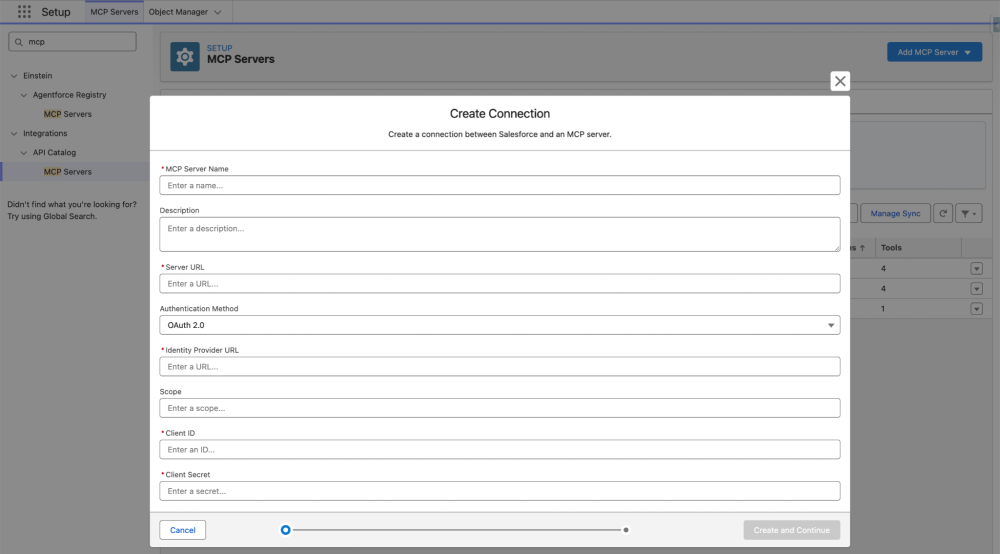
Import external MCP server
- Open Setup → Quick Find → API Catalog → “MCP Server”.
- Click Add MCP Server → Import External MCP Server.
- Configure:
- Label: TimezoneMCP
- MCP server URL: Your CloudHub application URL (e.g., https://timezone-mcp-server.us-e2.cloudhub.io/mcp)
- Authentication: OAuth 2.0
- Identity provider URL: https://anypoint.mulesoft.com/accounts/api/v2/oauth2/token
- Client ID: (from Connected App)
- Client secret: (from Connected App)
- Click Create and Continue.
What happens during registration
Salesforce performs these steps automatically:
- Token acquisition: Calls the Identity provider URL with client credentials to obtain a Bearer token
- MCP initialize: Calls the MCP server’s /mcp endpoint with method “initialize” to negotiate protocol version (2024-11-05)
- Tool discovery: Calls method: “tools/list” to fetch the tool catalog
- GenAiFunction creation: Creates Salesforce metadata records for each discovered tool
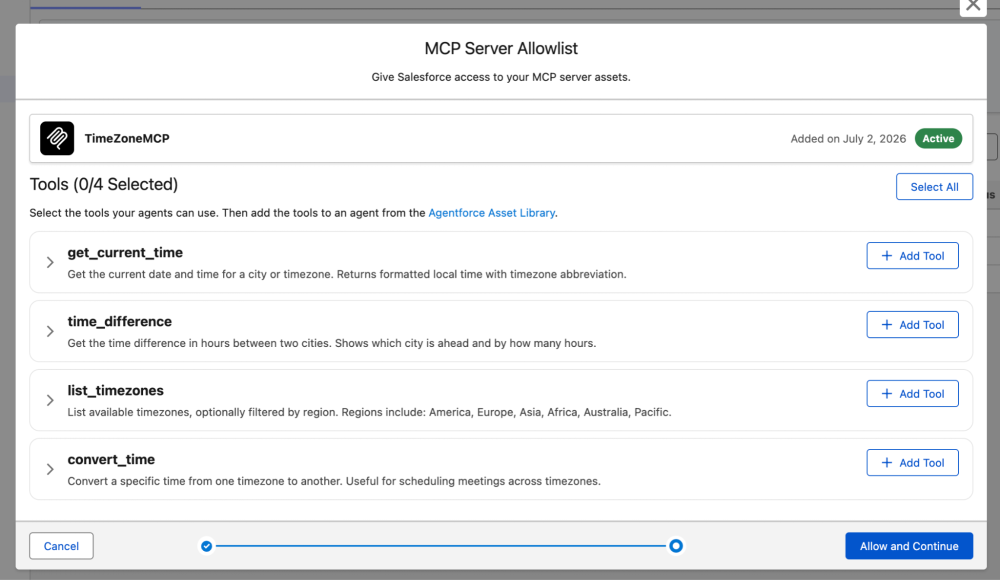
Add tools to allowlist
After discovery, Salesforce displays the four timezone tools. Select all four and click Add to Allowlist. This makes them available for use in Agent Script.
Agentforce integration: Invoking MCP tools via JSON-RPC
With tools registered, we can now configure an Agentforce agent to call them. This happens in Agent Script, the YAML-based DSL that defines agent behavior.
Incorporating MCP actions into Agent Script
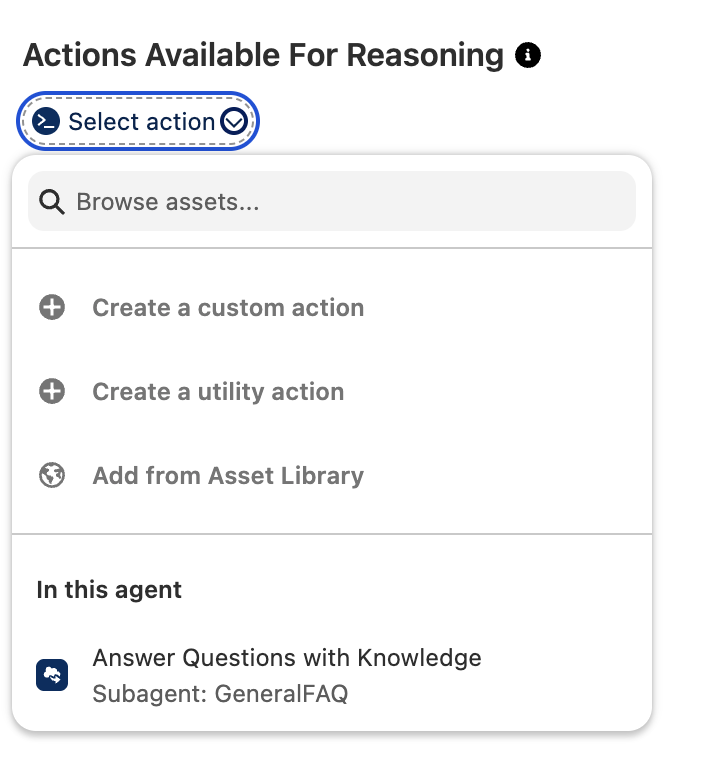
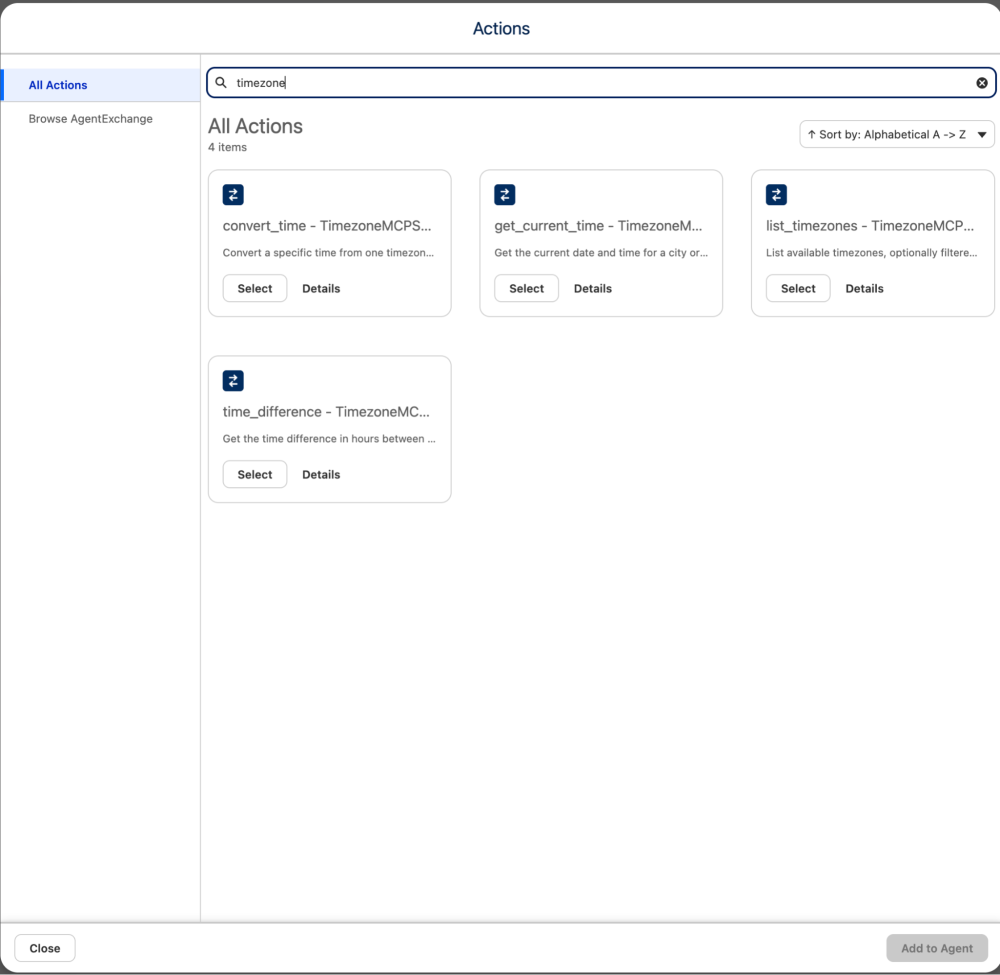
Once imported, your MCP agents become available within the Asset library, allowing you to select the tool and add it directly to the subagent’s action.
- Navigate to Agent Studio.
- Click New Agent and select Agentforce Employee Agent.
- Name your agent “Time Zone Assistant” and keep the default developer name.
- Switch to Canvas View.
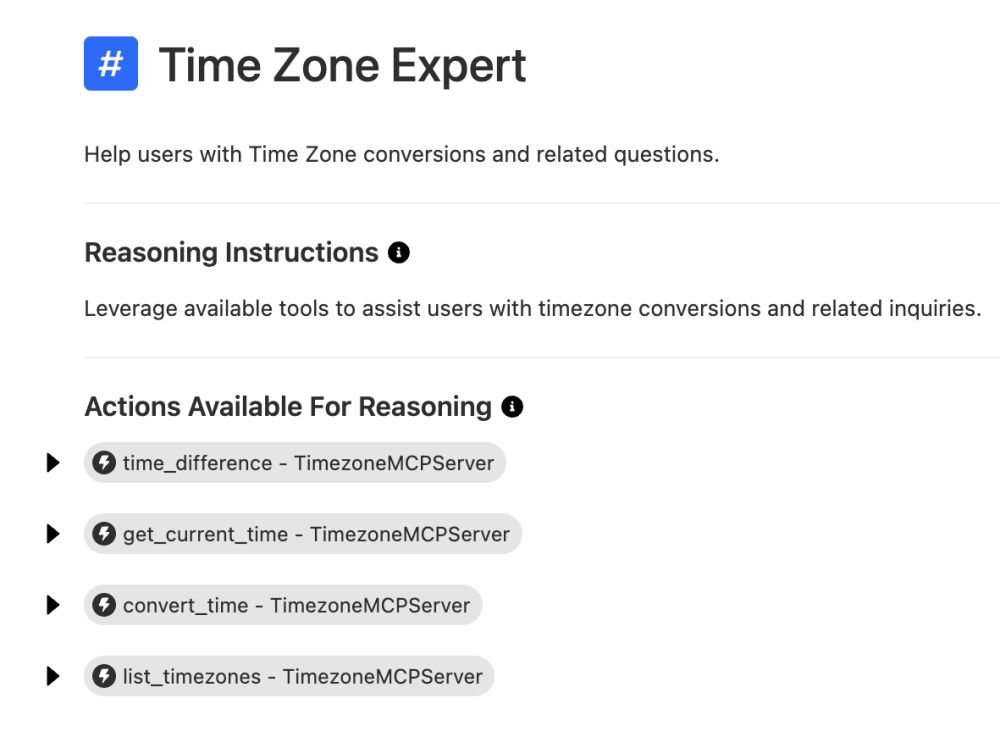
- In the subagent section, click the + button to create a new subagent named “Time Zone Expert”.
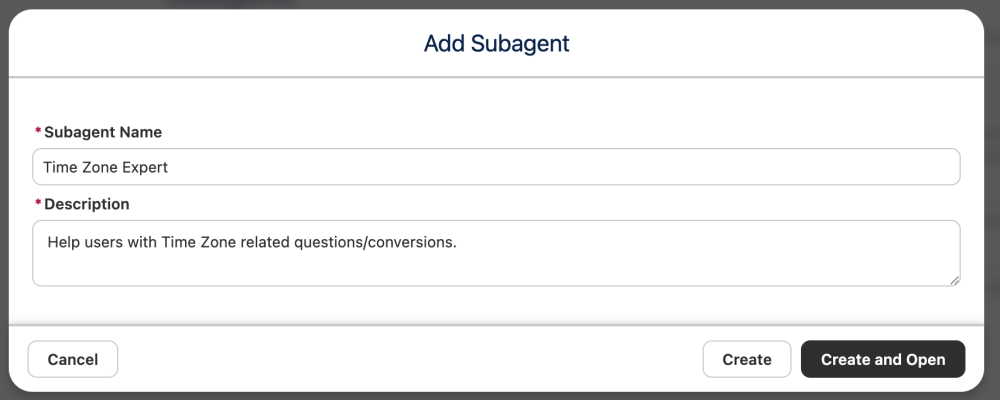
- Configure the subagent:
- Description: “Help users with Time Zone conversions and related questions.”
- Reasoning Instructions: “Leverage available tools to assist users with timezone conversions and related inquiries.”
- Click Select Action and choose Add from Asset Library to import your registered Timezone tools.
- Select the Time Zone MCP tools and click Add to Agent.
- Choose Review and Validate: verify that the subagent properly displays the new actions in its configuration panel.
- Click Save, then click Commit Version & Activate.
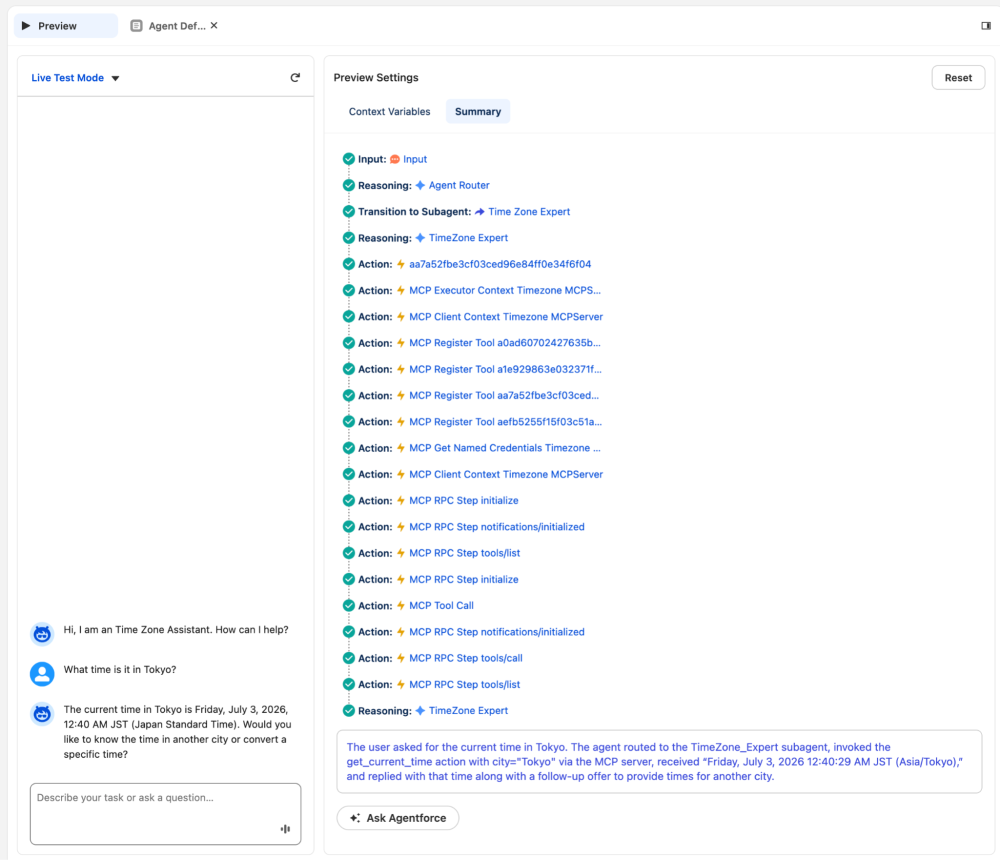
- Navigate to Preview and test the setup by asking: “What is the current time in New Delhi?”
How RPC calls flow from agent to MCP server
When a user asks “What time is it in Tokyo?”, here’s the execution flow:
- User input parsing: The agent’s reasoning model extracts city = “Tokyo” from natural language
- Action selection: The
@subagent.Timezonereasoning determines theget_current_time_actionshould be called - Target resolution: Salesforce looks up the
GenAiFunctionwithDeveloperName - Token acquisition: Salesforce calls the MCP server’s token endpoint to get a Bearer token (cached for subsequent calls)
- JSON-RPC invocation: Salesforce constructs and sends the following:
1{ 2 "jsonrpc": "2.0", 3 "id": 1, 4 "method": "tools/call", 5 "params": { 6 "name": "get_current_time", 7 "arguments": { 8 "city": "Tokyo" 9 } 10 } 11} - MCP server processing: The Mule flow validates the token, routes to the timezone logic flow, and returns the following:
1{ 2 "jsonrpc": "2.0", 3 "id": 1, 4 "result": { 5 "content": [ 6 { 7 "type": "text", 8 "text": "Wednesday, July 3, 2026 12:40:30 AM JST (Asia/Tokyo)" 9 } 10 ] 11 } 12} - Agent response: The agent receives the formatted time and responds: “The current time in Tokyo is Friday, July 3, 2026, 12:40 AM JST (Japan Standard Time).”
The entire exchange happens over HTTP — no Apex, no custom callouts, no manual credential management. Salesforce handles token refresh, retries, and error handling automatically.
Conclusion
By implementing MCP over MuleSoft and connecting it to Agentforce, you’ve created a reusable, OAuth-secured tool server that any MCP-compatible agent can call. This same pattern applies to real-time inventory queries, shipping label generation, knowledge base retrieval, and multi-step external workflows.
Resources
- Documentation: Model Context Protocol (MCP)
- Documentation: MCP for Agentforce
About the authors
Parvinder Singh is a Senior Forward Deployed Engineer at Salesforce with deep expertise in Salesforce and Agentforce, specializing in building intelligent, customized agent experiences for enterprise customers. He is passionate about sharing developer insights with the community and bringing practical, field-tested patterns to life through hands-on content.
Alex Martinez was part of the MuleSoft Community before joining MuleSoft as a Developer Advocate. She founded ProstDev to help other professionals learn more about content creation. In her free time, you’ll find Alex playing Nintendo or PlayStation games and writing reviews about them. Follow Alex on LinkedIn or in the Trailblazer Community.