If you’re building or running Agentforce agents today, the new Agentforce Builder is for you. Starting the week of July 13, 2026, agent creation moved exclusively to the new builder. Agents you already built on the legacy builder keep working and stay editable, but you can no longer create new ones there. So, migrating your existing agents to the new Agentforce Builder is now the path forward, not an optional upgrade.
The biggest change with migration is how the agent reasons. The legacy engine is prompt-based: it classifies your message into a single subagent, then a reason-and-act loop (the ReAct pattern) until it can answer. The new reasoning engine is graph-based, built from subagents as nodes connected by transitions, with variables that carry state along the way. A starting Agent Router reads intent and hands off, but it rarely stops there. Based on what the user wants, a network of subagents works together to accomplish the goal.
Agent Script is the language for building agents in the new builder. It blends natural-language instructions with programmatic expressions, giving you hybrid reasoning: the predictability an enterprise demands, plus the flexibility an LLM makes possible. Best of all, once you migrate your legacy agent, you can prove that the outcome is the same with a test suite with no regressions.
In this post, we’ll look at why we need to migrate from legacy to the new builder, how to upgrade your agent, and how to harden it in stages with Agent Script. Then, we’ll learn how to test for regressions between migrated agents against the previous agents with the tests and scorers with Agentforce DX and a coding agent.
Why migrate legacy agents to the new Agentforce Builder
The new Agentforce Builder is an authoring workspace built around the whole agent development lifecycle: configuration, execution traceability, context management, and deployment. It’s more than a fresh interface. At its core is Agent Script, which pairs the creative problem-solving of an LLM with deterministic logic that follows your business rules.
Here’s how the legacy and new reasoning engines compare at a glance:
| Dimension | Legacy engine | New engine |
| Reasoning model | Classify into one subagent, then a ReAct loop | Graph of subagent nodes connected by transitions |
| State | Re-derived each turn | Variables carry state along the path |
| Determinism | LLM re-evaluates every subagent and action per turn | Structured logic follows defined transitions |
| Latency | Higher, from repeated re-evaluation | Lower, following a structured path |
Teams that have already switched point to three key benefits:
- Consistent behavior on every message: Hybrid reasoning holds the agent to your business logic exactly as written, even on regulated or high-stakes flows. Because it follows structured logic instead of re-evaluating every subagent and action at each turn, it also avoids the repeated reasoning passes that add latency in the legacy loop.
- Full visibility into what the agent is doing: Agentforce Observability is built in, with a reasoning summary for every message and granular session traces (searchable spans, variable changes, and timestamps), so you can find a root cause and fix it. New observability features land here first, including the custom scorers we use later in this post.
- New capabilities ship here first: This ranges from Agentforce Voice and expanded language support to per-subagent model selection and agent-to-agent orchestration. Migrating now puts your agents on that path instead of a frozen one.
How to upgrade a legacy agent to the new Agentforce Builder
You’ll kick off the upgrade from the legacy interface. In Setup, the Upgrade to New Builder action stands up a new version of your agent in the new builder, carrying over every subagent, action, system message, setting, and connection, all converted to Agent Script.
Note: Your original agent stays untouched and active, so there’s no downtime while you validate the new version, and you always have a reference to compare against.
Here’s the click path:
- From Setup, go to Agentforce Studio → Agentforce Agents.
- On your agent’s row, open the action menu and choose Upgrade to New Builder.
- Confirm the upgrade, then review the generated Agent Script in the new Agentforce builder’s Canvas view and save the new version.
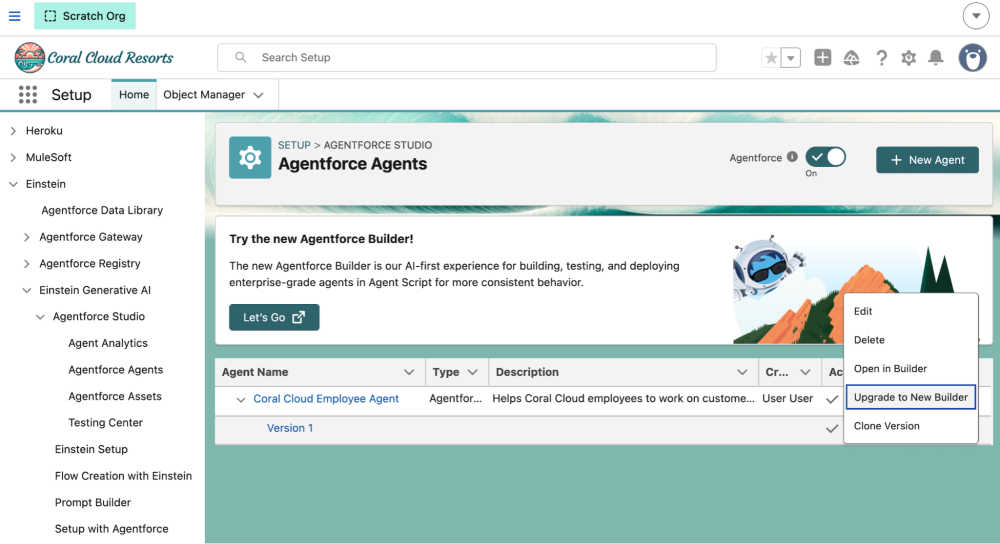
NOTE: The Agentforce Studio app is the home of the new Agentforce Builder and a central hub for building, testing, and monitoring your agents.
Prefer the command line and coding agents? You can pull the same script into a local Salesforce DX project with Agentforce DX and edit it in Visual Studio Code or have your coding agent assist you in building the script.
Whether to migrate at all, and when, depends on where your agent is today, so check Salesforce’s migration guidance before you start.
Migrate in stages, then harden with Agent Script
A staged migration is far easier to stabilize than one big rewrite. Migrate as-is first, confirm that the agent works end-to-end with tests (covered in the next section below), then fix any regressions before you change anything else. Anything that worked before and breaks now is a migration regression, not something you introduced, so isolating that stage keeps it easy to trace.
Once the baseline is stable, harden it. Use variables, conditionals, filters, and transitions to add determinism where a decision has business consequences, like data checks, required sequences, or transactions. Leave the rest to LLM reasoning, since every expression you add is a decision that the model can’t make. Work in small batches and test after each one. For the migration playbook, see the migration guidance.
Verify Migration with Regression Testing
Migration changes how your agent routes and plans, even when you don’t touch the business logic. You need evidence that the same inputs still produce the same actions and answers. Guessing isn’t a strategy when an agent can issue credits or update records.
So, follow a simple arc: write a small baseline suite against your legacy v1 agent first, convert it to the new builder, run that same suite against the migrated v2 agent to prove nothing regressed, then layer in richer tests once you’re green. New tests come last on purpose. When the baseline run and the post-migration run use the identical suite, any failure points to the migration, not to a test you just wrote.
The flow diagram below shows four testing steps to follow after migration to ensure there was no regression.
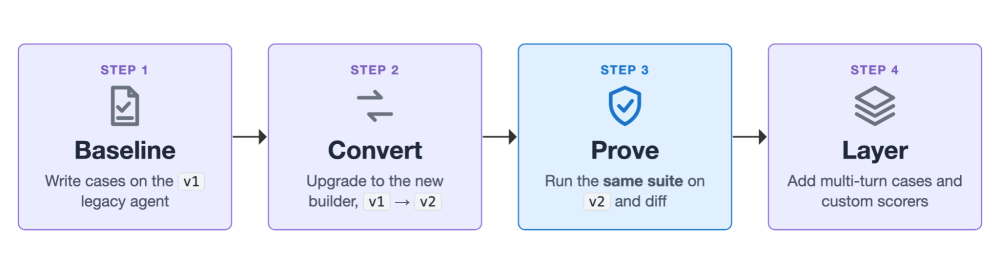
We’ll use one running example: the Coral Cloud Employee Agent. Its legacy version is our baseline (call it v1), and the version upgraded to the new builder is v2. The same test suite runs against both, so any difference in the results comes from the migration, not from the tests.
The legacy Testing Center is where you can run tests for your legacy agent; those suites are stored as AiEvaluationDefinition metadata and use <expectation> tags in the metadata. For the new agents, Agentforce Studio now provides a Tests tab, where test suites are stored as the newer AiTestingDefinition metadata and use <scorer> tags instead.
| Spec | Legacy | New builder |
| Metadata | AiEvaluationDefinition | AiTestingDefinition |
| Tags | <expectation> | <scorer> |
| Runner flag in CLI | testing-center (default) | agentforce-studio (--test-runner) |
| UI | Testing Center | Agentforce Studio Tests tab (Beta) |
A test suite is a named collection of test cases for one agent. Each case sends an utterance, optionally with some conversation history (for multi-turn testing), then grades the result with one or more scorers. Scorers evaluate agent sessions for quality and business insights.
The screenshot below shows the new Test cases (Beta) tab in Agentforce Studio that displays a list of agent test cases with pass and fail results for each scorer.
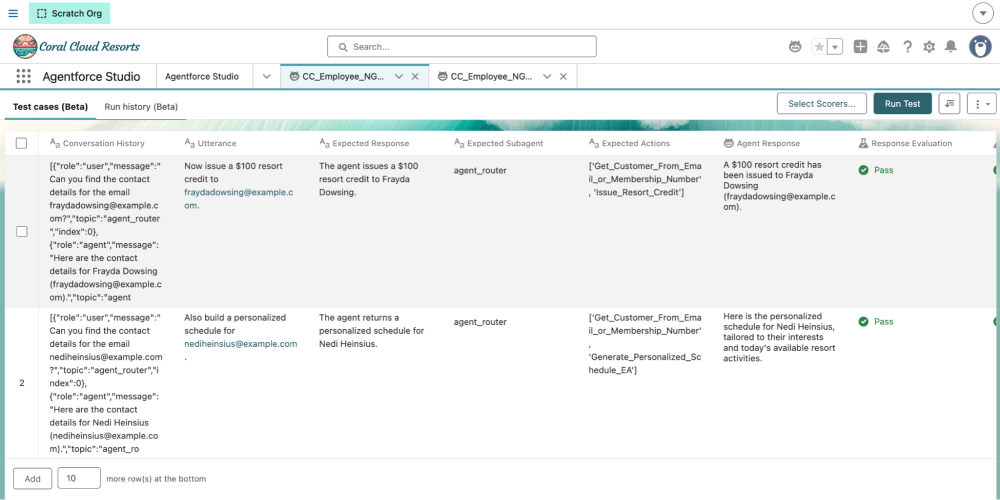
Three scorers capture the behavior that matters most for a migration.
topic_sequence_match: Did the agent route to the expected subagent?action_sequence_match: Did it invoke the expected actions, in order?bot_response_rating: Does the final response match what you described, judged by an LLM?
Quality scorers grade the response itself: completeness, coherence, conciseness, and output_latency_milliseconds for speed. Two newer scorers go further: factuality checks a response against known facts, useful for guardrail cases, and task_resolution checks whether a conversation reached its goal.
Here’s a single-turn case that checks a contact lookup from end to end. Read it from top to bottom: the case sends one utterance, then grades the result with the three scorers above. topic_sequence_match confirms the routing, action_sequence_match confirms the lookup action fired, and bot_response_rating confirms the answer.
This snippet below is one case from the single-turn test spec for the new Agent Builder, specs/ngt-single.yaml, a plain YAML file you keep in your Salesforce project. Running sf agent test create against it generates an AiTestingDefinition metadata component under force-app/main/default/aiTestingDefinitions/. That generated metadata xml component, not the YAML, is what deploys to your org.
1subjectType: AGENT
2subjectName: Coral_Cloud_Employee_Agent
3subjectVersion: v2
4testCases:
5  - inputs:
6      - utterance: Can you find the contact details for the email nediheinsius@example.com?
7    scorers:
8      - name: topic_sequence_match
9        expected: agent_router
10      - name: action_sequence_match
11        expected: "['Get_Customer_From_Email_or_Membership_Number']"
12      - name: bot_response_rating
13        expected: The agent returns the contact details for Nedi Heinsius.
Run the suite from the CLI
Agentforce DX gives you the whole test loop as sf agent commands on the Salesforce command-line interface (CLI), so runs are repeatable and drop straight into continuous integration (CI), or into a coding agent that runs them for you. The same suites are also visible in Agentforce Studio’s Testing Center if you ever want the UI. These commands need a recent Salesforce CLI with the agent plugin; run sf update and reinstall the agent plugin if the --test-runner flag isn’t recognized. The agentforce-studio runner and AiTestingDefinition are currently in Beta.
sf agent generate test-spec: Scaffold a test spec YAML for your agentsf agent test create: Create the test suite in your org from that specsf agent test run: Run the suite and collect results
One flag, --test-runner, decides everything. Omit it and each command defaults to the legacy testing-center runner and writes an AiEvaluationDefinition metadata for your v1 agent. Pass --test-runner agentforce-studio and the same command targets the new agentforce-studio runner and writes an AiTestingDefinition metadata for your v2 agent instead. All commands run from your Salesforce project root.
The code block below shows the legacy loop first, with no --test-runner flag, so every command runs against your v1 agent through the testing-center runner and works with the AiEvaluationDefinition under force-app/main/default/aiEvaluationDefinitions/.
1# LEGACY (v1): testing-center runner, AiEvaluationDefinition
2sf agent test create --spec specs/Coral_Cloud_Employee_Agent-testSpec.yaml \
3  --api-name CC_Employee_V1_Tests --target-org my-org
4
5sf agent test run --api-name CC_Employee_V1_Tests \
6  --wait 10 \
7  --result-format json \
8  --output-dir ./test-results \
9  --target-org my-org
Now, let’s look at the loop for the new Agentforce Builder. We’ll call this the new-builder (v2) loop. The only change is --test-runner agentforce-studio on each command, which points the same workflow at your migrated v2 agent and the AiTestingDefinition under force-app/main/default/aiTestingDefinitions/.
1# NEW BUILDER (v2): agentforce-studio runner, AiTestingDefinition
2sf agent test create --spec specs/ngt-single.yaml \
3  --api-name CC_NGT_Single --test-runner agentforce-studio --target-org my-org
4
5sf agent test run --api-name CC_NGT_Single \
6  --test-runner agentforce-studio \
7  --wait 10 \
8  --result-format json \
9  --output-dir ./test-results \
10  --target-org my-org
Orchestrating the above commands correctly is your regression harness. Capture how the legacy agent behaves, migrate to the new builder, then run the same scenarios and compare. The difference is your migration sign-off. Note, since we have everything in CLI, you can have your coding agent orchestrate this loop end to end.
Automate the regression comparison with a coding agent
There’s a natural division of labor here. You write the baseline suite by hand, because deciding what “correct” looks like takes domain knowledge that only you have. Everything after that is mechanical: run v1, run v2, diff two JSON files, and flag every case that changed. That repetitive loop is exactly what a coding agent automates for you.
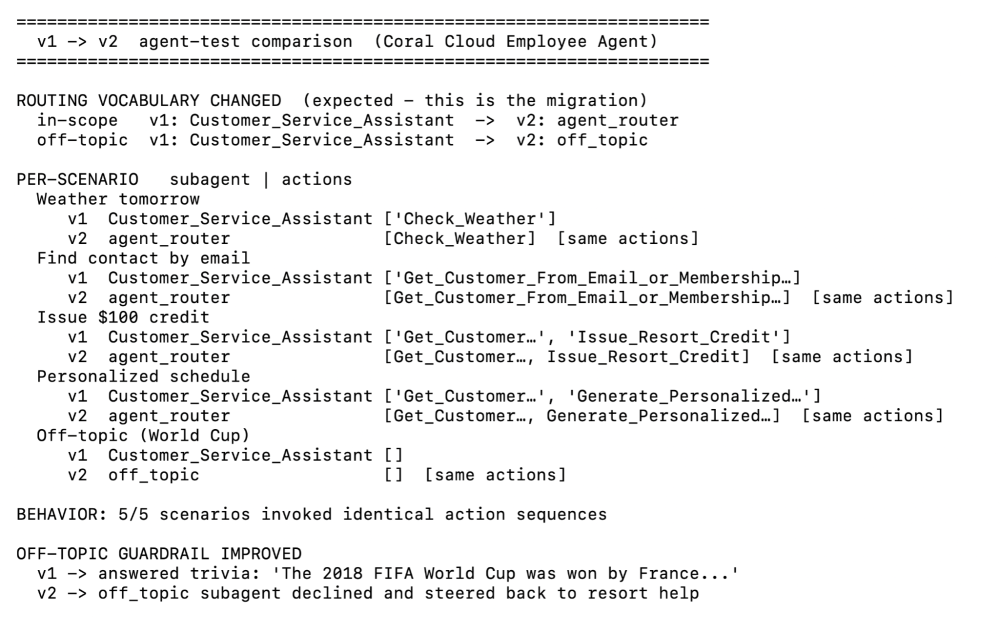
Because every command runs on the CLI and returns JSON, you don’t have to read those result files line by line. You hand the whole comparison to the agent instead. Here is the exact prompt I used. It asks the agent to compare the migrated v2 run against the v1 baseline and flag any case where the routing, the action sequence, or the response outcome changed.
1Run my NGT agent-test suites against the migrated v2 agent, then compare
2the results to the v1 baseline. Call out every case where the routed
3subagent, the action sequence, or the response outcome changed.
Note: I preferred to name my new tests with prefix NGT (Next Generation Tests) in the test create command, and hence I can reference in the prompt to identify tests for the new Agentforce Builder.
Here is a screenshot of the comparison that Claude Code produced for the Coral Cloud Employee Agent migration. The diff lists each case as unchanged or changed across the three scorers. A clean sign-off shows zero routing and action-sequence deltas, with response outcomes that stay semantically equivalent. Any changed case is where you focus your review, and where you decide whether the change is an intended improvement or a regression to fix.
Test multi-turn conversations
Some regressions only show up across turns — a follow-up that depends on context resolved earlier in the conversation. Multi-turn cases catch those. In multi-turn testing, the runner replays only the user turns as real messages; agent turns are context, not executed steps. Once your agent uses Agent Script, a case can seed the conversationHistory before the final utterance, but that replay rule trips people up.
So, a follow-up like “issue a credit to them” fails, because the agent has no resolved contact in memory and asks again. Restate the identifier, or drive the setup with a user turn, and the full action chain fires. Add the task_resolution scorer, which grades whether the conversation reached its goal, not just whether one action fired.
The code block below shows that multi-turn case, which lives in a second spec file, specs/ngt-multi.yaml. Keeping it in a separate YAML from the single-turn spec means sf agent test create generates a second AiTestingDefinition (here, CC_NGT_Multi), so the two suites deploy and run independently. Notice how conversationHistory seeds the earlier turns, the final utterance restates the email, and action_sequence_match now expects the full lookup-then-credit chain to fire.
1- inputs:
2    - utterance: Now issue a $100 resort credit to fraydadowsing@example.com.
3      conversationHistory:
4        - role: user
5          message: Can you find the contact details for fraydadowsing@example.com?
6          topic: agent_router
7          index: 0
8        - role: agent
9          message: Here are the contact details for Frayda Dowsing.
10          topic: agent_router
11          index: 1
12  scorers:
13    - name: action_sequence_match
14      expected: "['Get_Customer_From_Email_or_Membership_Number', 'Issue_Resort_Credit']"
15    - name: task_resolution
Tip: Keep single-turn and multi-turn cases in separate suites. Currently, a mixed suite stalled, while single-only and multi-only suites completed cleanly. Splitting them is a safe habit that also makes results easier to read.
When you outgrow the built-in scorers, you can define your own. Custom scorers let you write evaluation logic for rules unique to your business. See the custom scorers guide to go further.
Conclusion
Migration follows one arc: upgrade your agent to the new builder, stabilize it in stages, then prove it with tests that nothing regressed. Agent Script gives you a router-plus-subagents design that scales. Agentforce DX makes the move a measured change instead of a guess: capture behavior on v1, convert to v2, and let your coding agent run the same suite and report what changed. (The Testing Center is there when you want the UI.)
Start small: write a few single-turn cases with sub-agents, action, and response scorers, and run them before and after you convert. Then layer in multi-turn cases once your single-turn suite is green for your new agents.
Resources
- Agentforce Migration Guide
- Set Up and Run Tests in Agentforce Studio (Beta)
- Agent test create CLI command
- Agent test run CLI command
About the author
Mohith Shrivastava is a Principal Developer Advocate at Salesforce with 15 years of experience building enterprise-scale products on the Headless 360 Platform. Mohith is currently among the lead contributors on Salesforce Stack Exchange, a developer forum where Salesforce Developers can ask questions and share knowledge. You can follow him on LinkedIn.